Search
-
Re: [MAYA] Modeling ToolSet

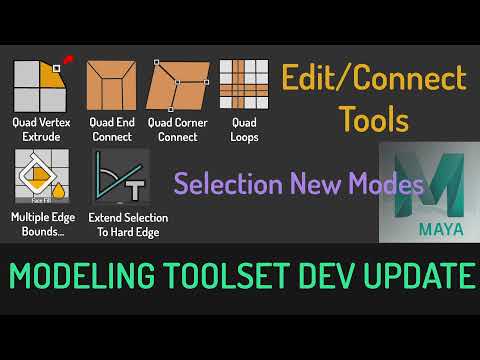 development update: In This Update, I will be demonstrating the new selection modes and Quad Connect tools. This tool is still in development, I will release it as soon as its stable enough. -----New Selection Modes ---- Multiple EdgeBounds -- it will auto select Face section inbetween 2 Edge Bounds Extend To Hard Edge --…
 -
Re: Brazilian carnival dancer WIP
 Oh ok. the way I was taught was by creating a flat surface for the butt and instead of rounding them off I extruded the faces of the butt 2 or 3 times while scaling them in. By doing this I have more control over the edges and more vertices to tweak around with, a way to get the rounded shape of the butt. And for the…
 -
Re: Round 3: Female Character
 Thanks for the info guys, I saved all my steps so I'll jump back a few iterations and work on my forms again. I do have reference with her arms up and down. I know I'm should be using the same pose for both, which I would have, put I couldn't get them to line up perfectly without distorting the images. I realize now that…
 -
Re: (very) Low poly head modeling question
 I know man and I get it. Look at my first image up top. That was based off of a WoW model and then I made an exact copy of the image Cyrid posted. I can make them when I copy someones work but I just want an effective way to box model them quickly without spending ages extruding each edge and lining it up. It seems dumb to…
 -
Re: Protecting SmoothFace history
When you modify a mesh in Maya you will see inputs representing commands you ran in the channel box. That is the history that gets deleted when you run the delete history command. You can manually pick and delete certain inputs in the Hypergraph:Connections window that is in the Window drop down menu at the top. Be careful… -
Re: Maya's interactive tool
 It's not very difficult to write a Target Weld mode like Max's. I wrote one a month or so ago for Maya 2008, only took about 2-3 hours to get something tested and working with no bugs. Nice to see people doing better interactivity with Maya's tools, it's definitely one of the things I miss from Max and other packages.…
 -
[3DS Max] Baking high polygon texture to low polygon
Hello this question may seem old but need some help. I have it where I have a brick that I have done some extrude to and place a texture to it give it an interesting brick design. Now I want to see since its just a simple square in a way to take that same texture look and put it in a low polygon without having to extrude.… -
Model Tips for Architecture in Maya to Unreal

 For a Project i chose to take a modern japanese Flat, as you can see its isnt that complex. First i started to Block out every Wall,floor, Ceiling. Instead Subdividing/extruding everything from one block i just mashed in Blocks. The result was a chaotic combinations of Blocks, some of them are intersecting each other (…
 -
Re: Are there similar tools in 3DS Max like in Blender?
 For 0:50 it looks like a standard falloff brush or soft selection. Soft Selection has its own panel in the Editable Poly menu. Alternatively if you want to use a deformation brush go into the Ribbon (aka Graphite modeling tools) > Freeform > Shift. For 8:05 just looks like basic edge transforms, extrude, and bend. Extrude…
 -
Re: How would you (perfectly) map a tiled texture to a tabletop in maya?
 Here's an idea. I chose to sacrifice low triangle count in order to use an optimized texture. I went with 16x16 texture since thats what you dropped. Bigger tiling texture resolution = less segments. I started out with just 1 square plane, and then i just duplicated and used snapping like crazy. Then combine, extrude the…
>3548 results