Search
-
Re: [Autodesk Maya] Layout UV tool broke and I have no idea why!
 The cube layout is fine, it's as it should be - 13 texel density, no scaling, fits with more than enough space left. My scene is set to centimeters with Z as vertical axis. Could you test my bed mesh instead? It's already unwrapped properly. Try to use laout UV from unfold 3d plugin with scale mode and pre-scaling disabled…
 -
Re: Knight Mecha
 It's neat looking, but it does look a bit bowlegged. Also maybe add some bulk to the hip area on the vertical axis. This thing needs some tassets (thigh armor) as the leg spindles look like a very fine target. I do like how you've done the feet.
 -
Re: How to unwrap this object?
Unreal does in fact support 8K textures. It also supports non-square but still power of 2 resolutions, such as 4096X8192. So if you're that dead set on that perfectly uniform texel resolution, simply unwrap in the style of your second image, and when done scale everything down by half on one axis and into the 0-1 space. If… -
Re: Invasion [UE5 environment]
 I think the fog is a little strong, particularly near the camera. I would also try using vfx or fog sheets (subtlety is key). Adding some particle size variation with them might work well. Also try adjusting the color the fog. Water vapor or mist is often white, while dust or dirt particulates can have a slight red,…
 -
Re: ZBrush symetry not working properly

 Since it looks like you're using Dynamesh you should be able to just mirror and weld across the x-axis: however, you'll first need to mirror the model since Zbrush mirrors the left (Model right) side. Mirror is under the Deformation tab and Mirror And Weld is under the Geometry tab.
 -
Re: Librarian stylised model [Wip]

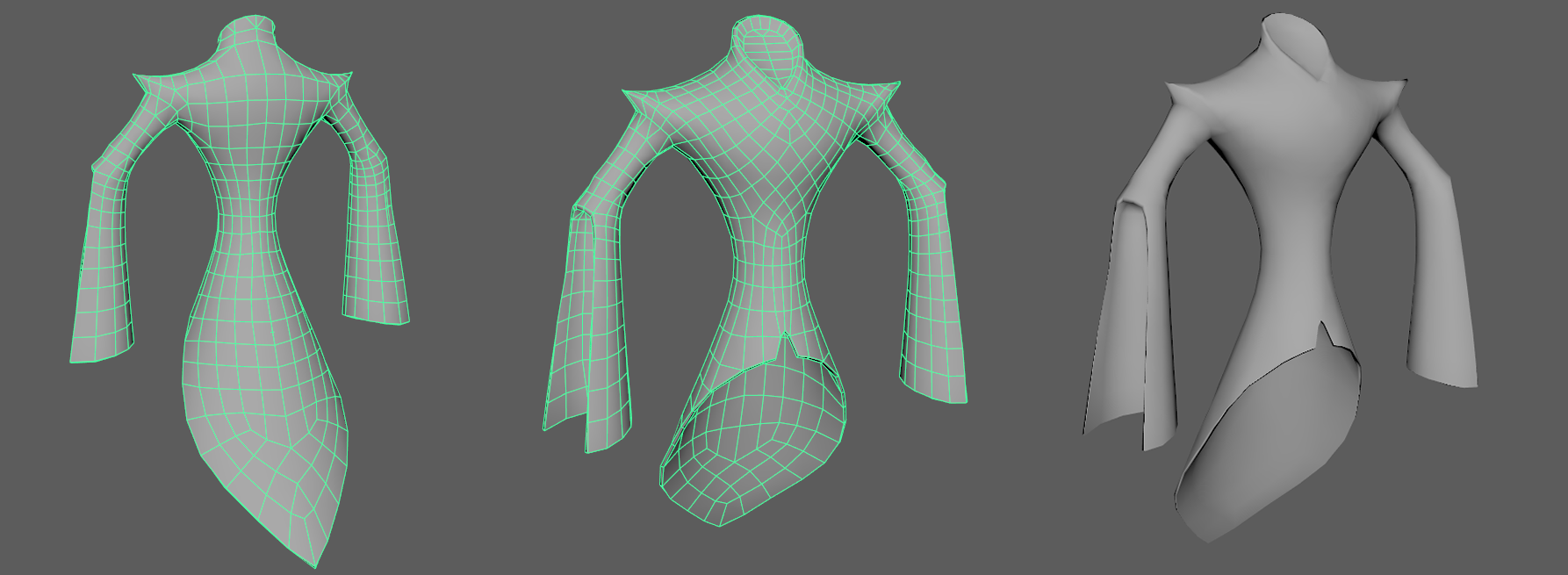 Good evening, it's me again! 😊 Decided to work a bit on the coat for this guy today, nothing exceptional. I still wanted to note that I tried something unusual, I tried reducing the mesh in Maya and using that as a base for the retopo but it was so not worth it. The time taken to clean up the mess would have been much more…
 -
Re: How many polygons in the opening cinematics of AC: Revelations and The Witcher 3: Wild Hunt?
 nobody is counting polygons here. there will be a basemesh that's fairly dense and then there is displacement on top which pumps it up by a lot more. search for digic pitcures or blur studios or axis or whatever wireframe and you will find articles showing their basemeshes…
 -
Re: [UE 4] Dynamic lighting artefacts? Can't find cause?
UPDATE: So! After a lot, and a lot of digging think I solved the issues so thougth I'd share if anyone has anything similar. The black spots were in fact a normal map issue. I noticed the maps weren't your standard blue hue - it was sort of a mix of green and pink and purple? Anyway, it had something to do with substance… -
Re: Blender riging to UE4 – mannequin workflow without retarget & rigify workflow
 Heya, At the end of the day there is only one thing that matters in regards to the asset : If you want the model to be directly compatible with marketplace animations, then the asset has to be 100% compatible with the Epic Mannequin skeleton. That is to say, using the so-called "screwed up axis" (which isn't really screwed…
 -
Re: Hair card normal map baking issue
@poopipe sorry for the late reply poopie, I saw your reply a lot later I moved on so I completely forgot to check the post for a while. I actually found the solution and the thing was because I laid my hair on the y-axis, and rendered it from the top cam. I solved this issue by render from the front cam and rotate the hair…
>5462 results