Search
-
Re: Scripted materials and param blocks
 In the MaxScript Reference Index Type "Updating Scripted Plug-ins" You'll have to give you material plugin a version number, and when it loads an older version you can give it instructions to update the material. I've used scripted materials and every time it's ended badly.
 -
Re: doom 3: phobos in need of modelers
 We just made a new update on our site again. This time its a devblog about making the maps for doom 3: phobos. We are still looking for modelers to help us out finish this, so hopefully this update will enqourage some of you to apply :) www.tfuture.org/phobos
 -
Re: Factor 5 closes shop
 I updated the list with regards to Pivotal Games, Big Huge Games, Heavy Iron, and Incinerator Studios. Also, seeing as their are a lot of these threads on studios closing I second the motion for a 'studio closings' thread. I'll make one and keep it updated if many other people want it.
 -
Re: Garbeled UV coordinates in UT3 package
 Sounds like the updating lightmap UVs problem. After reimporting the updated ase you need to open up the static mesh editor and reset it's the LightMapCoordinateIndex back to 0, then back to 1 (or whatever channels you are using for lightmaps), then rebake the lighting. That should do it, hope that helps.
 -
Re: release the heads!
 Ha ha suckers I got there first! Great SDK Japhir and I totally agree on the looks. It wasn't hard to make her look like angelina. Did you update more than just the hair strip or can I use this texture with the updated version?
 -
[WIP] - Skeleton Warrior

 Hello! I am a college student currently working on a project that requires me to post updates to a forum thread on this site. For this project, I will be creating a 3D character based off of this illustration by Lin Chang: https://www.artstation.com/artwork/RYYxgA Currently, I am on the greyboxing stage, here is my…
 -
Dwarf Warrior - Game Model (WIP)

 Hi guys, Currently, I'm working on a dwarf warrior character. I have finished a first version of the high poly model of the character. Here there is a quick render: UPDATE: Here there are some renders of the textured low poly version of the character. I hope you like it. UPDATE 2 (New ilumination and tweaked materials) All…
 -
Joshs super fantastic improvement thread
 Update on progress, I have edited this post to make it easier to view the thread with my latest work. Posting an update on my improvement. I am currently working on a Halo Study of a scene and my HP prop is done, I plan to make a LP of the door after I have finished more of the scene.…
 -
Re: Answered: Quixel colors not working

 I did all the steps as you said guys but still I have this error ? also installed this like for update version and Still I have same error https://support.quixel.se/hc/en-us/articles/207575105-Quixel-Colors-doesn-t-update-to-the-latest-version-after-install
 -
Re: PBR Sport Balls Pack [RELEASED]

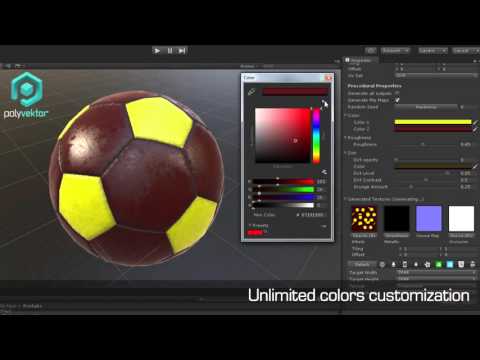 PBR Sport Balls Pack 1.1 update is live and available on https://www.assetstore.unity3d.com/en/#!/content/44478 https://www.youtube.com/watch?v=xBEFNljKhs4&feature=youtu.be Update includes: - more ball variations - added customized materials (change color, add dirt etc.) - added mask textures - LODs
>32412 results