Search
-
Re: reset Xform question
 that actually a better way to explain my previous statement. Max sometimes flips my normal faces on it's own, which not only affects it's appereance, but also generate a mess when i try bake an AO from it. and if i recall it correctly, i,ve stopped using mirror tool ever since Max 6. let me recap my current char modeling…
 -
Re: Brick Wall - Baking normal advice
 In this case because your wall is so uniform and flat, I think you would be better served by using a single quad as your low poly mesh. Doing it that way though you'd need to adjust your high poly bricks so that the sides flare out a bit as they go further back into the wall. That way they will show up better in the baked…
 -
Re: 3dsmax - make a form, meld into main form
 I took a look at the model, but it's a bit messy. The disk model has a couple Conforms on it that are doing nothing, if you haven't done so, you might want to read up on Conform in the Help. The disk also will need some subdivision on its top and bottom flat areas, otherwise it won't bend properly across that sharp curvy…
 -
Re: My second hand painted model ever made.
 Hey Manu12el, I think that you might need to add a few more polygons in areas that are popping off of the book. It looks like you've got the extrusion working for you on the gold clasp-thing at the spine of the book, but it could really use a little bit of attention on the gold corners of the cover (maybe extrude some…
 -
Re: Feedback on Darius model

 My examples are in Zbrush, but the same principles apply no matter which software you use. There is no 'right' way exactly, but there are ways of doing things that are considered 'industry standard' or are proven to be better ways from experienced people. It takes practice, trial and error to see what works best for you.…
 -
Re: Helix along curve (telephone cable), Maya 2016

 one way to do it is to use is Surfaces>Extrude * make a nurbs circle Create>Nurbs Primitives> Circle * align the circle to the start of the curve * select both the curve and choose Surfaces>Extrude from the modeling menu * now you should have a tube. Select the tube and under Extrude set the Rotation of the extrude to a…
 -
Mechanical SUB-D tips and tricks
 Since there really arent a lot of resources on this subject i figured i'de start a thread, heres a lil thing i made for TK to show him how to do soft intersections with floating geometry. Its not always perfect but works pretty well and you can touch up the spots that dont look right in seconds in ps after you render…
 -
Re: Going from XSI to learning 3DS max
 !.: F2, F3 and F4 toggle between different Viowport Settings...F2: toggle between shading selected faces and only outlining selected faces, F3 toggles between Wireframe and Shaded, F4 turns Wireframe for Shaded Display on and off. 2.: When you just press the button for e.g. Extrude , you can click on a face and extrde it…
 -
Re: Sharp corner edges on a square detail over cylinder without distortion

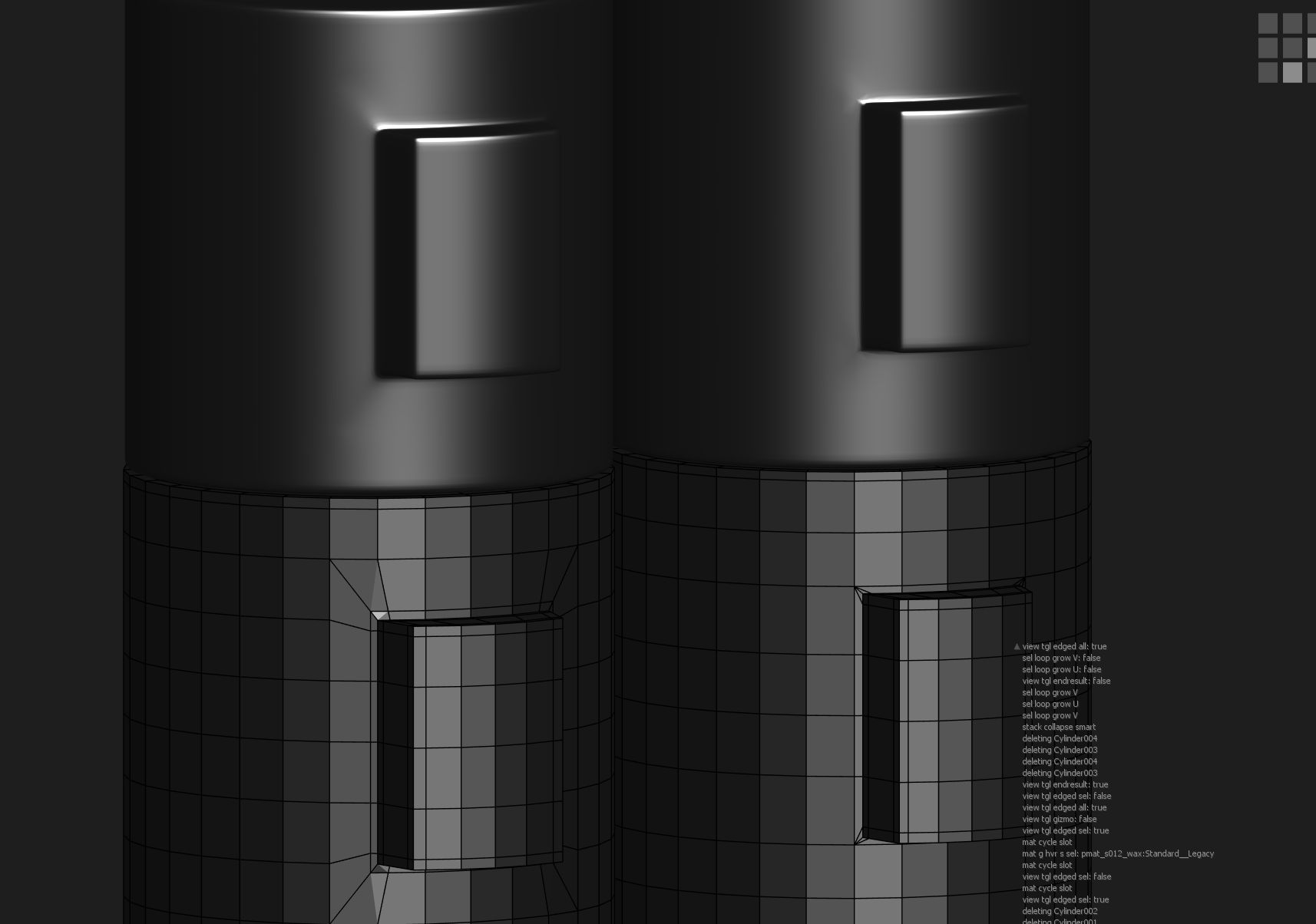 The majority of 3D artists make this mistake. A lot can be said for what kind of geometry to use in this situation, but the fundamental problem is straightforward: You fell for the temptation to simply extrude the quads straight off of the cylinder. As a consequence, your transition geometry (the part going from cylinder…
 -
Re: You know why Max is -fucking- awesome?
 I think extrude would work *if* you perform it as a an actual modifier instead of performing the extrude on the base editpoly. Basically the lowest stack level (editpoly, spline, aso) is where you put the overall information that 'drives' the shape ; whatever you stack up next is more like parametric operations you perform…
>3548 results