Search
-
Re: Group that formed modern Capitol Punishment now says "US Court System doesn't work"
 Let's take a quick look at some correctional facilities around the country. Starting with Louisiana: One out of every 45 people in Louisiana is in prison. Think about that for a minute. This is the highest rate in the country (and the world) by a wide margin. The crown jewel of the Louisiana prison system is Angola. This…
 -
Re: Monastery Refuge - Unreal Engine

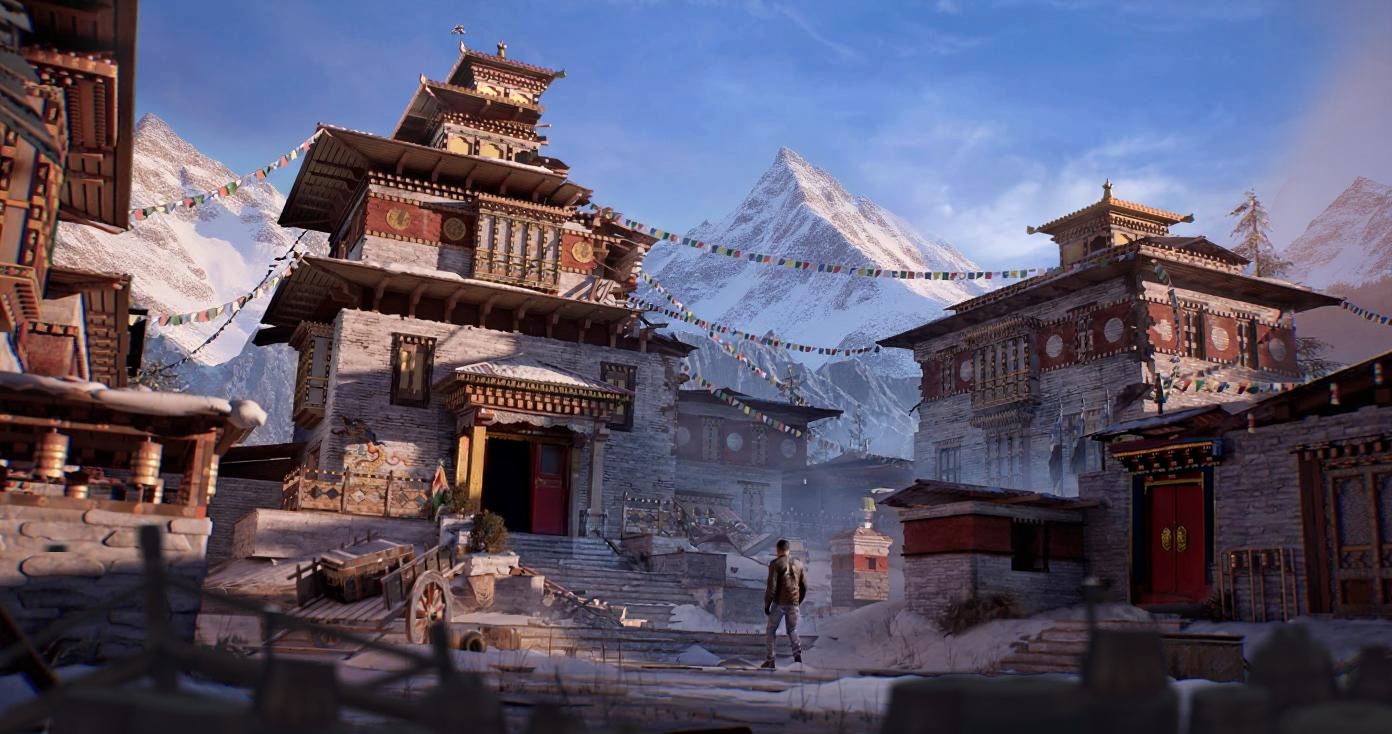 Great project @srinivasjlkm! A lot of solid iteration at techniques. About 80% there. Couldn't resist doing a quick paintover pass to get it closer to 90% without much work. 1. Your fog cards were quite sporadic creating some muddle lighting tones and colors. Once cleaned up and colors and lighting brought together the…
 -
Freelance Marvelous Designer Artist for Stylized Animated Series (Remote)
 Freelance Marvelous Designer Artist for Stylized Animated Series (Remote) I’m looking for a freelance clothing artist to create stylish, animation-ready outfits in Marvelous Designer for an upcoming animated series on my YouTube channel (30,000+ subscribers). Project: Paid, remote, freelance/contract. Immediate start…
 -
Re: Import multiple images as layers in photoshop?
Actually, it's really simple. Open Bridge and select all the files you want to open. Tools menu --> Photoshop --> Load files into Photoshop Layers It creates a new file in Photoshop and opens all the files as layers Damn. Make me register just to tell you people things. :) -
Re: Roadkill, 3DSMax 2009 - 2010 script updated
 yeah I fixed that edge selection through the UVunwrap editor half way through, though there is a bug in Max2010 that prevents me from using either of the 2:unwrap5.getSelectedGeomEdges()unwrap6.getSelectedGeomEdgesByNode ... See also:…
 -
Quick ZBrush Question (Subdivision)
 Hey guys, I'm new to Zbrush, so sorry for the simple question but.... When I import a model of an OBJ into Zbrush and subdivide it, it tries to smooth all my open faces. Is there a way to get it to Subdivide in Zbrush the same way it subdivides in Max with turbosmooth. As in when I subdivide in max, open faces subdivide…
 -
Re: 16-bit images get imported as 8-bit in Photoshop
 TIFF, TGA, BMP, PNG, RAW... nothing seems to work. EDIT: I'm starting to think it's a problem with Terresculptor exporter. 16-bit images saved in Photoshop open just fine, but I can't open most of the files I export from Terresculptor or they open in 8-bit mode.
 -
Re: Sketchbook: kevlar jens
 Thanks, Jeremy! I most definitely will. High school is *soon* a part of the past, only exams left now, and then I'll finally have all the time in the world to work on my art. Opening page 3 with some Beastie Boys [ame=" https://www.youtube.com/watch?v=BptQHAW2T5M&ob=av2e"]Beastie Boys - Shake Your Rump - YouTube[/ame] ** I…
 -
Weekly Concepts - Critique
 For an open-ended project class at my university I have decided to start improving my concepting skills. So as an assignment, I've got to do 1-2 concepts a week, mainly character design. The focus is mainly anatomy, how well the concept gets across the idea of the character, and how well the concept itself is technically…
 -
Need help with FCheck
 So for school I have to bring a .MOV file into FCheck... Problem is I can't do that... Does anyone know how to open a MP4 or a .MOV in FCheck? Or is there something I can convert these videos into that FCheck will open? I tried extracting the frames and I made a folder with a few hundred JPGS, but You can only open one…
>28488 results