Search
-
Re: lowpoly shading with normal maps for flat stuff?
 Everywhere you have an angle of more than 45 deg and a hard edge, you need to separate the UV-shells. Otherwise you always will have this lowpoly artifacts on your normal map. Only 3ds Max has this problem, it’s just fucked up! You can bevel everything, or set some smoothing groups to achieve a better shading on your…
 -
Re: New game project needs efficient and interesting art style
 What I will do for our next game is go with kind of normal modelling style but only baking the most important and reused parts while trying to rely on texturing with strong edge definition and matte materials and some tactical bevels to compensate Personally I think doing the usual thing just without baking and having a…
 -
Re: Doom4 plasma rifle
 -Hard/Soft edges have to do with rays and angles at which your normal map is being baked/projected, Summed up: 90 degree edge + harden edge + Split UVs = normal map has less gradients (better results for generating cavity map) and less visible seams. 90 degree edge + harden edge + Sewn UVs = normal map will have seams in…
 -
How to roll up in zbrush?

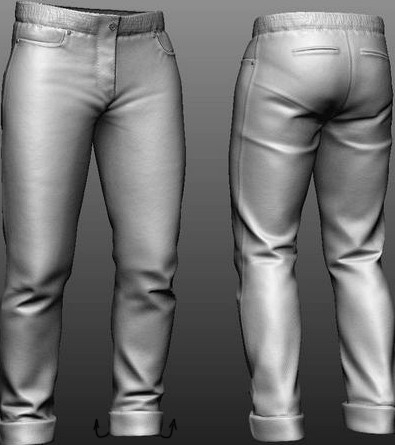 Hi guys, is there any brush in zbrush (or way) with whom i can roll up edges of trousers or sleeves like shown on the pic above? i hope u understand what im trying to ask
 -
Re: weapon attachments and FN SCAR.. high poly!
 hey man, your doing great job here. the overall look at first stance is great, if u wanna get it better i would suggest same as other said here go softer on the edges, make sure its showing, maybe go x2 than what u got and another thing is the shape and proportions even on the smaller part, yea i know its small and…
 -
issue in marmoset when using normal map
 Hi everyone,I am rendering a model for my portfolio in marmoset toolbag.But when I use normal map I find a promblem like this: You can see there is some hard edges in the chest. And then I put the same model and the same normal map into maya.The render result is like this: It seems every thing is all right. The low-res…
 -
Re: Seeking Topology Advice
 The topology looks fine, specifying your use for this model also helps... e.g. if it's meant to be animated your topology is in the right direction... but if it's supposed to be a statue etc or an environment asset you could re-topo for better details assuming you'll be sculpting into this later on? The only alterations…
 -
Re: Marmoset Toolbag 1.10 Official support thread
Hi everyone,I am rendering a model for my portfolio in marmoset toolbag.But when I use normal map I find a promblem like this: You can see there is some hard edges in the chest. And then I put the same model and the same normal map into maya.The render result is like this: It seems every thing is all right. The low-res… -
Re: Problem with normal Baking substance
 Hi! What does the low poly mesh shading look like without normal map applied? Are the edges showing the issue shaded hard? Remember to split UVs at hard edges and use hard edges where it makes sense (steep angles). Here is the Normal Map wiki entry.
 -
Re: Portfolio Feedback
 Hey thanks for the feedback, @Bomb_Bear This project took a while to render and this particular area put me off as well, I guess I was more focused on the lighting. I soon realised that I hadn't been utilising the hard/soft edge tool in Maya and I haven't had the time to rerender. @Dpowell94 I realised this as well and…
>27970 results