Search
-
Zbrush - Export Render with transparent background?
 I'm rendering in Zbrush and want to export just the colored part of the hair, not the black background. Is it possible to export the render with a transparent background? I finally figured it out and it sucked the life out of me. 1. In Zbrush change the background color to white (255,255,255) 2. Click BPR Render. 3.…
 -
Re: Zbrush - Export Render with transparent background?
 to get antialised transparent background with one click, try ZCornea zbrush plugin. no need photoshop. I built this plugin for my game projects to collect crystal clear UI element renders. https://www.artstation.com/a/4630813
 -
Re: Zbrush - Export Render with transparent background?
I wish there would be a way to export exr with cryptomatte. Readable by photoshop 3d-io plugin preferably. Would start using Zbrush and Photoshop again probably. Maybe they will do it in 20 years after countless useless tools. Or un-premultiplied render passes at least -
Re: Zbrush - Export Render with transparent background?
Tools are useful except ppl dunno howto use them. ZCornea is free and useful. https://www.artstation.com/a/4630813 if you find a better faster way plz tell us. to you save our days. -
Re: Zbrush - Export Render with transparent background?
Thank you! -
Re: Zbrush - Export Render with transparent background?
Thank you, this was perfect. -
Re: Zbrush - Export Render with transparent background?

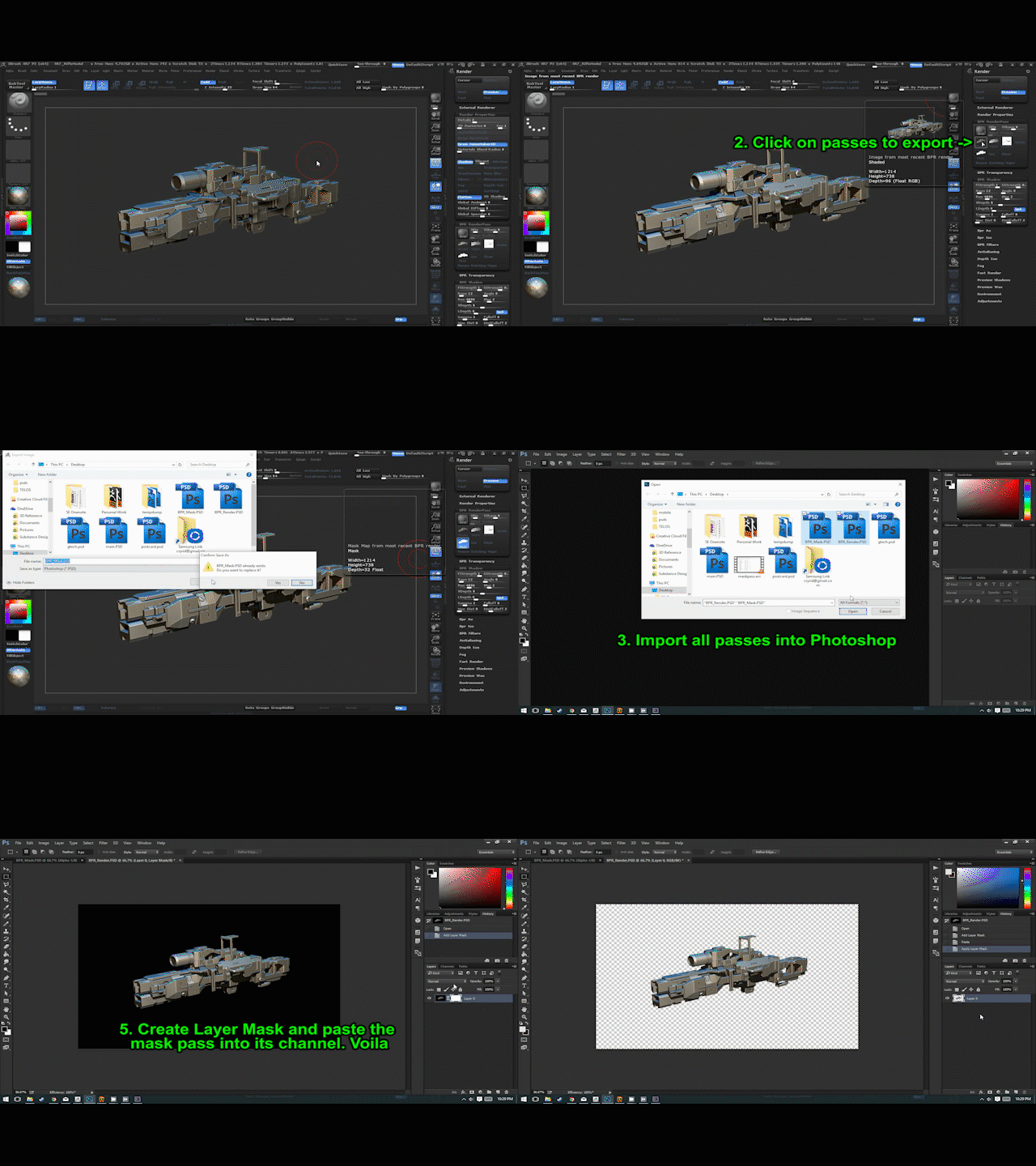 Step 1 isn't necessary. You can use any background color. Using BPR to export a separate mask pass is the way you want to go though. It'll give you a nice anti-aliased result too. Your photoshop steps might be a little busier than necessary as well, if I'm reading it right (especially #7). It's really a quick process to…
 -
Re: Zbrush - Export Render with transparent background?

 New ZB plugin out that'll automate the passes to PS: https://youtu.be/MFTXrNiyBbk
8 results