Search
-
Re: [ZBrush] Mesh rotation resets when I move it
 Yeah, this is what I've been doing too. You can even press T again and get back into Edit mode to rotate it/move it more if need be.
 -
Re: moving from Maya to Max.
 Z centers your camera on the object and the camera will orbit around it. Walk through mode can help position the camera also (little foot prints down in the lower right). The help file has more info on it. I can get into specifics if your interested. Basically its mouse look. You grab a certain axis on the gizmo. Click the…
 -
Re: Do you know any way to avoid 3ds Max to default continuously to move tool instead selection tool?
 Yes, I use "select object" instead the default one, another annoying default from MAX as swaps to unwanted selection modes. Anyway I don't think this affects the tendency that has Max to "move tool" mode even if you choose "select object" Q when coming from other modes. This is MAX 2017 but I think 2018 is the same and…
 -
Re: Nvidia Control Panel
 Yeah, i used "slimmer" a neat little tool (the "town square" of people) had to create to avoid these new moves. Ah , hmmm how would we then utilize the options though? like enabling settings on the gpu & such, i am all for it if we can somehow do it "ourselves". (GN report on Nvidia YT link 2video)This happen & i stopped…
 -
Re: Paint vertex normals in 3dsmax
@Klunk: The problem with projecting/transferring the actual normals of a mesh is that it's a closed surface (at least usually, maybe you could break things up into many smaller units, but then you'd have to manipulate those somehow). Imagine you want to comb your vertex normals sharply in one direction over a larger area:… -
Moving UV vertices in Maya, moves all connected vertecies. Help?!

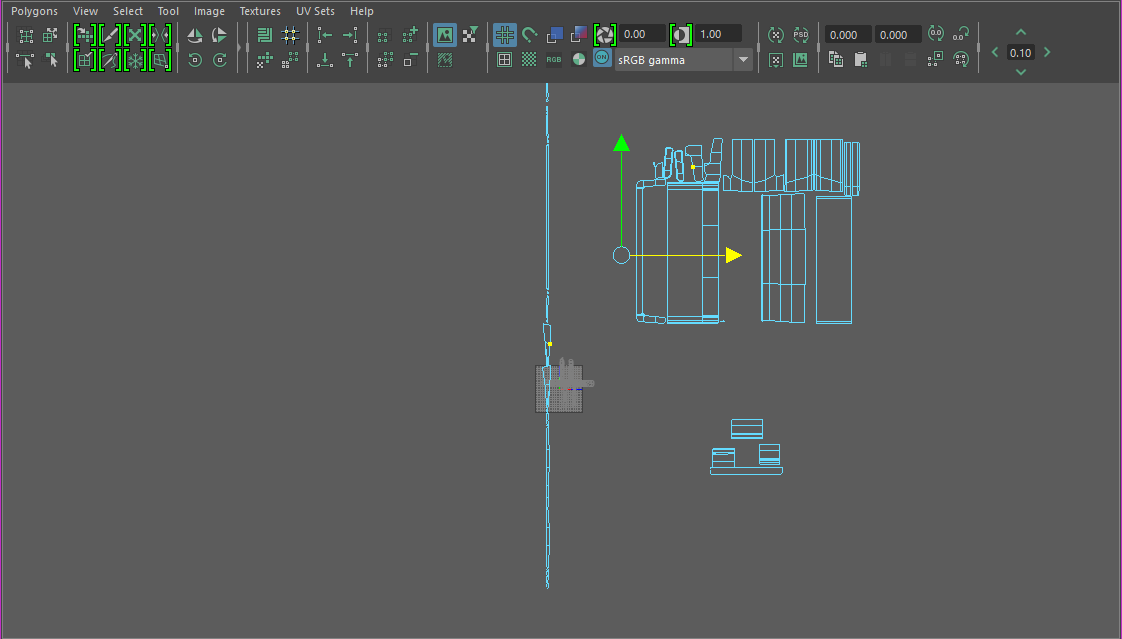 I don't think I've ever had a bigger headache on such a fundamental problem with a 3D program. I haven't had this issue in any other program before, 3DS Max, Blender, XSI, etc. How do I "split" the vertices/faces from eachother and form a separate shell... or something? The Split and Create Shell appear to do nothing... I…
 -
XSI move/slide equivalent in Maya
Herrow - I was watching a Gnomon video by Vitaly Bulgarov and i noteced that he would freely move points around without changing the shape/siloette of the object he was working on. he did this ALOT. Pretty sure he called it turning "move/slide" on. I am looking for an equivalent to this in Maya. I have already found "Slide… -
Re: Tablet: Pen or Mouse mode?
 I have my mouse in mouse mode for all three screens and I have my pen in pen mode for just my left most screen (where I run all my intensive programs). I had my pen set to mouse mode for the first few months, way back when I hardly ever used it. Now I use it far far more and there's really no way on earth you'd catch me…
 -
Markl - Howl's Moving Castle

 Hey everyone! I've managed to finish my little tribute to Ghibli's Howl's Moving Castle! It's a game-res, textured model of Markl. You can see more (including Marmoset Viewer scenes) on artstation: https://www.artstation.com/artwork/g3bNZ This project let me finally learn more about Marmoset Toolbag bake tool, which is…
 -
Re: [MAYA] Help with Animation, Speed too fast.
 If your position of the object is reached to fast.. shouldn't you move the iframes (or whatever it's called in Maya) for that position to the right so that they are "reached" later in time ? Maybe even using more than 144 frames. The numbers are only the relative position to the curve (0= one side; 0.5= in the middle; 1=…
>108919 results