Search
-
merge uv maps?
 how do you merge uv maps? i have 3 different parts of my model mapped in 3 different maps, How do i merge them to one single map? Thank you, Michael
 -
Blender 3d: How to merge 2 edgegroups to last selected edgeloop vertices?
 Hello! I been wondering if there is a tool or such in Blender to allow me to merge 2 edge loops at the last selected edge loop, I DO NOT MEAN bridge edge loops, I am talking about merging. I would be very thankful if you know a way or can offer some tips/tricks on doing this. I need to merge loop A to loop B vertices,…
 -
Unreal Engine FBX problem and Merge and Replace Actors
 Hey Guys, So I recently made a small scene in max and wanted to bake some basic lighting in UE4. Everything here is unwrapped, (some are not 0-1 space). However when importing in unreal i get this: If I import the same fbx into marmoset, everything seems fine. Also I had put the walls in the same group so I wouldnt get any…
 -
softimage ~ merge and keep uv coordinates
 I have finished uv mapping 2 models in softimage, only to realize that it would have been better to merge them as one object, and then uv map them. the problem I'm having is that I can't figure out how to preserve the uv coordinates when merging, and I'd rather not remap the thing. can anyone help me with this?
 -
Re: Arcane Inspired 3D Character Bust

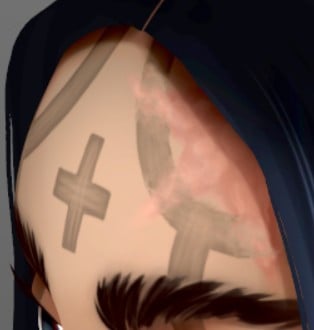 Nice...very! looking at her hairline scar? - now I'm only referencing real world tattoo application and not by any means questioning your artistic direction / aesthetic of this piece so merely a suggestion. Anyhow rather than it's pattern abruptly end at the boundary, maybe continue adding discoloration or minor surface…
 -
Zbush Subtools Turn Black On Merge
 Hi Everyone! So I have been poly painting a 3d print sculpture with quite a few sub tools and now I want to merge all the subtools and hollow out the figurine... but when I merge them the whole thing turns black and I loose all the poly paint information. Does anyone know how I can get around that problem? Cheers! :)
 -
Re: ZBrush Subtool Merging/weilding problem
 The easy way to do it is: -Export the lowest levels of the head and body above and merge the verts together in max/maya etc. -Use subtool master to merge the highpoly tools together. -Import the merged lowpoly back into Zbrush over the highpoly and press yes.
 -
Need Help Merging Theses Two Shapes
 Hi everyone, I need help merging those two shapes while having a good topology. I just don't know how to set up my two shapes for the merge. I tried many techniques, but there's always something wrong when I switch to smooth preview. Thank you ! Here's the image :
 -
The Luxury of Mercy
Topic by CeaserYorky · · Home› Contests & Challenges Archives› Riot Creative Contest 2017› Riot Creative Contest 2017 - NarrativeHere it is. -
How to properly merge vertices and edges in Maya?
 I want to merge the selected vertex with the one above it. But when I do, it seems like it merged properly, but it really didn't. The result geometry is a mess. Those two edges are not real edges - I can't bevel them, they're not part of a loop, they break multi-cut and so on. I really don't understand how Maya works.
>6860 results