Search
-
[3ds Max] Seperate all elements to objects while keeping normals?
 I found several Max scripts that seperate all elements to objects but none of those keep the mesh normals. The only workflow that keeps the normals seems to be this: -Clone the whole object -Edit mesh, delete everything but one of the elements -Repeat This is for Destructible chunks that I need to import in UE4 seperated…
 -
Suite dDo, Where is all the Wear?
 Hi Folkz! Just a short question. Is this the old version: of This:? With the Old dDo i could make a lot more with my edges. Where is this all gone? Gazu
 -
All textures export at 4k?
 I keep hearing people say to export all textures at 4k and downscale them in engine. Does this apply to things that I know will be using smaller textures like 256 or 512? Seems so many 4k textures will keep adding to project file size.
 -
Re: All Hallows' Eve
 Dude your stuff is amazing! Is that all custom work? like the models and all?
 -
Why are all my faces overlapping?
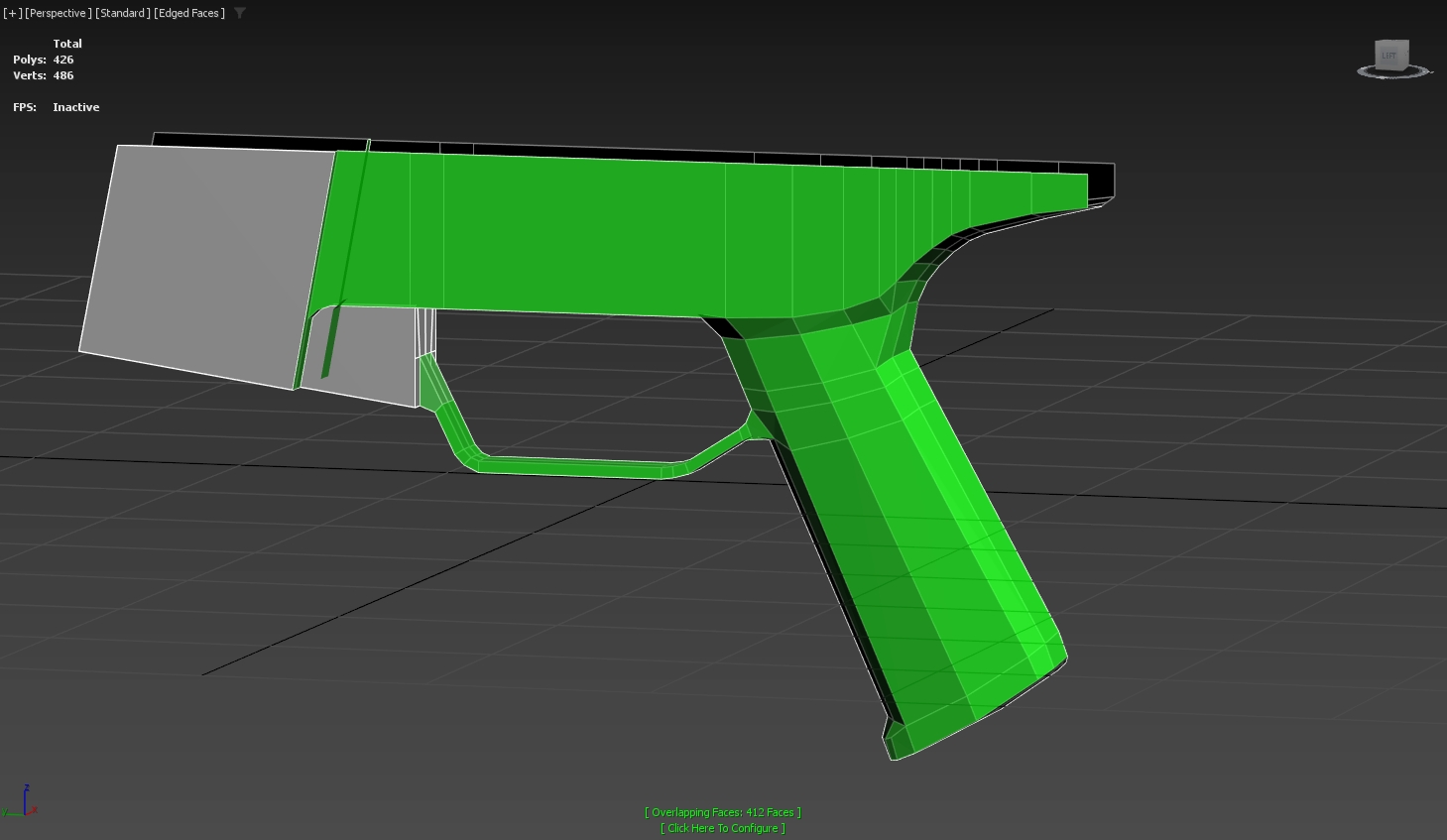 I've never had this issue before, but I've recently started using shift extrude on edges and faces. Why has this happened? Is there an easy way to fix this? All done in 3ds max btw
 -
who is all going to SIGGRAPH this year?
 just wondering who all is going to SIGGRAPH, this would be my 1st time to go, i will get to go maybe, if my wife lets me borrow some of her airline mileage, Chris^_^
 -
Re: Using maya as a game editor for environment art
 Well, for character animation usually you don't have the same kind of strict limits as you have for environment art, so it's a different issue in many ways. For environments, usually you have to pay close attention to reusing assets and materials/textures as much as possible, so you don't blow the memory budget or kill…
 -
Splash Damage - All art roles
 http://www.splashdamage.com/careers Looking for artists of all job descriptions including senior/leads. Cheers Tim
 -
THE best movie / cast of ALL TIME
 An action movie that looks BADASS! and dont go talking about story because we all know no one watches movies like THIS for the story. [ame] http://www.youtube.com/watch?v=wv4PfF2ys-4[/ame] /discuss
 -
Re: Animating All My Rigs, a little rusty.
You can make this way better by offsetting your controls. Set all your controls to looping (infinity) curves. Your chest moves first in a breath. So, let's use your chest control as the baseline. Start offsetting your controls by 2 frames for each control, moving outwards from the chest. So, if you have a neck control and…
>101150 results