Search
-
Re: Tips on modeling a house?
 Inside of ProBooleans there is an option under Sub-object Operations to Extract Selected, if it gives you an error saying it can't extract base shapes or some such nonsense change it to copy. It won't ever let you remove object 0 so you'll always have to copy that one. You can also click on each object that has been added…
 -
Re: Mudbox 2014
 Well I hope they get rid of the bug where I can't select an object in the object list, or where I can't select an object and that object is also hidden...
 -
Re: [WIP] Stylized Island (for portfolio)
 Cool idea for a portfolio piece, and you’re smart to worry about shots this early – the island itself can be great, but if the cameras are weak, all that work gets lost. A few concrete things you can try: * Pick one main story angle. For example: “approaching the hostile shore”. Place the camera low on the waterline,…
 -
Re: [WIP] Aircraft altimeter

 looks promising, it might be cool to have such edge damage on the edges of screws' drive recesses as well - where it could be damaged by screwdriver In general if object is not supposed to look heavily worn I'd try to keep edgwear rather subtle and non-uniform - just accents here and there rather than along whole edges,…
 -
3ds Max conform tool
 OK let me explain what I am trying to do (this could get confusing). I am looking for a tool that essentially works the opposite of shrink wrap. So I believe there is a tool in max where you can have a large object (lets say a sphere) with a smaller object inside it (lets say a cube). From here I think there is a tool that…
 -
light maps, and their implementation in engine
 we're looking at getting some lightmap support so we can get some nice prerendered lighting ingame. Since we dont have massive environments or a sophisticated in-engine lighting system we'll be rendering the maps from maya and the game will apply them to the corresponding objects. The way we're going to do that is by…
 -
3DS Max 2015 Spline + Cloth Sim = Large Collision mesh problem
 Hey guys, I'm trying to do a quick cloth sim to just get some nice cloth distortion and save me the trouble of sculpting it in Zbrush. Issue: I've made a spline with a sweep modifier that cloth is to drape on, the spline always acts like it's collision mesh is far bigger than itself: I'm in SP2. My steps to try and fix…
 -
Question regarding Texel Density.
 Hey there lovely people! Here's my question: Let's say that the project I'm working on asked me to maintain the Texel Density at 1024 per meter (so a 1x1 meter tile has a texture resolution of 1024). So far, so good. The problem I'm having is managing UV space when the object I'm working on is either too large or too small…
 -
Re: Zbrush 4R8 project all not working
 Just thought I'd follow up on here since a similar issue happened to me (again). Assuming folks aren't using the projection wrong (have models visible and geometry turned on to projection settings)... It's almost always a scale issue. I was using Character Creator recently which has a terrible scale for zbrush sculpting…
 -
Re: [WIP] Muzen Wild Mini | Hero Prop

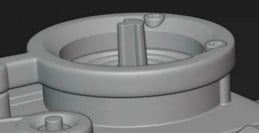 Noticed this element as well, recessed slightly deeper plus differing width and scale than the posted refs or are you using a collage displaying various versions of this object?
>26409 results