Search
-
Re: The BRAWL² Tournament Challenge: Judgement!

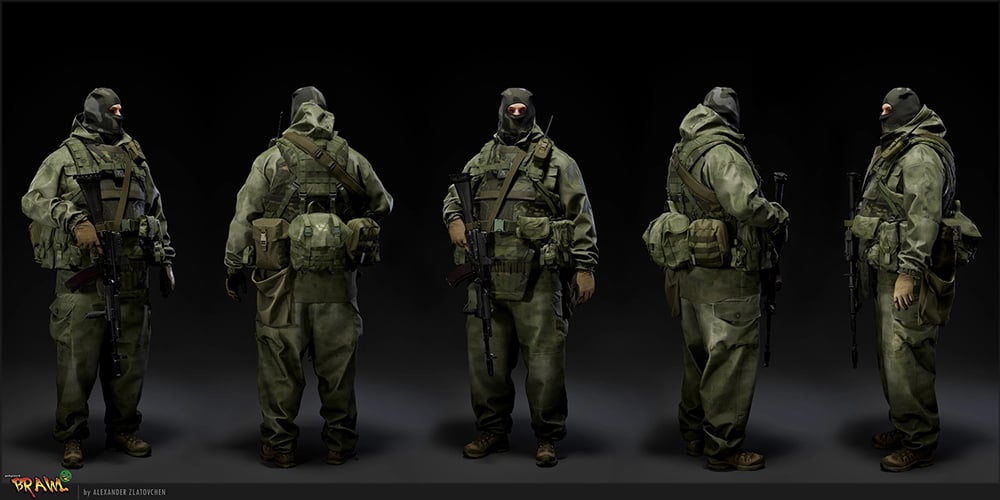 1st Dorado - Alexander Zlatovchen The model looks incredible, great job on the clothing and accessories. Top level. You did an excellent job in Marvelous Designer; those small details really make a difference. The level of detail is amazing. I would’ve liked to see images of the texture maps and UVs. I also wish I had seen…
 -
Telltale Games is looking for a Lead Animator!
 Apply Here! Summary Telltale Games is looking for a Lead Animator. On your project, you will be responsible for ensuring that all the animation is completed at a high level of artistic quality, and within the time constraints of our production schedule. Responsibilities * You will collaborate with our Art Directors,…
 -
PC-CSGO | Desert Eagle Jurassic

 Desert Eagle | Jurassic http//steamcommunity.com/sharedfiles/filedetails/?id=675847518 "Challenge your opponents with the Desert Eagle custom painted with the terrifying figure of the ancient Tyrannosaurus Rex and as the T-Rex was King of the Lizards, become King of the Battlefield!" The DE | Jurassic pulls off a dinosaur…
 -
Luck hates me
 ok, i was texturing some stuff, i merged the layers, and applied a sharpen filter to enhace some definition, each file had like 50 -100 layers. i save AND BAM, computer restarts !!!!!!!!!!! now i just have the merged image with the sharpen applied....im about to despair...
 -
Maya how to make instances share material assignment?
 So I made a model, instanced it a bunch of times in the same scene. I wanted to then update the main model and apply a different material to it, but the material only gets applied to that one instance of the model. Any way to make an instance and have it look to the parent for the material as well?
 -
Re: UV Map + baked texture looks good but.. doesn't work?
 Next time please post your technical questions here http://www.polycount.com/forum/forumdisplay.php?f=43 For your question: Try to exit sub-object mode and apply the material then. Or select all faces and apply the material.
 -
Re: Just Another Scrapbook Thread
 @grotessive94, the eyes are just a boring ass polypaint with the material 'Toy Plastic' applied. If you turn on MRGB you can paint material information as well as colour, this lets you have different materials applied to different areas.
 -
Re: Marmoset Toolbag 1.10 Official support thread
 Did you make sure you created, saved and applied 2 separate materials to the meshes? The default material thats assigned to the mesh will go wacko unless you create and apply a new material to the mesh you want it on.
 -
Re: The Walking Dead
 Yea that makes sense but why just grab the handle and slam the door open. Why not apply some of the same care they applied to opening the trunk? It was opening the door quickly that alerted the zombies... oh well hindsight I guess.
 -
Re: Unreal Engine 4 "Soul" Mobile Demo
 because you create it from scratch? create tileable alphs to apply to you wooden structures as a base, chipping of edges and giving it more character will be easy once you have the main structure applied from stock brushes
>29991 results