Search
-
PS CS5: The Undo/Layer Dance
 Know what I'm taking about? It goes like this: 1. Work on layer 200. 2. Move to layer 1 to work. 3. Make a mistake and 'Undo'. 4. Try again 5. Realize you're working on layer 200. /facepalm 6. 'Undo' 7. Go to step 2. I find this mildly annoying. Is there a way to disable this Photoshop "feature"? thx, -kp
 -
Re: Where have all the promising projects gone?!
 Maybe look to join BFME reforged ? Also maybe there has been multiple shifts occuring that led our industry to this kind-of lack of cool project. Covid, where we stupidly increased recruitement hopping to solve a sudden, yet temporary peak of players. Layoffs then destroyed lots of studios, lots of good studios, some being…
 -
Re: zbrush layer introducing artifacts
 Its possible that a layer's record mode just isn't supposed to be toggled on and off 50 times. If you have heavy tweaks to make to an existing layer or are using blendshapes, it might be better to make them on a new layer and then merge down into the original layer? (Or does that produce artifacts too?)
 -
SOLVED: Copy Layer to All Maps Causes Suite to Hang
 -edit- Uh, I'll take my crow deep fried please. Disregard this thread.. the Layer Propagator was popping up underneath my open documents (I run them windowed/floating instead of docked as tabs) instead of on top of them which only gave the appearance of Suite becoming unresponsive.. /edit Maybe I'm just not understanding…
 -
Dual Layering textures for an iphone scene?
 I am trying to set up a scene with a dual texture layer, as the character moves over the first layer anywhere he/she has touched becomes transparent showing the layer underneath. So foot steps for example, wherever they step, you'd see a foot print. Or a snowmobile, wherever the snowmobile went the tracks would show. Can…
 -
Re: Rawk - Post any rocks you make here!

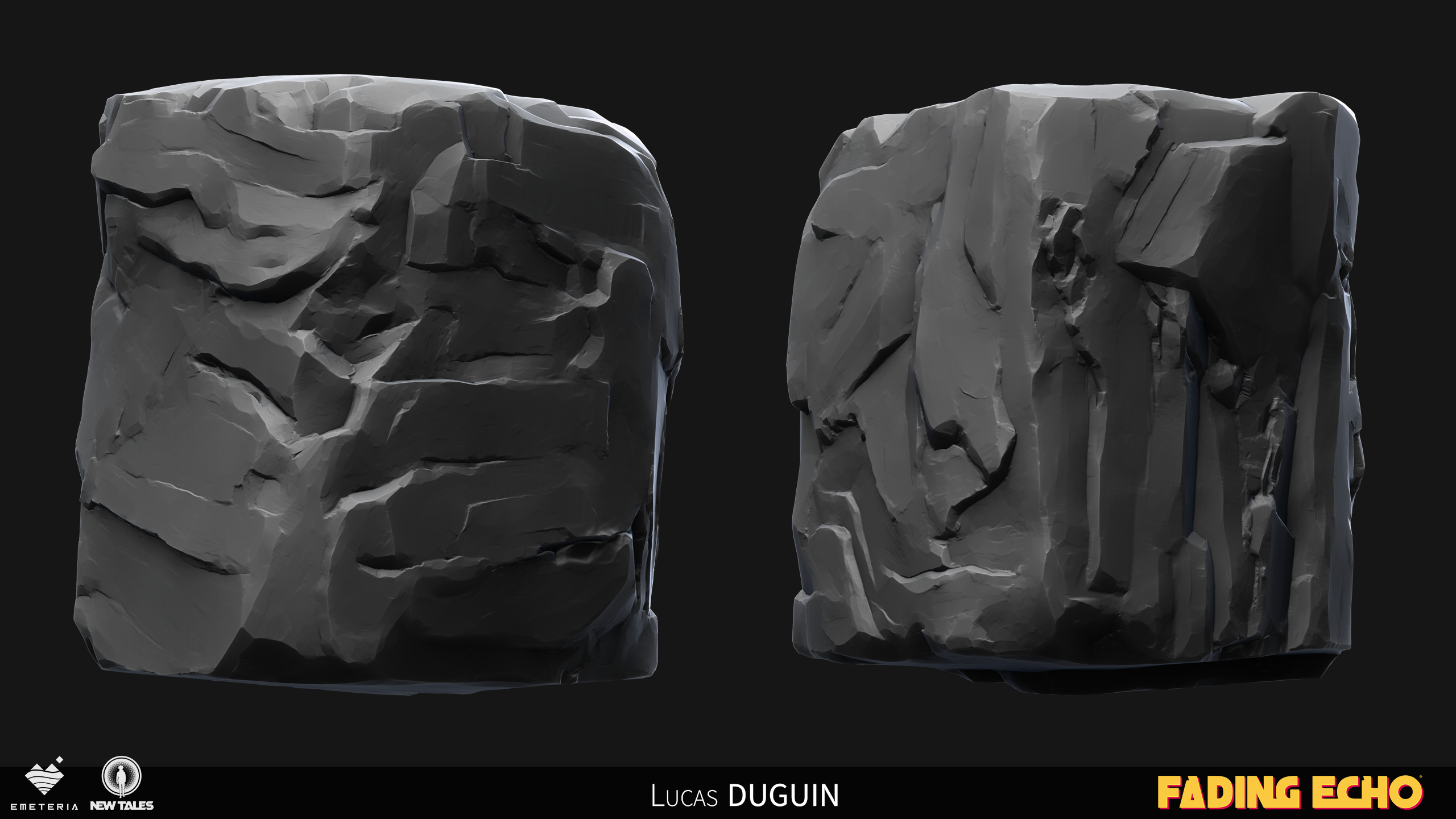 Hello, based on another post I made about the topic it was suggested to post about some rocks I created for the latest game I worked on. The game follows a semi stylised art direction which took a lot of trial and error to reach the result we have today. Here is a quick breakdown of the process I put in place. 1. Sculpting…
 -
Maya layer shader reflection map with reznel fall off is this possible?
 I'm trying to simulate a in game reflection map shader in maya. This is what I have so far, layer texture, top layer is an environment cube set to additive, buttom layer is the diffuse texture, this is working great and I have a reflection map plugged in where I want it to be reflective. My question is can I some how hook…
 -
Re: Zbrush 2,5D layers. Nondestructively?
 Are you sure? I have pretty limited experience with Substance Painter so perhaps I missed something but what I saw were layers just simply adding its depth over what were beneath , no proper z combine, no resulting mask for color /spec. No non destructive "smart" style layers either. I mean a layer of bumpy ground for…
 -
Answered: Access to Layers in Downloaded Asset
I downloaded the Wet Destroyed Asphalt to blend with two other textures I already have. When downloading it stated there were six layers, and yet upon opening I was surprised to see no layers. Unfortunately I'm unable to manipulate the water pools - color, value, turbidity - to match the other custom textures I've made.… -
Answered: Add layer to a single map?
 OK, so another newbie question, apologies if this is just plain stupid, however I want to add layer to a single map (an Emissive map). Is the correct workflow to add the layer and then turn it off in all other layers (click box on left and then shift-click it?). I have made a right mess of the masks attempting to do this.…
>27689 results