Search
-
Photoshop undo always changings the layer I have selected?
 I find this quite annoying, I'll select a new layer, move something on that layer and then hit undo. Instead of just undoing the thing I moved it undoes that plus it takes me back to the previously selected layer. This is a bad feature, is there any way to turn this off so layer selection is recorded in the undo?
 -
3DS Max bug? - Can only select corner of meshes

 Hi guys, I am trying to select my element as you can see in the image below but it will not select? The only way I can select the mesh is by hovering over multiple edges like the image below... Can anyone tell me why it's doing this? Surely I'm missing something simple :)
 -
Re: Maya lock object selection toggle script
 This is a great script! It solves a huge problem for Maya for me - switching vertex-edge-face nneeds to be 100% precise or it will select a different object (behind or above or completely lose selection). Now I can use Maya like Max - I have a key bound that toggles this script and works as a toggle between Object and…
 -
[Maya] ~ Symmetrize, selecting edge as symmetry centre doesn't work
 I'm trying to symmetrize some UVs through the specific tool (Symmetrize) in the UV editor. I want to set the symmetry axis by clicking on a central edge. At first it worked like a charm, I managed to select the edge and the axis would move accordingly. But then, at some point, it stopped responding. What I do: .: Open the…
 -
Answered: Any Changes Coming For How We Can Select?
 Just wondering if there might be some changes coming for how we can select parts of our model? In Substance you can select bu UV or by Geometry, and by no way am I trying to compare or suggest you follow them...but that aspect of their program is really quite useful. So will there be any changes in the selection process…
 -
Re: Select beveled faces in Maya?
 Sorry to dig up an old thread, but I needed this recently. The script didn't work for me, although I found a workaround in 2017 version. Goes like this: 1. Bevel desired object. 2. Go to attribute editor of the beveled object, select bevel node and go to the bot where there is a drop down menu "Node behavior". Change from…
 -
Re: f-ing annoying maya selection glitch
 frankie is getting a similar problem in maya 2008, although i don't know if it's tied to the selection method - whenever he selects something it takes 2-3 seconds to actually select it (with just the channel box/layer editor on the right, not the attribute editor). having the attribute editor open is a surefire way of…
 -
Re: Soft selection falloff hotkey for 3ds Max
 I don't think you can out of the box but with a little scripting you can create two macro's that can be hotkey'ed. I'm not sure how comfortable you are with maxscript so let me know if this seems like a bunch of gobbledygook.macroScript SoftSelFalloffPlusCategory:"MyTools"toolTip:"Soft Sel Falloff…
 -
[3ds max] Can not select single edges/faces anymore
 Hello I have the following problem. On object in my scene does not allow me to select a single edge/face anymore only when clicking on vertecies it selects all edges/faces connected with that vertecies. On my second object in the scene I can select single edges/faces without a problem. I have no idea what I screwed up I…
 -
[3DS Max] Translate step snapping, and moving selection pivot

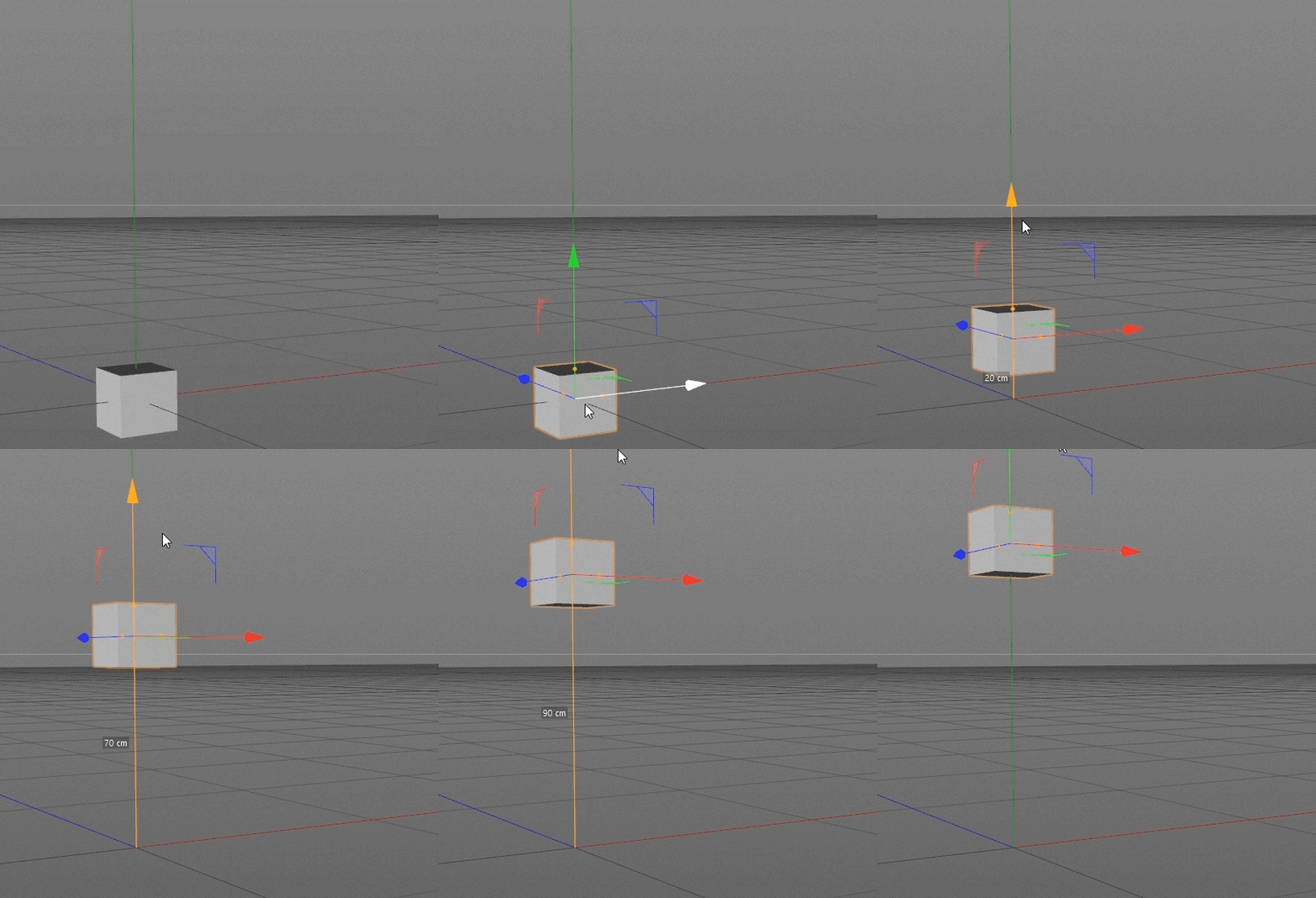 Hey everyone! I'm currently converting to 3DS Max after a few years modeling in Cinema 4D, and I have a couple of tools that I dearly miss in 3DS Max, or at least I haven't found anything like them in 3DS Max. Number 1: Translation step snapping Simply lets you move objects a certain distance at a time. I find this…
>15387 results