Search
-
Re: What Are You Working On? 2011 Edition!
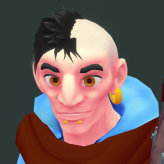
 here's a guy i did to test out dynamesh. just about everything but the hands started from a sphere. i continued detailing and polypainting it and then rendered it zbrush . you can actually use polypaint when its a dynamesh, but don't hide your polypaint and ctrl drag or it will delete your polypaint.
 -
Re: zBursh sculpt and texture masks?
 Are you talking about a material I'D mask? In ZB you can break all the pieces to polygroups, and assign your different colours: Autogroups>Polypaint from Polygroups and bake the polypaint to a texture using polypaint to texture. Texture map>Create>New from polypaint
 -
Re: Painting vertex color maps 3dsmax.
 Max is really quirky. I really like vertex paint, u know its similar to polypaint in zbrush. Makes u bother less about uvs. It makes me wonder about uv textures painting. I am begining to feel zbrush devs knew what they were doing when they decided to go with polypaint rather than uvs like mudbox and other 3d apps. I do…
 -
bodypaint?

-
Re: Quick question about zbrush-->retopo workflow.
 Yup. XNormal allows you to bake the polypaint colors of the highres sculpt onto the low poly. You just need to 1. Export your polypainted sculpt with polypaint turned on (decimation optional, but if you do be sure to enable the 'Use and Keep Polypaint' option under the preferences) 2. Uncheck 'Ignore per-vertex-color' in…
 -
Re: Getting diffuse to correspond with normal map
 Zbrush is a pain in the a... for making textures. Nobody use materials there except on a square plane where you can displace your displacment texture and make a few material tricks. If you prefer to scultp/polypaint with materials you can use Polygroups >>> From polypaint . It's actually not only polypaint but material…
 -
Re: Sketchbook: DerRazputin
Sculpted some feet: Although I didn't add color here, it got me wondering: How do you deal with details on layers and polypaint? Because, in my experience, layers don't play well with polypaint, would you bake them later on and add polypaint after that onto the already detailed mesh (maybe based on cavity/peaks and valleys… -
Re: Zbrush color fill issue
 You may need to turn on Colorize under Tool > Polypaint > Colorize (be sure it's highlighted). Alternatively, you could Tool > Polygroups > Auto Groups, this would group based on each element, then go to Tool > Polypaint > From Polygroups to automatically polypaint the tool with the polypaint color. This would just make it…
 -
Re: [WIP] Prop Model: Spell Book
 It's looking neat! You could use the 'Lattice Deformers' in Maya after you're done to give it a stylised deformation though that would make it different from the concept. They're similar to ZBrush's 'Deforemer' deformer. Since the concept looks hand painted, you could polypaint the high poly in ZBrush and bake out that…
 -
Re: Bodypaint
 Bryan seems to have a major boner for bodypaint today! hehe
>2626 results