Search
-
Re: [HELP] Morph in Max revert my adjusted vertex normal
 Ah, you can't use any modifiers above Skin, they generally won't export at all. I'd suggest editing the normals directly above the Editable Poly modifier. Also, the Morpher modifier probably won't transfer under the Skin. This is something you should setup directly in the game engine.
 -
Re: Confused about mixing quads and tris in retopology
 As an environment artist, I use plenty of triangles in my work. If your mesh is to be used by another professional down the production pipeline, you have to validate your retopology with them. So, a rigger might impose quand base retopology to character artists. Otherwise the in engine result is your guide. It's generally…
 -
Re: Displacement map "Surface Dithering" problem
Oh maybe because you're using the old Displace modifier? Which renderer are you targeting in Max? If you're using V-Ray, it's better to use the VRayDisplacementMod modifier. -
Re: Applying Normal Map to Wheels
 Hmm..you didn't assign any turbosmooth modifier to your HP model. Also if you want to bake in SP2, you need to collapse the turbosmooth modifier before export it, if not SP2 will ignore your modifier stack from max.
 -
Re: Selecting verts/edges in UV Unwrap for manipulation in Edit Poly (3DS Max)
 Unfortunately the modifier has to be baked(collapsed) Having unwrap as a mode in Max rather than a modifier is something the community has been crying out for for some time. there's a Tweak UVs mode in the modifier, but you can't directly manipulate the geo.
 -
Re: Wrapping 3d models - question
 In Blender it could be curve or bend modifier to bend the thing around barrel, then shrinkwrap modifier to lay /project bottom vertexes perfectly on the barrel surface and data transfer modifier in case you need to project / grab UV from the barrel to the thing .
 -
Re: 3ds max texture problem
 As an addition to what Eric mentioned there "apply a Normal modifier and Unify." I had some strange shading problems myself. Adding a normal modifier and unify might fix it sometimes, but in a lot of cases it didn't. In which case, using the same modifier you could try to reset them instead. Cheerios
 -
[Finished] Kaminsky Handheld Device

 The final piece: Taking a break from some other work to make this handheld pad from Kaminsky designs, used with permission. All critiques welcome. The concept: Here's the current progress: Originally I'd worked with a subd only workflow for practice, but found that blender's remesh modifier alongside smoothing modifier did…
 -
Re: The Bi-Monthly Environment Art Challenge | January - February (100)

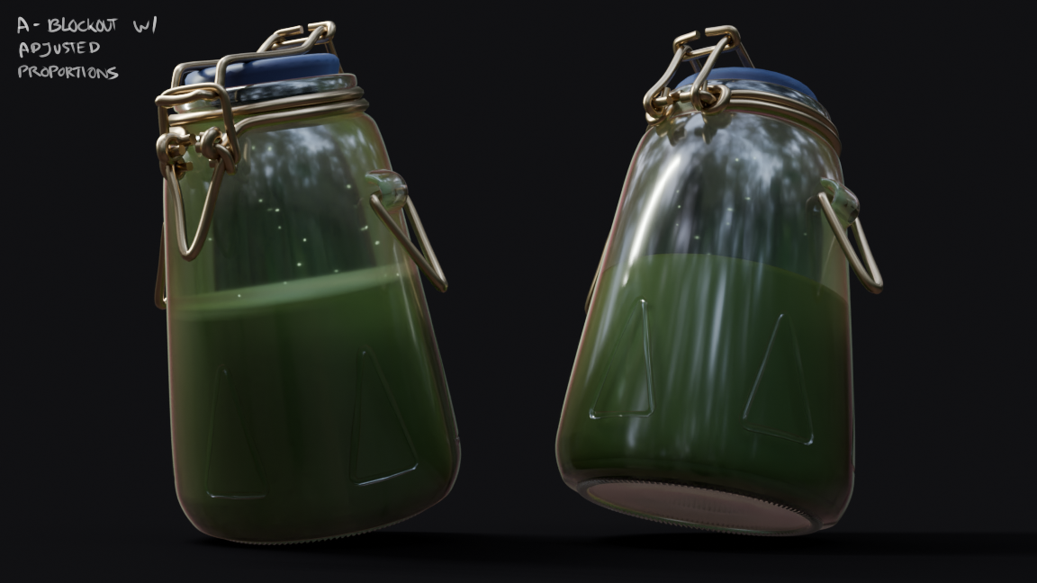 I wasn't planning to join any challenges, but the jar concept is so straightforward and nice I couldn't help it! Here is a mostly non-destructive blockout in Blender with quick shaders. There are a few edges that can only be adjusted once the modifiers are applied, and I'm going for quads to sculpt imperfections in…
 -
Re: Mel Scripting Help
 Your error happens because you're having dragCommand on Pine, which is the same slider you're modifying. You want to have dragCommand on oak do you not? :) Currently: pineSlider -> dragCommand -> Modify Pine You want: oakSlider -> dragCommand -> Modify Pine
>11681 results