Search
-
Re: [UDK] Zelda Water Shader Help
 What is the bit of code in the custom node doing? I don't quiet understand. How is it bending the U and V into a radial? Can you break down what each part of the equation is for? I'm mostly curious as to what the atan2 is.
 -
Re: Cel Shading
 Shader Forge has an outline mode built-in to the shader editor, worth a look if you go back to this. Shader Forge is really very easy to use, if you've ever used any node-based editors, like Hypershade.
 -
Re: Autodesk Maya 2016
 nope sadly not :( we don't use any modelling nodes on these, just mesh and texture applied and assets put in layers sometimes the layer disappear, sometimes the materials, sometimes the meshes, sometimes combinations and sometimes all of it alltogether. It is horrible.
 -
Need help using the Simple_Hair_UV script for creating hair uvs
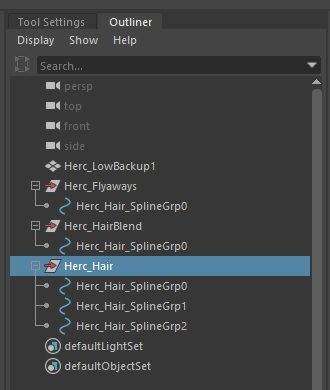
 Im using the Simple_Hair_UV script found in the Xgen UE documentation however when i imported my IGS alembic file that i exported, it has 3 different description and multiple splinegrp . How do i add multiple groups and curves in the script? Tried using " ; " and " , " in between each group and it doesn’t work.…
 -
Need help using the Simple_Hair_UV script for creating hair uvs
Im using the Simple_Hair_UV script found in the Xgen UE documentation however when i imported my IGS alembic file that i exported, it has 3 different description and multiple splinegrp . How do i add multiple groups and curves in the script? Tried using " ; " and " , " in between each group and it doesn’t work.… -
Re: How to pack more details into my terrain?
I would suggest generating erosion on the terrain using a dedicated tool like WorldMachine or Terragen or the like. This will make a splat map for you, which you can use in a Composite node as your layer masks. To isolate the RGB color channels you can use Color Correction nodes, or even easier just use a single OSL Uber… -
Re: Blender 2.5 Crash Course (Not For Retards)
 That was a great video! I actually took some notes! I have a couple points I want to add on to your video: Multiple Component Selecting Mode- you can press Shift and select multiple component modes, like Shift select both Face and Vertex mode, or all 3. (similar for the transform widgets rotate, scale and translate) You…
 -
Re: Maya fbx import only wireframe visible
 That is typically a good way to clean up a mesh. :) Models also have a Drawing Overrides section in the attribute editor for both the transform and shape nodes, this was probably set to Template mode. Something to check out if you run into this again later.
 -
Re: Substance Desginer to Unreal, basecolor map turns out tinted in the material editor?
 Probably too late but if someone is asking the same thing... i fixed my issue this way In your substance, add a 'gradient' node juste before your baseColor output. Your baseColor output will be set to color mode and not grayscale.
 -
Re: (Solved) Substance PBR export appears more glossy in Maya
 Looks good matey, have you shared the ShaderFX file anywhere? I tried to recreate your graph from the picture but none of the available nodes in ShaderFX give me the texcoord with the RG outputs you have on the left? Ta!
>37262 results