Search
-
Re: Texture baking features?
 I'm thrilled to hear that my method worked out great for you. Would you be willing to provide me with a small cutout of the model that contains pores and whatnot in order for me to test out the baking options myself and see what works and what doesn't? Unfortunatelly the only thing I was able to come up with is a geometry…
 -
Re: How would you go about implimenting this into UDK?
 This stuck with me. After some further, more detailed, reading and researching, you can totally create the van der Corput sequence that Hammersly and Halton based extended from in UDK. You'll need DX11 mode on to have it work, as that supports Shader Model 4 and therefore the bitwise operators that make the sequence fairly…
 -
Re: 3ds Max, Shader FX, wind effect?
 I looked at the HLSL, but I'm not great at figuring out what the code should be. I can't see anything glaringly wrong, but I'm not sure what I'm looking for either. That's why I'm using a node-based editor. :D // -------------------------------------- ShaderVertex --------------------------------------SHADERDATA…
 -
Re: How can I add textures created in Substance Designer on a model created in Maya ? (Noob question)
 Hi, I'd like to back this thread up to what you've got going on in Designer first. You mention wanting to get the nodes you've called out as textures (Normal, Histogram Range, Ambient Occlusion and Blur HQ Grayscale). Normally what you'd do is connect those to the final output nodes, and export them all in one shot in the…
 -
NUDE Vs NUDE. SANS PANTS CHALLENGE
 creature. monster. plant. basically anything that's on a level that excuses it from hangin' its balls out in public. NO GEAR* i'd like to keep this one pretty open to any interpretation of that. you environment guys might like to bring a castle. or well sculpted rock. hard ons for hard surfaces bring a mech. drone. or…
 -
Re: using 2 uv sets in maya? (multitexturing)
Add both textures as you would normally do then go to Windows > Relationship Editors > UV Linking > Texture Centric (or UV centric) then you can just make sure each texture is connected to the right UV set. you could probably add a UV selector node on top of the texture node.. not sure I got the names right but you should… -
Re: Programming Knowledge for Game Art???
 For a regular artist? None But you should have some technical aptitude and understand logical dependencies, the need for rules and budgets and specs and why they should be respected. This will help you to deal with things which are not programming in the strictest sense, but which are often considered "technical", such as…
 -
Re: Sculpted Dragon Head (wip)
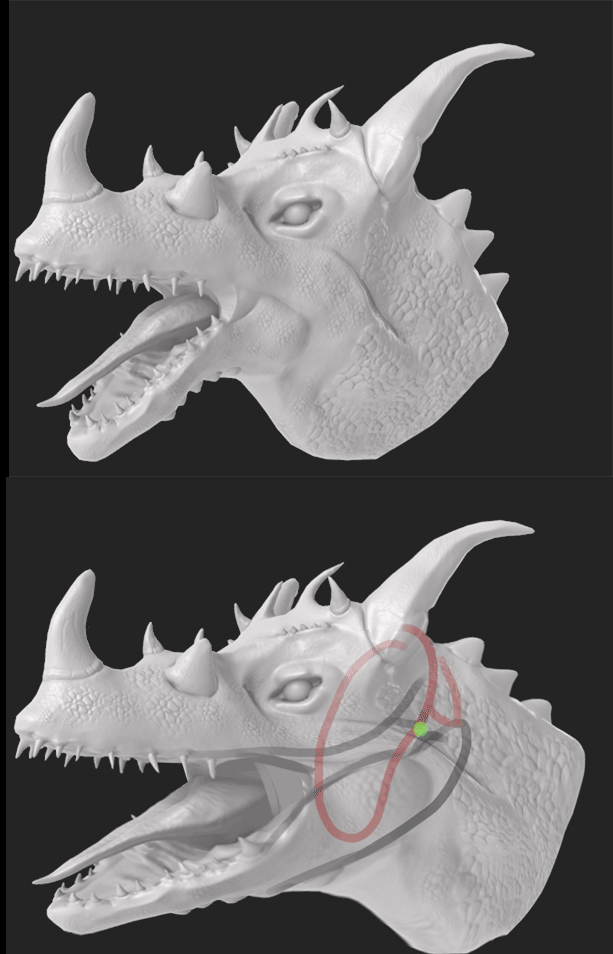 that would be very tricky to do and it would mess things up but however this has a been a huge help. And this is something to keep in mind for next time and all. Like i said this was all about practice and it been full of mistakes but I gotten lot of notes and feedback to help me out for next time. Still i'll take a look…
 -
3D modelers needed for a twisted looking combat racer called Machine Men
Just want to say sorry in advance for the long post. Note: I'm using the free version of Unity. [ame=" https://www.youtube.com/watch?v=MSv3Oez4O-4&feature=player_embedded"]Paul Oakenfold - Ready, Steady, Go (Video) - YouTube[/ame] The link is to a song By Paul Oakenfold called Ready, Steady, Go! First off, watch the music… -
Maya sculpting blendshapes forces color change on model

 update: solved, kind of. not worth investigating because advanced skeleton actually has a blendshape correction wizard, which if you use, makes it so that this problem isn't a problem. I had been adjusting the blendshapes manually. if using sculpting brushes on a non-skinned model, you can toggle the display so that the…
>37264 results