Search
-
MODO - Export FBX with multiple layers
 I selected both layers in item mode, then right click and used 'Export Selected Layers' - I selected FBX export and 'Just Layers' in the export options popup. My FBX export settings:
 -
NEW INDIE SURVEY: Kits, Plugins and Training for MODO Indie?
 Hey modonauts, I know that everyone is pumped up and awaiting the release of MODO Indie 901, but in the meantime I've been working with others in the background to try and evolve the software more. If you can please take the time to take this survey it will greatly help us out in order to know how to approach the subject…
 -
Modo tests to random environment
 Some time ago I decided to start learning Modo so I made this thread for my random Modo test. I was 3ds max fanboy before but I really like Modo modeling tools. Would be nice to know good Modo tutorials for a n00b like me. I also post my progress to here.
 -
Re: Help: Werid coloured polys on export from Modo-Max
 My first guess would be that it IS the vertex normals getting messed up by Modo. It's one of the few things that I dislike about Modo is that it handles smoothing groups very poorly. Are you using obj to move your models back and forth between Max and Modo? And if so, when you import your model into Modo are you deleting…
 -
Re: Modo Tutorials for a Maya user
 For hot keys, any command or button that has a hotkey, it'll show it in the menu or on the button (hover over buttons to see alt commands (shift/alt/ctrl modifiers are standard... i.e. shift + cube button creates a new unit cube in a new layer). Customisation is a big part of modo, you can re-arrange and re-assign pretty…
 -
Texture baking in Modo?
Anybody know the correct blend modes, and render settings to bake a couple of painted bump maps into a single normal map? Also I've noticed that you can't bake out a bump map from, is this a known bug? I couldn't find any official word on the Luxology website. -
Re: Assigning smooth groups to each UV island in Modo?

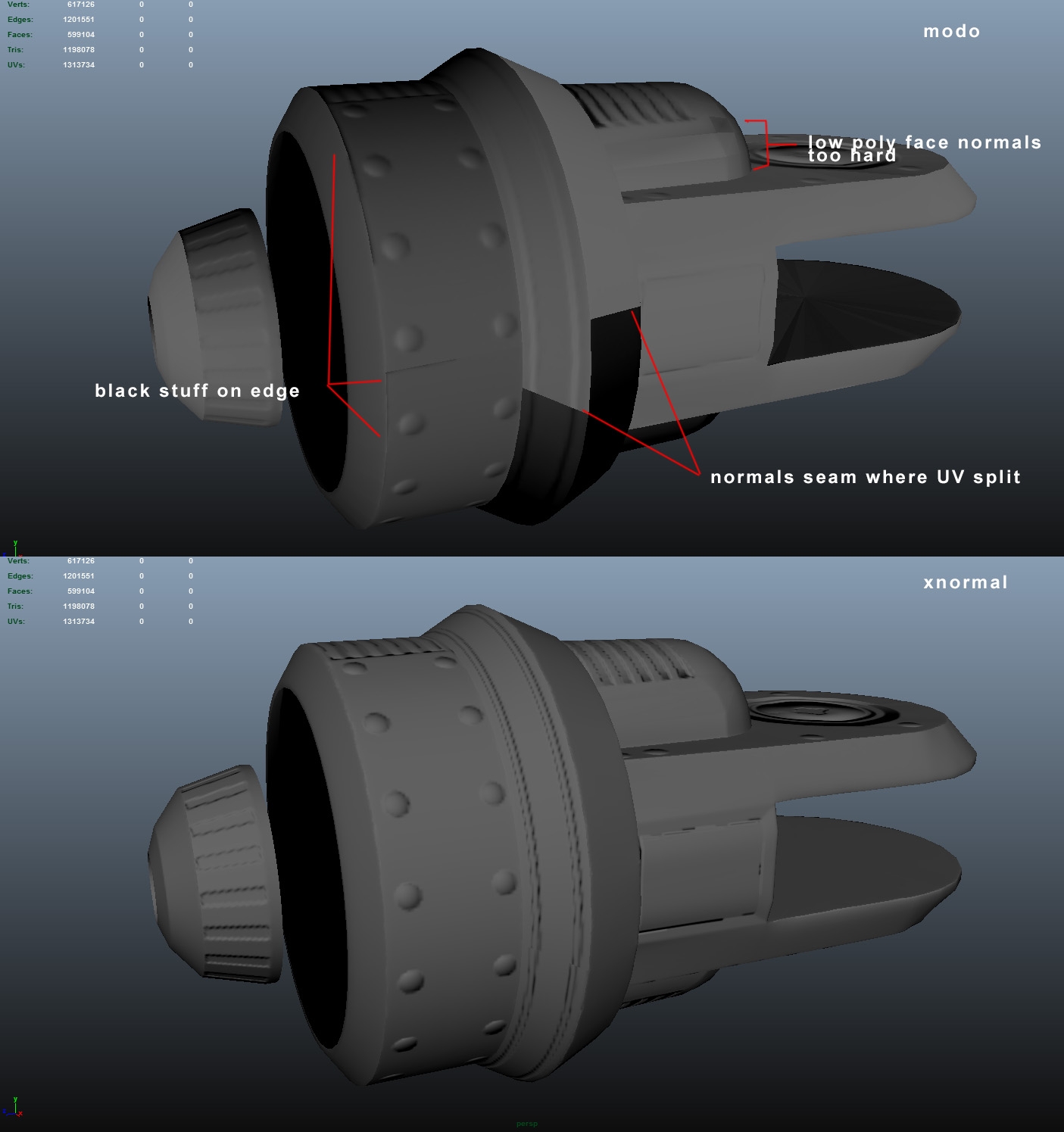 Top is an example of a modo bake with a cage. It looked worse without the cage. Bottom is an xnormal bake without a cage. Looks like I'll have to use Xnormal for baking, but splitting up my high res mesh into smaller pieces, then subdividing in another program like blender (because of the modo indie poly export limit)…
 -
MODO | Explode Mesh Tools
 MODO | Explode Mesh Tools The Explode tools were originally created to aid in baking hi-rez mesh detail to low-poly meshes for use in games, but I have found them to be useful for other things as well. This video is a quick look at the Explode tools in the Hatchet Collection for MODO.…
 -
modo LXMacro "Command Disabled"
 Hi guys, recently I try to teach myself about cryengine and found out that modo and cryengine have different up axis that give a slight problem here (even though I know UDK also have different up axis then modo, but the exported geometry fbx seems fine and not lie on d ground like cryengine did). Wasn't able to find an…
 -
Modo to UE4 Pivot Problem
 Hi, I've set up a fence on a grid in Modo, but in UE4 the pivot doesn't rotate exactly from the edge of the board like I have it set up in my Modo file. I'm using FBX import settings from this thread on the foundry, with -90 under roll and yaw import settings, however I'm using the modo FBX 2013 file without running it…
>21559 results