Search
-
Feedback on my material settings please? =)
 Hello everyone! This is my first post here (although I'm always reading other posts :P) I'm an animation student (although I wanna work in video games but there aren't any related careers here) and my partner and I are working on our thesis, which is of course an animated short. So I wanted to ask for feedback on a very…
 -
setting up marmoset for weapons rendering
while texturing my guns. I use marmoset .just wanted to know how can i set up my lighting and materials in marmoset to view weapon nicely...any suggestions for hdri..which hdri will be best for guns render.. -
Best tool/settings for displacement maps
 just wondering what tools other people use, and the settings therein to generate their displacement maps for the UDK DX11 features. also, what changes need to be made within the material editor (multiplication nodes etc) to make the map more functional.
 -
setting up 512x2048 UV
Hi guys. I remember coming across a written tutorial but can't remember who it was by. The tutorial is setting up a 512x2048 UVW because I usually texture by an even number but in this case I have something that would waste UV space if I were to texture say 512x512 so I need it to be 512x2048. I've gotten a bit confused… -
10 Brushes and Alpha (Set 1)

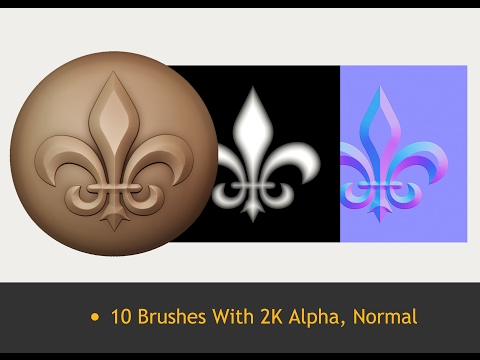 Gumroad Shop https://gumroad.com/pokerjarny - Decorative brush and alpha set for Quixel and Substance painter. - 10 brushes and height/alpha maps, all 2048x2048 Sample Video https://www.youtube.com/watch?v=nDZao50klVk https://www.youtube.com/watch?v=nDZao50klVk
 -
[KF2] Skin Set Snake skin
 Topic by deltatokyo · · Home› Contests & Challenges Archives› Killing Floor 2 - Guns 'n Gear - CONTEST HAS ENDEDI'm making a skin set for the following weapons: AK12, AA12, M4 and SCAR. Reference: So far managed to make a custom snake skin texture, tested it on M4: Going to work on the other weapons, their parameters, add contrast and fix the overall pattern.
 -
[Chivalry] - Agatha Knight - Eggsecutor's Set
 Hey all, this is a placeholder post for the set I will be making for Agatha Knight. will probably take my time on this as I just came off another contest and am currently crunching at work. I will be making a chicken helm and themed blade. Will update later!
 -
GI JOE / COBRA set of characters
 Well, i finished the first set. You can find some of the WIP threads over on cgchat.com. Cobra Commander Baroness Crimson Guard Pythona Destro There are a lot more pics and videos posted over on Cgtalk... http://forums.cgsociety.org/showthread.php?t=274132 B
 -
Remove quick select set #MEL
 Hi, Suppose I have created quick select set in outliner. How can I remove it through #MEL? I tried but couldn't figured it out. Any help? Found this page but these commands are not working for me. https://download.autodesk.com/us/maya/2011help/Commands/sets.html
 -
Re: [Godot] Seeking Team (3d Modeler, rigger, animator and texture artist) for a FNaF Fan Game [Blender]
 Good morning, I'm a 3D character modeler and sculptor. I'd be interested in participating in the project. How can we get in touch?
>122283 results