Search
-
Medieval chest
 Hello Polycounters! I have been working on this medieval chest, I still have a few details to add to it before I work on a high poly, but I felt like showing my progress so far. NEWEST: I made some quick images in Marmoset (great program, shame it costs so much) Any thoughts so far? I will be adding a 3 locks to the front…
 -
Face Geometry Crits please!
 still trying to get the human figure down, decided to work on the face tonight since ive put it off once or twice. I feel confident with the majority of the build, however the eyes (and ears) are giving me a bit of trouble and id like to know what texturing and normal manipulation can do for it as-is. any crits…
 -
Re: Substance Painter - Master Thread
 Jerc, I gave that a try and it failed. The images would not save to the shelf and give the following errors. Are you sure someone there hasn't hard coded the word masks somewhere in there? This sure feels like someone doesn't want me to use a folder named masks. [ResourceImage] Failed to save image.…
 -
Re: Working with textures.
 Maybe I am asking the question incorrectly. 1. What different types of information should be on the different maps of mine. I would create a texture map, apply that to the object. Then I would take that image black and white it out to create a "diffuse" map and then take that black and white image and create a normal bump…
 -
Re: [Portfolio] - CG Nick - critique
 1st, Main issue I have is that you're forcing horizontal scrollbars on my laptop, which is widescreen resolution. You could lay out your smaller images beneath the main big image and solve the width problem. 2nd, agree with another poster about the background the words don't really enhance anything so I wouldn't have them…
 -
Re: Zbrush rendering for printing
 Fine-Grain Noise Overlays in Photoshop can help to break up large chunks of solid colors when printing. I used to work at a large-format print shop (5m paper widths :poly124:), and we'd sometimes add fine-grain noise to images. It doesn't really "improve" the image quality, but when deciding how to print the image, the…
 -
Re: Blender Mega Thread

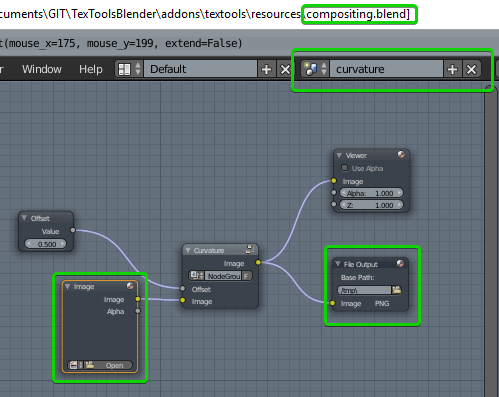 @Linko Here is what I have so far. This method 'composite_nodes' is called after I bake the tangent normal map. You can find the full code here def composite_nodes(image, scene_name): previous_scene = bpy.context.screen.scene # Get Scene with compositing nodes scene = None if scene_name in bpy.data.scenes: scene =…
 -
Re: [UDK] Chicago Street Building
 @Richapocalypse Thanks man, I've added some dirt and grime to them here and I think it looks better. I don't want to mess them up too much though. I'm going for a building that is semi-taken care of as oppose to a derelict building. Also, cheers for the link! @JO420 good observation, I hadn't noticed till you said then it…
 -
Re: Sony Walkman - Class Project WIP
 It looks pretty good! well done, the only criticism I could give you is to focus more on your edges. From the reference image above, the edges are a lot softer around the outside, and on the top beveled piece it is tighter. Edge flow is important with hard surface objects as even the slightest of and edge being too soft or…
 -
Need Reviews
 This image is my final low poly killer mech design rendered in Maya. I started out with using the curve tube brushed in Zbrush when I was working out the design. This next image is of a viking that I created with Zbrush in an attempt to capture the general realistic style of Assasin's Creed. This image is of a character…
>44213 results