Search
-
Re: what's wrong with unwrap seams in normal map
 I think the problem is caused by white background in normal map, probably caused by alpha. Those white stripes on dilated edges give those shading problems, 127 127 255 color background may fix this.
 -
Re: Support
 Not sure if this is the right forum to ask this, but I was looking at the features for 1.6 and it says that there is now 16k support. Now does that mean texture map size can be 16k. If thats the case why would you need a map that size.
 -
Re: 2006, warmest year yet in the US
It's normally 16F-20F this time of year where I live. yesterday was 46. Today it's snowing, and going to drop to 16F tonight. I don't know about you, but I dont remember that as a kid. I remember predictable weather. -
Re: New monitor time
http://www.behardware.com/html/cat/22/ This site may help a bit, I guess it's okay to link that there no? Personally I can't cope with 160/160 viewing angle from TN-panels, something might want to take into account. -
Re: 186 grey instead of 128 grey got any tips for authoring textures this way?
 Hey thanks for bringing this thread back I had forgotten about it. I did a lot of research and found answers to my question, but forgot to post back here. So first, Beddall, yes we had that same problem at work with the overlay method you are talking about. There is a fix for it, but I don't know what it is. One of our…
 -
Re: Abandoned ship
 here you go. https://cdn.artstation.com/p/assets/images/images/001/165/663/large/lee-henry-door.jpg?1441382065 https://cdn.artstation.com/p/assets/images/images/001/165/665/large/lee-henry-light.jpg?1441382069
 -
Re: Another Normal map seam thread
Is your normal map being gamma corrected (it shouldn't be)? If it is being gamma corrected then it will be unnormalized and you'll hit these issues. What happens when you fill the entirety of the normal map with 127/127/255? is that what is happening in the first image? If so, that sounds like an issue with gamma… -
[3ds max] How to get rollout from interface?
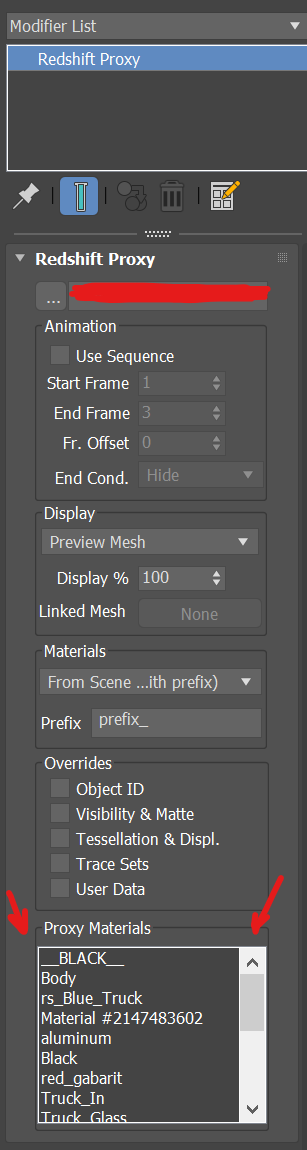 I’m trying to write a script to override the material on a Redshift proxy. I can’t access the proxy material from the proxy rollout. I’m stuck at this point — any help would be appreciated. attach script here: macroScript RS_Proxy_Overdrive category:"Hihead" toolTip:"RS_Proxy_Overdrive" ButtonText:"RS_Proxy_Overdrive" --…
 -
Re: Trying Blender
 Btw, Reset game's modeling is made with Blender. And it looks like it will kick asses visually. If i remember right it's mainly been done by 2 guys, here in Finland. And they couldn't hire me.. http://reset-game.net/?p=169#more-169 http://www.youtube.com/watch?feature=player_embedded&v=KLd8kEQJIzw
 -
Re: How would you texture out this large enviroment piece?
 Even if using 16k in-game were plausible, it's still nowhere near enough res for a mesh that huge. If 1k=2m2, for instance, 16k would still be blurry. That terrain is 1000's of square Km Multi-layered tiling is the way to go. And you can use the engine landscape tools to blend a tiling road in. And break it up further with…
>1691 results