Search
-
Re: exportFile #noprompt in MAXscript
 well before I got your PM I already read this thread and r_feltch_r's comment ;) copypastepixel wrote a initial great script to export a OBJ file with some default modifications using binary hacks http://www.polycount.com/forum/showthread.php?t=71230 I used parts of his technique in TexTools for the…
 -
UV Squashing in Borderlands 2 on masks for color tints.

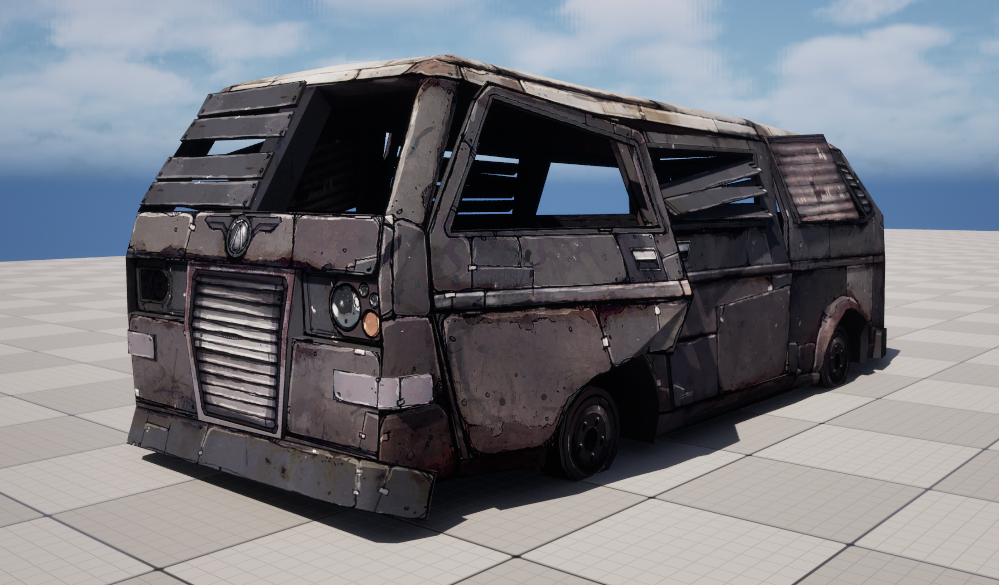 I wanted to share something I came across while looking at models and textures from Borderlands 2. There is a 3D model called WreckedVan that is used all over the game. It comes with a 2048 diffuse map and a second packed mask texture. The size might seem large for 2012 but given that it was standard practice to give…
 -
Re: What program for texturing?
 If you are texturing in Zbrush you painting directly on the polygons in 3D space. There are a few ways of texturing in Zbrush. The most common ways are just painting with the sculpting brushes set in RGB mode or by projecting photo textures via Spotlight. There are two ways you can use this. Method 1 is to paint on your…
 -
Re: [CE3] Sci-fi Machine Room
 @pixelpatron: Thanks for your critique! I'll just tried to light almost every area of this environment but royally failed as you can see. I really like your paintover! It gives everything some more depth and and way better readablility! Thanks a lot for that! @AlexCatMasterSupreme: Thank you, too! I'll definatley do that…
 -
Re: nORMALS ZBRUSH TO mAX
 Ok well now we are starting to get somewhere thanks to you fly_soup. Here's where I am at now What I think happened was that I changed my OBJ exporter to the guru export, which is awesome by the way. Guru has a default scale setting of 1 by the max OBJ export has a default of 6 I think. Thus, somewhere along the way the…
 -
Re: objects exported from max have pivots centered to grid?
Yes, that centers the pivot of an obj on import. That doesn't fix the problem if when I export with a pivot other than center, eg at the base of a mesh so its easy to position in unreal. -
Re: object invisible, but not hidden
 Isolate Selected didn't work, applying a new material didn't work, importing an exported obj didn't work, and I don't think the objects are too big or small, scaling does nothing.
 -
UDK Multi Sub Object Shadow
 Hey PC I have a mesh in UDK with a multi-sub obj material on it. The issue I am having is that the edge around the different materials is a small shadow that I dont want. How to i get rid of the shadow?
 -
Re: Is there a way to use the Quick Loader with the Python module?
 You're right that the baker interface in Python doesn't support the use of the quick loader. We'll go ahead and expose the functionality for it in the next patch: import mset baker = mset.BakerObject() # Use Quick Loader baker.importModel("E:/MyModel.fbx") Currently Marmoset Toolbag does not support using the quick loader…
 -
Re: Maya - XNormal - Handplane - Marmoset Toolbag 2 Workflow
 I finally found a solution, quite painfully. Here's the workflow that I found, not 100% perfect but that's definitely a starting point. - lowpoly and hipoly modeling in Maya - set a minimum amount of hard edges on the lowpoly to avoid too sharp angles (>=90°), and unwrap in a way that every hard edge is also a UV border -…
>28988 results