Arm and Wrist Pain - how did you dealt with them?

polycounter lvl 6
Recently I decided to get back into 3D after abandoning it for as much as a decade, and today after only 6 hours of Blender, I was swiftly reminded why I had to drop it in the first place - arm pain, specifically in these two places here:
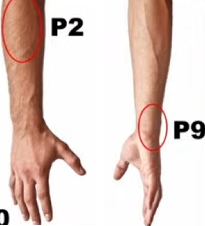
I already know how this is going to play out - my arm will feel weaker and the discomfort increase day after day, until just 1-2 hours will be enough to shut me down for the day, and I'll see no choice but to put 3D aside again.
I really don't want this to repeat, I'm kind of desperate to do more, and I know mentally I could do this 12 hours a day no problem, but my body just won't allow that, so I'm looking for solutions to this.
I already know how this is going to play out - my arm will feel weaker and the discomfort increase day after day, until just 1-2 hours will be enough to shut me down for the day, and I'll see no choice but to put 3D aside again.
I really don't want this to repeat, I'm kind of desperate to do more, and I know mentally I could do this 12 hours a day no problem, but my body just won't allow that, so I'm looking for solutions to this.
This is probably a common issue among artists, so I would like to hear from people that suffered from this and recovered, and to know what worked for you, before I try something stupid and risk to injury myself further.
Also, having asked something similar a decade ago, I know one of the reactions can be "why you're asking us instead of a specialist?" - and that's fair.
...this is a bit embarrassing to say, but being a hikikomori, that's essentially outside the things I can put up with.
So please, share with me what worked for you so that I can try something different this time.
Thank you in advance.
Also, having asked something similar a decade ago, I know one of the reactions can be "why you're asking us instead of a specialist?" - and that's fair.
...this is a bit embarrassing to say, but being a hikikomori, that's essentially outside the things I can put up with.
So please, share with me what worked for you so that I can try something different this time.
Thank you in advance.
Replies
Hi, I´ve also abandoned 3d for almost 10 years for very similar reasons (my problem was more palm oriented, "trigger finger"). There´s this thread that could have some answers/tips for you: https://polycount.com/discussion/comment/2731090#Comment_2731090
I also posted there, if I were to sum up my advice:
1 - Use vertical mouse - it helped me a lot and seeing which areas are your areas of concern - this might be the game-changer. If you haven´t tried it yet, you´ll notice the relief very quickly. Make sure you´re holding it correctly, I´ve seen people having a vertical mouse and they were holding it on the top as a regular mouse.
2 - Try to avoid mouse clicking (especially clicking and holding mouse wheel - you won´t even notice it, but you´ll need to use more force to press it/keep it pressed and it´s a huge finger/wrist killer. even switching the position of your finger from left button to wheel is hurting your hand) and use pedals instead (I use usb triple foot switch - you can have your left/right/middle buttons programmed to it and it´s a huge hands saver)
3 - exercise. I haven´t met a doctor who´d suggest any stretching exercises (and I asked...). So I went "F them all" and googled. I followed this video and it helped me a lot:
4 - sticky keys - I stopped using it completely, the first two points helped me to a point I completely stopped even doing the exercises, but using sticky keys is very helpful for repetitive actions. Mostly organization of your folders etc., but you could find other use for it too, like having your "shift" or "ctrl" button "pressed" for selecting multiple objects or vertices in a scene etc.
5 - if you´re using tablet, make sure you´re holding the pen right. I´ve been holding the wacom pen the wrong way and I´d love to travel back in time and kick my own a** for that.
I´d like to hear whether you´ve tried any of these already (especially the vertical mouse - as cruel as it sounds, but I really hope you haven´t tried it yet, because it is a game-changer when it comes to health of your hands/arms and if you haven´t tried it - there´s a huge hope, almost certainty that you´ll find a relief for your hands/arms). Good luck!
2. Compression gloves/braces and the equivalent for the elbow.
3. Vitamin supplements with ingredients specifically for joint and tendon health as well as exercises to strengthen the tendons.
4. This one's obvious but we all forget to do it - take breaks.
@Benjammin I'm thinking I'll be setting a timer, take a 15 minute break every hour, how does it sounds? Too much?
Previously I had Pan(Mouse side-button), RotateView(RMB), Zoom(Shift+RMB), so most of the strain was on the mouse hand - I've rebalanced those to be: Pan(Mouse side-button), RotateView(Space), Zoom(Q). And also will be consciously avoiding scroll wheel, I might just go and disable it actually.
Never used a vertical mouse, but having a 60gr mouse, I worry switching to an heavier one will cause a different type of strain (as I've seen some Vertical Mouse users complaining about).
With that in mind, I've tried to reach out to them.
But to be honest I'm very skeptical, like in one of the question when you try to book a consultation, they ask "How many USD $$$ have you spent in trying to solve the issue"?
And I'm like "...why are you trying to gauge the size of my wallet? Can we just focus on solving the issue?"
"Our team is currently reviewing your responses to determine whether
you are a good fit for the program. Once the review is complete, you
will receive an approval or decline email with next steps."
If you need to go cheap, then a regular keyboard with a proper desk set up and a wrist rest isn't the worst thing. And a trackball mouse like the Logitech MX Ergo is far better than a normal one.
I'm sharing a couple of things here in case someone is struggling with the same issue but I would also love to hear if anyone has been struggling with thumb pain as well and found something that works.
I went to see doctors relating to this issue and the only possible cause according to them is early osteoarthritis in my CMC joint from overuse over the year.
This is what I have done personally. I have tried a bunch of different mouses. unfortunately the vertical mouses were not a success for me as their vertical position increase the "pinching" motion with my thumb everytime I click.
I have a different Logitech mouse with a bit of a rest area for the thumb, not sure it really helped tho. I have multiple mouse and tend to circle through them as I work.
I bought an ergo grip for my cintiq pen which is meant to help with tight grip that can cause pain. I believe this one helped.
I also feel using and holding the buttons on my cintiq pen might be causing me pain so I completely stopped using the button on my cintiq pen.
So I bought this little side controller thing from HUION and managed to remap all of my substance and photoshop control to it so I never have to use buttons to navigate in these apps.
I have also been using this thumb brace to try and avoid any additional damage.
I'd love to hear if anyone else has been struggling with similar issues :-)
i'd maybe suggest getting a trackpad to use for 'office mousing' - i find i can use my left hand on those which helps rest the main one .
light, small mice and using a fingertip grip work best for me when i do mouse - with larger mice i rest my palm too much and end up gripping the whole thing rather than just guiding it with my fingies.
If I'm sculpting in Zbrush then of course I'll be using the tablet 100% of the time. But when I'm in 3ds Max I often use the tablet but will sometimes switch back to the mouse if I need to do precise clicking. Same when I'm in Topogun retopologizing.
...although I'm not very productive anyway, so that's probably not an issue either xD
I keep my forearm reasonably in line with the hand and also no big movements, probably +/- 5cm I believe.
Although if you watch me from the front, then the upper arm would be at an angle like in this stock image:
I don't know if that is an issue, like maybe a sign my chair isn't tall enough for the desk...
Is your elbow supposed to fall straight down?
I see many are using bracers - yesterday I was watching this video here:
...I don't know, honestly I haven't even understood much and could have misunderstood that part, and also I'm still taking these two physicians with a grain of salt because they managed to talk for 2 hours and didn't offered a single actionable routine or exercise.
Something to think about
Or, if anyone reach out to them, let me know whether they’re just selling smoke or actually getting things fixed.
If you need a demo, simply show a few minutes clip of some modeling actions that you think you need gizmo (and held down clicks) for, and people will show you alternate ways.
And as mentioned by others, using a tablet for modeling can help too since holding down left click with a stylus is much less stressful on the hands than holding it down with a mouse button.
Vertical mice are a very interesting concept and I think they can have their usel for some data entry tasks. I gave the Evoluent mouse a try back when I was trying to make using Max less painful but it didn't quite click for me, although YMMV of course.
I think timers are good in general since taking breaks is never a bad thing, but I don't think they'll do much for the pain.
a) you need to be constantly aware of your camera position and in which axis you want to move. That always take me a second of thinking, so it loses out of the box.
I do use G when moving object in Object Mode, or when sliding vertices on edges with G+G. (a little off topic but there is also a way to slide vertex on a face? The Face Constraint in Max).
But yeah, if I see only my index finger getting worse, I'll accept the drawback and only use G.
EDIT: also lets think for a second "how should the ideal move tool be?"
For me, you hit W and 3 arrows appear around the mouse, Red Green and Blue. You simply touch one with the mouse and now you've chosen the axis and are moving like when you press G+Y for example. No click involved, no miss-clicks or looking at the keyboard when selecting the axis.
I bet this would be an easy Blender plug-in to create for someone with the skills...
EDIT2: @pior I've just found out if you press MMB after G you get to choose the axis in viewport, pretty damn near to what I had in mind, I'm Gizmo-free now xD
Thank you for having me look into it once again
Although if you watch me from the front, then the upper arm would be at an angle like in this stock image:"
Sounds good to me. The mouse usually will be bit to the side, after all, unless you have a very small keyboard without a numblock. But I'm not a doctor. You could try if it feels more comfortable if you adjust your setup so your mouse is a bit closer, of course.
more seriously - if you have forearm / finger problems, these sorts of keyboards are lifechanging. they're completely programmable as well so can easily be mapped to hold all your app shortcuts on a layer, mouse clicks etc.
the touchpad acts like a little joystick - the outer ring behaves like a scroll wheel. less than 50quid + a sore head from writing the firmware. its useless outside of 'desktop' work but its much less stressful than a mouse.
I personally don't go outside much, and also mainly don't eat fish and never eggs, so my muscles problem might very well be lack of vitamin D.
Is worth a try, so... salmon & eggs on the menu for me xD
For example, where I live it only works with the sun from 11:00 to 14:30, and not during the winter, and since my skin is light past 10-15 minutes a day there is no benefit (vitamin D3 production caps, past that only the usual risks from sun)
Also, I've decided to follow his video to strengthen arms, I link it in case anyone needs it. The warm-up exercises, I plan to do every day before modeling regardless.