[Blender Add-on] Smart UV Tool – Fast, Clean UVs for Dense Meshes

Hey everyone,
I’ve been working on UV unwrapping workflows in Blender, mainly for dense meshes and production assets, where clean island layout and minimal distortion actually matter.
Most automatic UV tools work fine for quick previews, but I kept running into issues on heavier meshes uneven island scaling, excessive stretching, and layouts that look acceptable at first but become a pain during texturing.
The focus here isn’t speed or “one-click magic,” but producing clean, usable UVs that hold up during texturing and iteration, especially on complex or dense geometry.
To support this workflow, I ended up building a small Blender add-on called Smart UV Tool that helps automate unwrap decisions while keeping distortion and cleanup under control.
Below is a demo video showing my tool helping me to unwrap
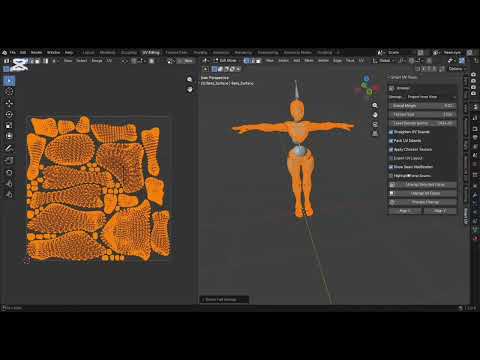 https://youtu.be/WUZIZ5AptU4?si=NDSydDz1WTWWAN3W
That said, I’m mainly posting to get feedback from others dealing with similar UV issues.
Below is a demo video showing my tool helping me to unwrap
https://youtu.be/WUZIZ5AptU4?si=NDSydDz1WTWWAN3WThat said, I’m mainly posting to get feedback from others dealing with similar UV issues.
Curious how others here approach UV unwrapping for dense or hard-to-manage meshes, and what tools or techniques you rely on when default unwraps fall apart.
I’ve documented the setup and breakdown here for anyone curious about the approach: https://superhivemarket.com/products/smart-uv-tool
Appreciate any thoughts or experiences.
Replies
UV unwrapping can be a real pain on dense or hard-surface meshes especially when you don’t want to destroy your existing seams or layout.I made Smart UV Tool to fix that. It gives you multiple unwrap methods, non-destructive temporary seams, stretch analysis with auto-fix, texel density control, and smart island tools all in one clean sidebar panel.
Key Features:Multiple Unwrap Methods: Standard Angle-Based, Smart UV Project, and Project from ViewNon-Destructive Temporary Seams (creates seams for unwrapping then restores your originals)Stretch Analysis with color overlay + One-Click Auto-Fix (only relaxes bad islands)Professional Texel Density Control (consistent scaling across the model)Smart Island Tools: auto straightening, one-click packing, quick Align X/YProduction Utilities: one-click checker texture, export UV layout (PNG/SVG), highlight seamsClean interface in the N-panel (Smart UV tab)Perfect for game assets, hard-surface, archviz, or any production workflow where you need speed and control without babysitting UVs.Quick demo video: [
Available now on Superhive (formerly Blender Market) https://superhivemarket.com/products/smart-uv-tool I Would love feedback from the Polycount crowd especially on how it handles game asset UVs. Have you tried it yet? Feel free to drop your results or questions here!
On Superhive it says the creator of this addon is 'Anvil Interactive Solutions', which reminds me of @anvilinteractive, who recently promoted addons by that creator too. Do you know each other?
Edit: Looking into it some more / reading again, this seems to be about a free plugin which is needed for the assets from the same company, which may not even mind that those assets can be used in a newer version before they get around to do the update themselves.
So from what I can tell, this would mainly be a problem if you want to charge for updating a plugin to a new host software version without adding features, or if you take this as a precedent for something bigger.
Edit 2: Thinking about it some more, the upload to an LLM without consent of the original author(s) might be the biggest issue, here. I don't think decompiling a plugin would be trivial (assuming it is compiled), but in theory, the data could be abused.