[MAYA] Help with Animation, Speed too fast.

Hey everyone, I'm working on a short animation while watching a tutorial using Maya. Although, unlike the tutorial, my animation is moving extremely fast. My project is running at 24 fps, with a small motion to a total of 144 frames. I've been trying to slow down the speed without changing the fps to a larger number, but I haven't come up with any solutions. 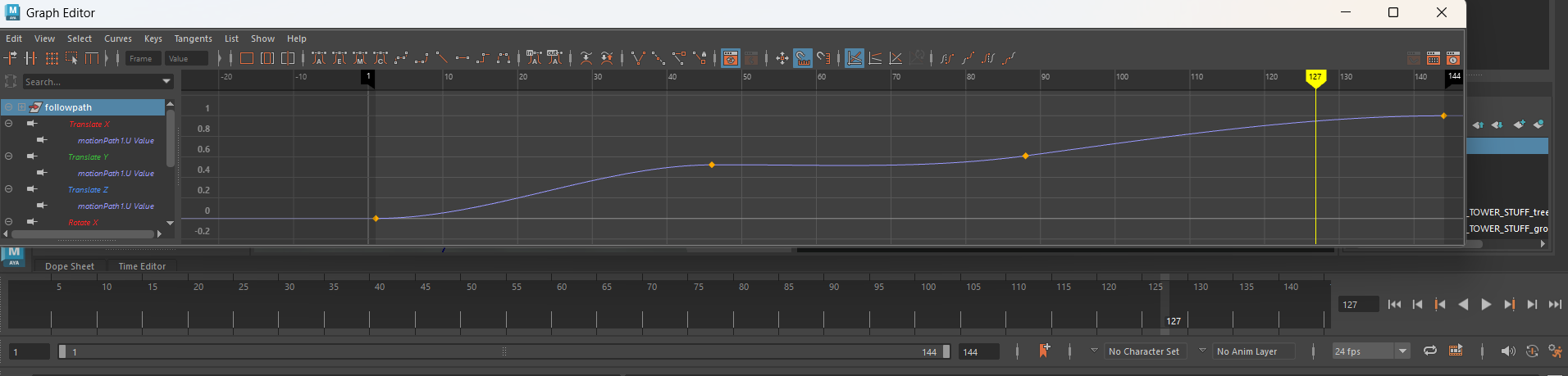
However I do think the problem might be the left hand bar of my graph editor to the right of my path, as the numbers are extremely small, in decimals. I'm not sure how to change this, so I thought I'd look for a helping hand. If this isn't the problem, I was wondering what might be another solution. Thanks for taking the time to read!
However I do think the problem might be the left hand bar of my graph editor to the right of my path, as the numbers are extremely small, in decimals. I'm not sure how to change this, so I thought I'd look for a helping hand. If this isn't the problem, I was wondering what might be another solution. Thanks for taking the time to read!
Replies