[WIP] SHIFT - Game Cinematic Trailer Project - Environment Artist Dev Log - Third-Year Uni Project

triangle
Hello! I am finally starting this thread in Polycount. SHIFT is my final year project at university. We are producing a game cinematic trailer and I would like to share some progress here as an environment artist and hopefully get some input from artists outside of school! I will be working on the environment assets and some lighting in Unreal Engine.
SHIFT is a game about a lone maintenance sent to a decaying virtual world on the edge of collapse to restore failing power cores. Wander a tranquil, utopian landscape, then enter broken dimensions within the cores themselves, where gravity twists against you and your shield drains with every step. Navigate perilous platforms, survive the hazards, and ultimately decide the fate of this fragile digital realm.
This is our art direction for future reference purposes:
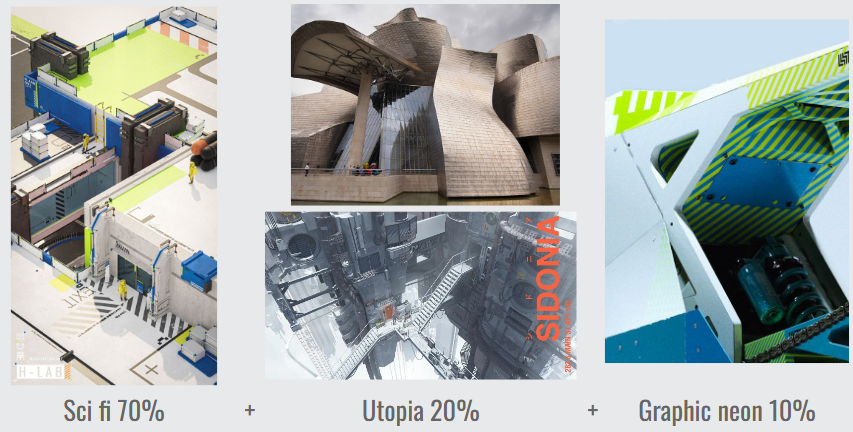
I will continue to update my environment arts alongside my concept artist's concepts!
SHIFT is a game about a lone maintenance sent to a decaying virtual world on the edge of collapse to restore failing power cores. Wander a tranquil, utopian landscape, then enter broken dimensions within the cores themselves, where gravity twists against you and your shield drains with every step. Navigate perilous platforms, survive the hazards, and ultimately decide the fate of this fragile digital realm.
This is our art direction for future reference purposes:
I will continue to update my environment arts alongside my concept artist's concepts!
Replies
Here are some shots that I assembled the character rigs and animation done by my teammates and I have also added in some basic lighting in Unreal Engine just for the feel and vibe. Further lighting will be based on my concept artist's key art.
Any feedbacks are greatly appreciated! For example the composition, lighting, etc...
Modular set:
Assembly:
Decal atlas:
I have also encountered some issues with the mesh decal. I have already posted a thread here asking for help: https://polycount.com/discussion/237997/ue5-mesh-decal-overlapping-wrong-order-help#latest
I have also tried to set up vertex painting for the ground:
Not sure if this setup is okay or if it's too resource heavy :'(
This environment is based on this concept from my concept artist Valen Kua:
Any feedback is appreciated!
I did 5 separate 2K RGB masks for 5 different materials and I think I could've just combined them into one.
Here are the results:
am trying to achieve something like water stains from rain & cold and stuff.
Then I saw someone's comment on our school forum with this link about RGB mask:
https://empirecmd.com/empire-university/variation-masks
..and I have decided to give it a try to use a variation mask with a lower resolution RGB mask instead of using a 2K RGB mask.
So I have combined all materials' RGB masks into one 256px map:
Then I made a master material in Unreal like this, please let me know if I am not doing it correctly TAT
I used a noise map from the Unreal asset as my variation mask.
Below are my results of tweaking the material instances for each material:
The textures look a bit cloudy instead of giving me the result of the water stains kind of feeling. Reference:
Any help/feedback/input is appreciated!
http://wiki.polycount.com/wiki/MultiTexture#Modulation_Blending
http://wiki.polycount.com/wiki/Modular_environments
I have set up a master material for everything using switch parameters:
Colour Script by my Concept Artist Ong Nanxi:
Appreciate any feedback as always!