Search
-
Re: Topology Help: How to Split Faces to Fix Choppy Lighting?
 Ok an N-pole shading error - (a vertex where 5 or more edges meet) which forces Blender to average face normals across different angles, causing dark spots or "pinching" artifacts when using smooth shading. And here's a few options that may resolve the problem 1. To fix the Normals and Smoothing often, shading artifacts…
 -
Max/GoZ/ZB: A Problem Concerning Texture Faceting / Flipped UVW Faces - Thank You

 3DsMax/ZBrush. (I've GoZed a couple of times which, I've heard, can cause such an issue.) I've spent many hours looking for a solution, but either people confuse the problem with flipped normals (a completely separate issue) or the issue remains unresolved. A solution is given here involving (3DsMax): 1) add a new poly…
 -
Max/GoZ/ZB: A Problem Concerning Texture Faceting / Flipped UVW Faces - Thank You
3DsMax/ZBrush. (I've GoZed a couple of times which, I've heard, can cause such an issue.) I've spent many hours looking for a solution, but either people confuse the problem with flipped normals (a completely separate issue) or the issue remains unresolved. A solution is given here involving (3DsMax): 1) add a new poly… -
Re: Vertex colors FBX problem.
 Yeah this is an issue with old exporter. I think you can update the exporter even on old max versions. But just in case, here's a maxscript to add support vertex to handle vertex color/alpha by face, thanks to polytools3d on cgtalk. Has to be an editable mesh i think. ( fn BreakVerticesByColorAndAlpha node = ( mesh = copy…
 -
Re: Vertex paint -Mesh or Poly
 With some leisure time to burn, I did find this (by @PolyTools3D himself) ... ( fn BreakVerticesByColorAndAlpha node = ( mesh = copy node.mesh getmapface = meshop.getmapface getmapvert = meshop.getmapvert vertscolors = #() vertsalphas = #() colorsarray = #() vertsbyface = #() flagedverts = #{} for j = 1 to mesh.numfaces do…
 -
Re: Face Rigging vs Using Morph Targets for Animating Face Expressions
 FACS (facial action coding system), all the way, 100% best quality you'll ever do, works best with mocap and hand key'ed animation. BUT it really depends on what type of characters you're going to have and what kind of quality bar you're looking to hit. You obviously don't want to use a nuke to kill a flly so using a FACS…
 -
Re: Dots on face during 3d Face scanning? Why? (pictures)
 From my experience those marks are just there to show where to place the reflective markers for motion-capture. It's faster to draw marks on the actors face like this (often times using a mask with holes), so that whenever one of the markers falls off it's quick to put one back in the right place. As for software, well…
 -
Face sculpting

 Need help improving my female face model Hi everyone, I’m working on a 3D female face model, but I’ve run into a problem: my model looks noticeably older than the reference images I’m using. I’m not sure what I’m doing wrong, and I’d really appreciate it if someone could take a look and point out my mistakes. If it helps,…
 -
Re: 3ds max edged faces performance issue
 thx for the tips.. but actually the backface culling is not affecting the whole thing.. and i should have mentioned, that I only get a framerate drop when hard-edges (facets) is selected.. with smooth shading + edged faces the speed drop is not nearly as strong.. in fact you feel it only with lots of polys (no surprise) :(…
 -
Looking for Feedback for Anime Face Anatomy
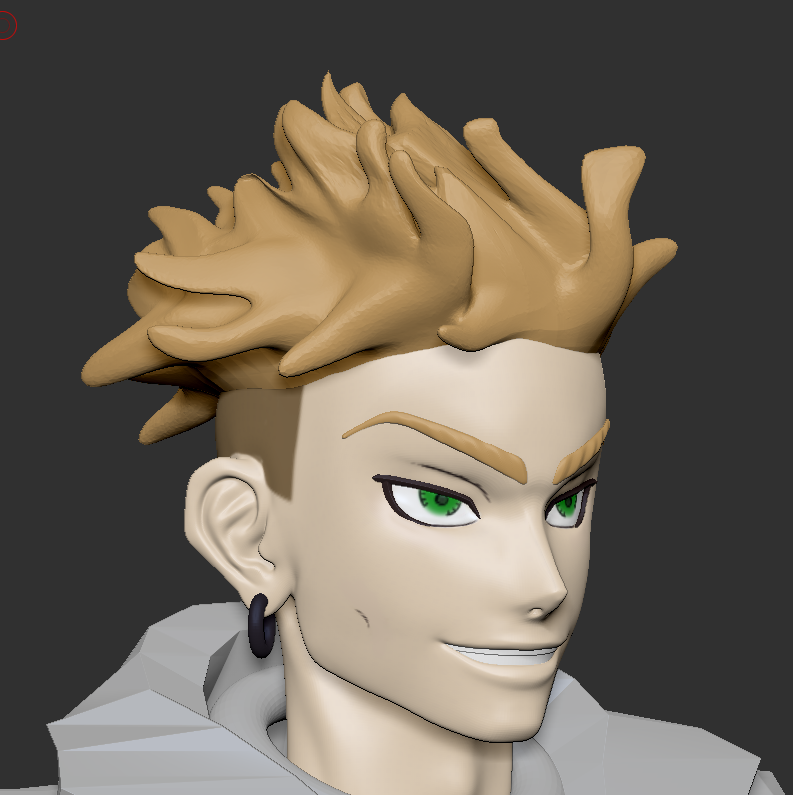 Hey lovely People, I am currently working on making Enjin from the Anime/Manga Gachiakuta in ZBrush. However I find myself having problems with getting the Face Anatomy right. My reference image is this panel from the manga However i also really like how this figurine displays his Face I recognize that my face has some…
>40167 results