Search
-
baker not baking new parts of my high poly
 so i created a highpoly and baked in marmoset and substance painter to try them out, i then added some floating geo (bolts/screws) i then re exported the highpoly and now both marmoset and substance dont bake the new parts, i've never en counted this issue before so i have no idea whats up
 -
Weird baking error, max RTT
 I'm not sure why my screws in my picture is baking as if it's pointing inward. On my highpoly, the screw is beveled, but it's not bent like the way it's getting baked. I'm using the Max RTT to bake. I've noticed this on other things I've baked lately, in particular small bits. They are coming out with a bent direction that…
 -
Re: Naboo Royal N-1 Starfighter
 Also, to texture highpoly you simply just select the Edit Poly in the modifier stack and unwrap the mesh with the edge loops ect, pain the the bum but only way to do it as far as I know. You then add an extra unwrap modifier ABOVE turbosmooth so you can render a UV template from the highpoly.
 -
Re: First Post, Good Evening - Hard Surface etc.
 Wow man, your highpoly bakes are so clean. I honestly could not in any way, tell that normalmapped snowscooter wasn't the highpoly. What do you bake with ? And you must also make the most efficient UV unwraps. ever. But then i read where you currently work and it makes sense :p
 -
Re: Zbrush 4R8 project all not working
 Make sure your retop is the active subtool and that your highpoly is visible (eyeball on in subtool list) when you project. If you retoped using zsphere then the scale between subtools will be the same. But, as mentioned, the scale of your highpoly might be too big. Append a primitive to the list(primitives are are ZB…
 -
Marvel Rivals Nightcrawler Fanart WIP

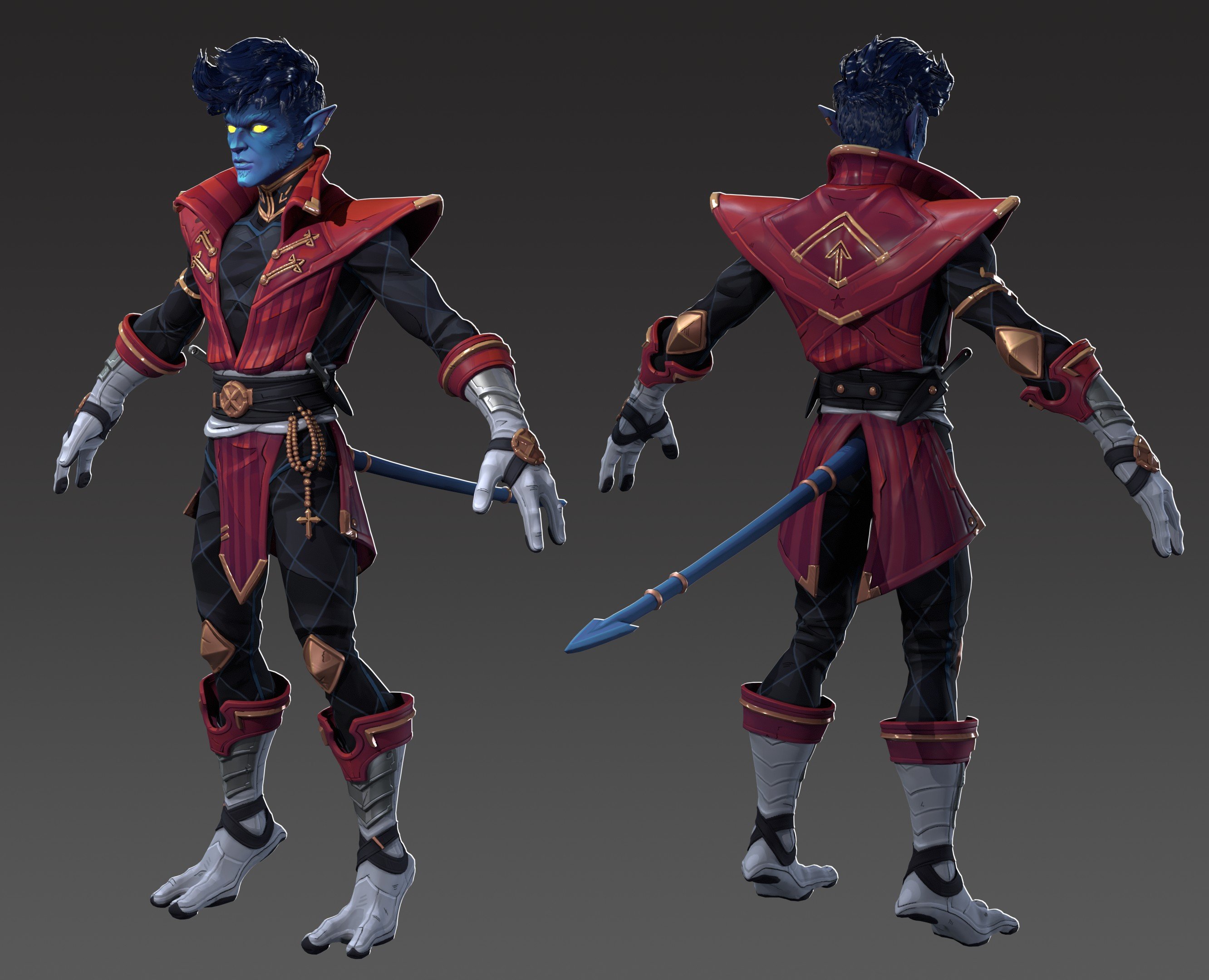 Hello! I have been working on this for a bit now, but I forgot to keep it updated here on Polycount. This is my Nightcrawler Marvel Rivals Fanart based on the concept by @ishaliart (Her and my artstation are linked below where you can see the progress there). This version of Nightcrawler is intended to be a Strategist…
 -
Re: [UE4/SD5] Victorian Detective's Office - WIP
 Looking good already with nice preparation! Lately I'm learning more about highpoly modeling and normal baking and I was wondering, shouldnt you use more soft/wider edges in your highpoly so they can be picked up in the normal map? E.g. : http://wiki.polycount.com/w/images/8/85/Normal_edge_thickness.jpg
 -
Re: [Riot Art Contest] - Franken Annie
 Reply by slosh · · Home› Contests & Challenges Archives› Riot Art Contest› Riot Art Contest - Character ArtOk, last word of advice. Import each mesh into 3dsmax one at a time. Make sure your highpoly and lowpolies are correct. A lot of times, I think my highpoly is correct and then i get weird baking errors. So i import them back into maya and usually, i've exported something incorrectly.
 -
Re: M4 carbine
Gazu, it's Max only. I love keeping full control over my topology and basically try to make things as lowpoly before smoothing, as it is possible. This way I can make a low-poly really fast after a highpoly stage just by removing support edges that help to keep the shape on the highpoly model -
Re: Script request
 Heh. I already did this for Maya (along with a "random vertex colour per object" thing for baking highpoly to get selection masks out). Sounds pretty straightforward. Is it for baking highpoly stuff too? I thought renderhj's TexTools script had some sort of vertexcolour baking already, did you try that?
>13676 results