Search
-
Re: How The F*#% Do I Model This? - Reply for help with specific shapes - (Post attempt before asking)

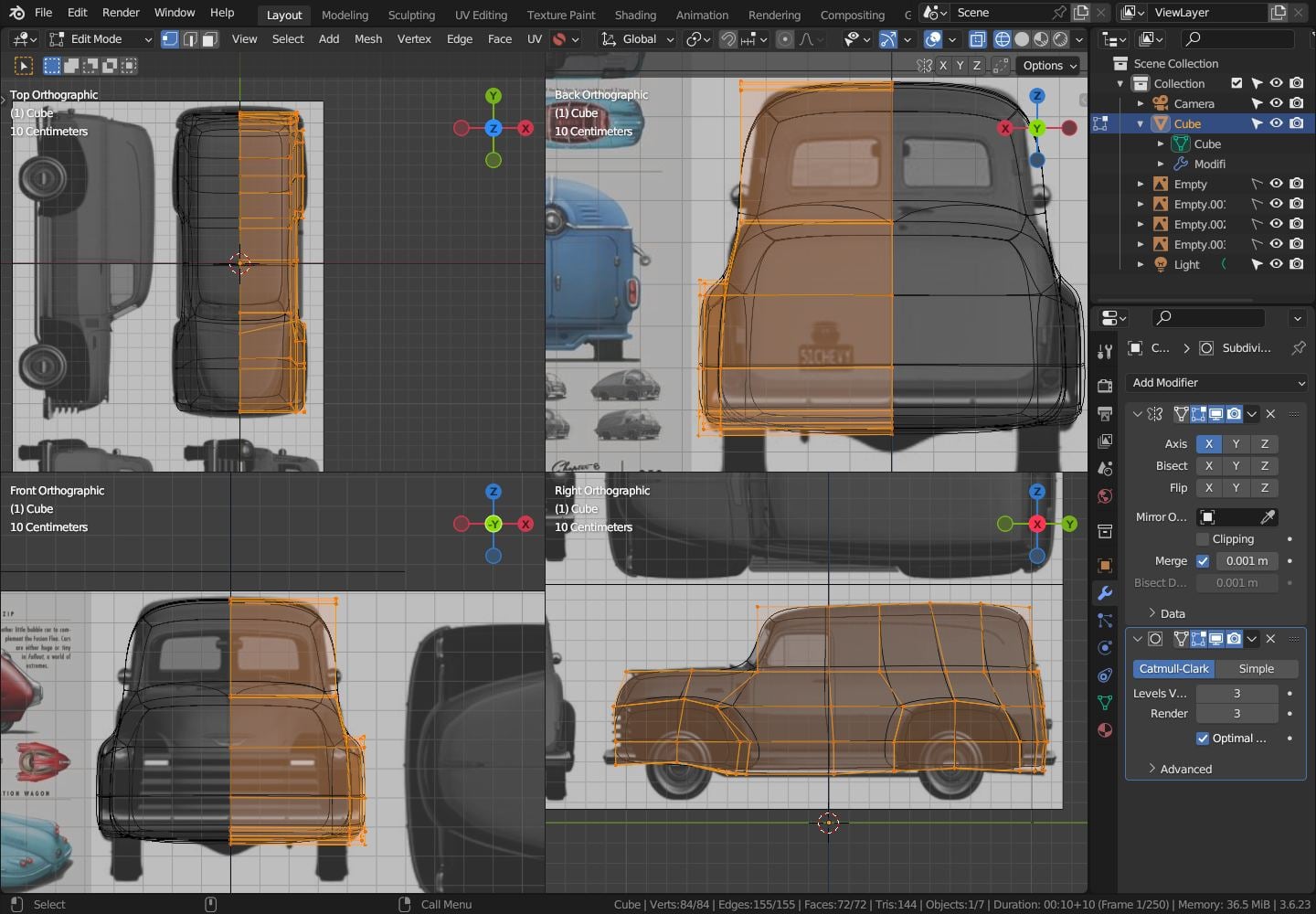 Well.. it's "the usuall": follow the reference.. here in 3.6.. :wink: using a slighly high subdiv here to "follow the form" a bit "better"; lower the subdiv to you needs
 -
Retopologize already retopologized model to a lower poly variant
 Hello everyone, First off: Sorry if this question is simple/obvious. I did some googling today and most likely I just searched for the wrong things, but I couldn't find an answer. My question is simple: Is it possible to retopologize/decimate a low-poly version of a high-poly mesh to an even lower poly version and keeping…
 -
Re: Sculpted Dragon Head (wip)
It would likely distort the UVs a bit, but if you have some headroom there, moving back the lower jaw origin/joint would help a lot. Right now, it seems to sit below or even in front of the eye while it should be a good bit behind it. See your references (the blue dragon at the top left might be a bit hard to read, but the… -
Re: xiaowantou's Game asset
 Hello Onionhead Thanks for your comments, about the texture, do you mean the lantern or the flowers or maybe both? For the lantern, yes I agree with you that probably I will redo my texture in order to have higher res. For the flowers, I use alpha channel for transparency map to lower the polycount for my flower, maybe the…
 -
3DS Max Asset Tracking, change texture names to lower case.
I've got some scenes with large amounts of texture maps, in asset tracking most of the map names are partly uppercase for some reason, linking manually ignores the case. All my textures are in folders based on resolution some have high/low res duplicates same names. Using a tool from… -
Re: Road to sculpting

 She is doneee! First of all, pardon me for the tiny pictures. Working from my small laptop screen. Quite annoying. Anyhow. Gosh, this girl has been a pain in the butt. Mainly because I messed up and figured out that my rose brush contained 0,1 mil points. So after 10 roses I had 1 mil points. Because of this, I had to…
 -
Slower than snails humping

-
3ds Max vertex color transfer between lower poly mesh to higher poly mesh
 I am trying to transfer vertex color from a low poly mesh to a higher poly mesh in 3ds max and can't seem to figure out how to do it. My searching has pointed me to using a projection modifier so I add a projection modifier to my higher poly mesh pick the lower poly mesh that has the vertex color on it as my reference…
 -
Zbrush: InsertMesh curve mode, how do I increase the objects size without lowering curve resolution?
 I know I can increase my brush size and tap the curve to adjust the object size, but the curve resolution becomes lower the bigger your brush size is. If I then decrease CurveStep to counteract this, my inserted mesh overlaps along the curve... if I turn on "stretch mode" to then counteract that.. my mesh is then squished…
 -
Leaf Blower Hero Asset
 It's my first time texturing in Substance Painter and I'm really trying to improve all aspects of my 3D art so any critique would be greatly appreciated! The Model itself is 4866 tris and uses four 1024x1024 texture maps.
>14660 results