Search
-
Re: 3DS max Doubled edges
 That is behaving as designed. Extrude creates new geometry and pushes it out. If it has a low value it won't push it out very far, leaving you with overlapping faces. What are you expecting extrude to do? Or what are you trying to accomplish?
 -
Re: moving from Maya to Max.
 Someone living in Canada? :D I don't know about Maya but you might find the ; key useful. It repeats your previous actions, so if you extruded a face, and clicked ; it would extrude the face again with the same settings.
 -
Re: How to do this in maya?
 It is also possible that you've extruded it after extruding once and not moving the vertices (therefore having 0 width faces on the edges). as Ghogiel said it should work just like that
 -
Re: My very first 3D Model
 Here i did this while listening to a podcast. (more help is at bottom, so read the whole thing and then start if you feel like doing it) I dont know what you know so i made it as simple as possible step by step. This is for me the simplest way I could think of making a model. (in one piece) if you look at the image I…
 -
Re: [3ds Max] Conform spline to another spline
 One possibility... extrude spline 1 on the Y axis, and use Conform to deform spline 2 only along the X axis, to fit onto the extruded mesh.
 -
Re: WIP - Nagato Yuki Bunny Girl
 I extruded the arms and legs. done some minor changes to the body structure. Still have some work on the current shape before extruding the hands and feets.
 -
Re: HK UMP .45
Not that hard, make the form of the hold, select the edges round, extrude and extrude again. Copy it where I need them, then compine them, and do some magic ;) -
Uv Mapping a shield
Hi, I modeled a shield. In some parts the shield is extruded inwards. How do I go about uv mapping the shield? Do I just uv map it like any other shield? Or do I have to uv the extruded parts as well? Thank you. -
Re: Washing Machine Part

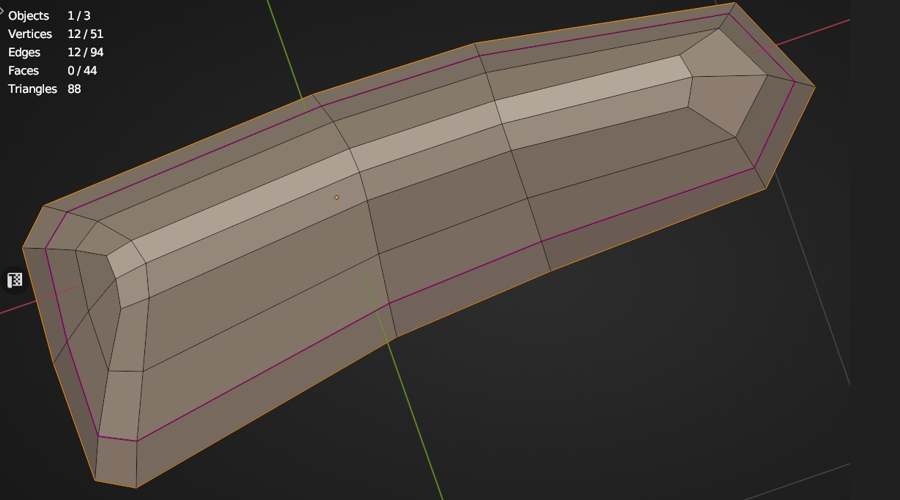 @Veer_P An interesting shape, they're typically fiddly to model in polygonal subd that are usually fabricated using an extruded die cast mould' and also CAD designed, hence indeed a challenge so my approach would be as if modeling a car body shell of some sort with a Shrinkwrap Modifier. Because there's a similarity in…
 -
Re: Poll: Which do you use Maya, 3ds max..
 well I do alot of strip modeling in Maya, it would probably go faster if I could be arsed to make a hotkey for extrude edge... but after the first extrude edge I just have to hit 'g' to repeat the last command.
>3548 results