Search
-
Re: [UE4] Summer Project - Witcher 3 Cloister Scene
 Yeah, much better! Later on you can take some corner meshes and meshes that conform the major shapes found on your main tiling meshes, and sculpt in damage and back that damage down to a retopo'ed plane and just slap those planes onto your meshes. Can even use tessellation to create a believable silhouette coming off of…
 -
Re: Retrogasm 2018 - Aniarts- FinalFantasy VI- Celes

 @Alemja THanks for the feedback! I applied it to the mouth area to be more fleshier! My Blockout is finished so now I'm planning the details. I read about Celes Job, shé's basically a Rune night so I searched and found this pic from FF tactics So I'm getting inspiration from the white pattern to decorate Celes' shirt. Here…
 -
Re: .-| Week 8 - The Weekly Hard Surface Challenge |-.
 I'll have to work on this one in bits and pieces this week. But since I was asked to document the process, I'll start with the blockout. Getting the proportions and all the big shapes hammered out will make the rest of the process go much quicker. Even if you completely replace the mesh, you have a nice guide for how big…
 -
Re: Mod. H&K UMP with Attachements
 A Element or a Polygon can have a Color, for example : Red. Now when Texturing, you can use the Red Color as a Mask for Texturing. So that you can see where the Shells are ^^ Everywhere where the color red is, is the Element that you want to texture. @Wesley: Sorry i forgot. I want 4K for the Weapon and 4K for the…
 -
Re: Sci-fi Bus Stop
 That sure is some playful colours! I like, just make sure you get in quite a lot of desaturated grunge, so you don't go overboard with the playfulness. Also, I would really like to see rather large areas where the paint has been scraped off to reveal some bare metal or something, especially close to the ground. I also…
 -
Re: Pixelatedkiwi's hand-painted art thread
 So yeah sorry, as you can see I don't explain workflow a lot :P Initially I painted over an image of the character quickly to get the direction, this guy has a lot of individual geo pieces so for me, its a lot quicker at first than painting blockout over the whole thing's geo and easy to play around with adjustments for…
 -
Re: Black Dogo - Vehicle
 Hello, Here's some more screengrabs with the tank, hopefully it's closer to the real thing @Arod529 Thank you. My advice would be to gather lots of high res reference images, blockout everything (every piece) and see how they work together, then put your favorite playlist in the headphones and start modelling them in…
 -
Re: [Finished] UE4 Environment (Motel) "Encounter"

 Been a little bit busy lately with other things but I'm making progress. I've created a modular set for the motel and I've started to play around with the blockout and composition. I ended up using the Regal Motel from No Country For Old Men for reference. This is my first time using Substance Designer to create materials.…
 -
Re: [UE4] Steven Universe Beach City Environment

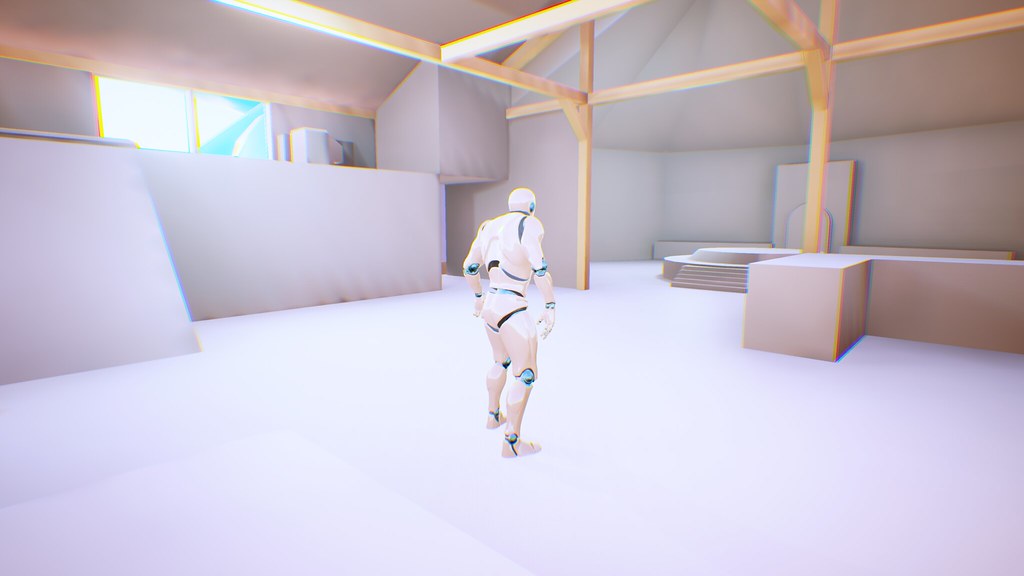 Hey everyone! I just finished up a blockout of the interior of the house. I tested it in UE4 already. The scaling is pretty close just a few minor tweaks and the camera works well within the space. Here's a link to my tweet that has the character running within the space on video. I'm pretty happy with this to be able to…
 -
Re: [WIP] Lost Fortune - Graduation project

 After some feedback from @Tzur_H about my corner piece i adjusted it some in the mesh, i rounded out the 90 degree angle to make it less hard and i also started on texturing some more modular pieces inside of substance painter. Now almost all assets are ready to be imported into unreal engine, where i will build up the…
>5303 results