Search
-
Stylized Female WIP

 Hey, I´m currently working on another stylized PBR female character for an UE4 game project. She is going to be a Supernatural Huntress and I created the Base (without equipment, equipment will follow later ... it will be skill dependent). Any feedback is highly appreciated. Will keep you updated on this thread till the…
 -
Marmoset reflections vs Substance Designer reflections

 I had similar PBR setup of metal material in SD an Marmoset. But Marmoset reflections does not looks as good as SD. I think the problem is in Toolbags reflections implementations. Just look how it shine and changes in Substance(left) and how it is sticks to the surface in Marmoset(right). Or maybe i missed something?
 -
Re: substance painter metallic/roughness export to unity specular glitch.
 I suspect this is because Metalness-roughness is a different workflow than Specular-glossiness. @EarthQuake has a great resource here about how to understand the two, and even how to switch between them. https://marmoset.co/posts/pbr-texture-conversion/ Are you using spec-gloss Substances?
 -
Re: The Bi-Monthly ENVIRONMENT ART Challenge | January - February (70)

 Going with the pot/cauldron, something small to get the ball rolling for 3D in 2021. Thinking of doing stylized PBR for textures/Materials. Heres the 1st blockout pass roughly camera matched as close as I could get to the concept. Will be using Blender For the modelling and Substance for the textures.
 -
Re: Arcane Tower [Warcraft 3}

 First iteration of textures. The metal should probably be darker. Although, if I do, I often end up having 2 different style. One for metals, one for stone. I have trouble combining these in stylized PBR, I feel :) Feel free to drop any comments :)
 -
Re: My Quixel questions
 Btw I am trying to reproduce now the materials I have done in pbr quixel into external program , but they do not correspond , is there a way to extract the textures and masks used by quixel ? I can't find them in the forlders and I dunno where they are , and eventually how to add new ones.
 -
Re: Reallusion Character Design - Mythcons

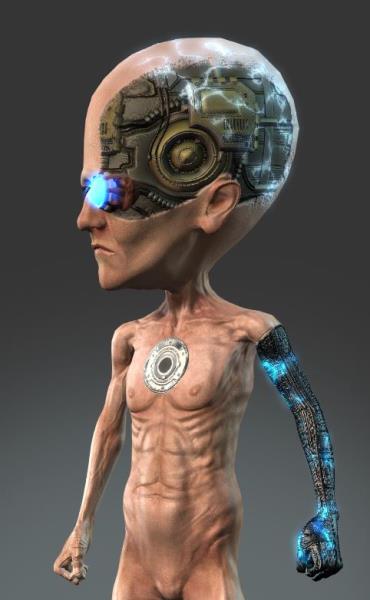 Reply by Mythcons · · Home› Contests & Challenges Archives› Reallusion's 3D Character Design Contest 2016Now that the Decals options are fixed, I'm able to add more dynamic detail to my textures. I use 3D-Coat for PBR painting. The cybernetic arm and the electricity are separate decals for the Body texture. I added the electricity decal texture to the 'Glow' channel to enhance the glowing effect.
 -
Re: New Year, New Tool? (aka using non-subscription specialty tools?)
 It shouldn't be complicated to replace the various models in the Shader anyway, these things tend to be pretty modular. Ue4 is quite old now, I wouldn't take it as the definitive example of how to do a realtime pbr Shader today. Certainly what we use at the office is more complicated and that's console based.
 -
Re: Gun turret
 You can change the reflectivity to "Metalness" and put the metal map there. Then put the roughness map into the Microsurface (Gloss) slot and invert it. An alternative would be to export the textures from SP with the PBR (Spec/Gloss) Template, then you can put the maps right into the correct slot. btw. Nice work. :)
 -
Re: ANSWERED: Blurred texture issue
i have sent you the maps, i kind solve the problem by unchecking metalness box, the texture isnt blurred anymore, but then im having another problem , how could i output pbr workflow now(sorry if it is a noob question)? i would like export to unreal.
>15797 results