Search
-
Re: How to rig a Poncho? please help
 there is a way to do that ! u need to change ur Bone Hierarchy a bit ! its really simple ! select ur support Bones then make a new Schematic veiw from Graph Editor(top menu). the schematic panel shows entire of ur bone's Hierarchy. if u have selected ur support Bones then it should be highlighted in Hierarchy. while ur…
 -
Re: Multiple animation file import with "@"
 Heya Magnus, You sure the animation FBXs are exported correctly? I am exporting from max 2009 , selecting the object "export selected"; I have tried it both by exporting all animations with a mesh in the file, and also without a mesh in the file (while importing maintaining the mesh in another static pose file with the…
 -
Re: Texel Density makes bakes look bad on important areas

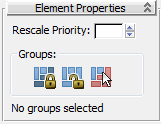 In theory there is a tool to change the scale relative between islands when packaging in the UV editor. But I can not get it working, using groups or not. * "For example, say you group some clusters, and then select a polygon belonging to one of the clusters and set Rescale Priority to 0.5. Then you apply Pack Together or…
 -
Re: Edge Constrain in Modo?
 Well, consider this piece of geometry that could be a piece of armor of some sort. Suppose I want to slide the selected vertexes at same time along their edges. Note how the model is offset from the world origin and the vertexes are asymmetrical in relation to the entire model, providing a non-trivial example. Selecting…
 -
Re: How To Request: Baked Vertex Lighting in Maya
Select your object, then go to Display>>Custom Polygon Display (option box) Make sure that "Color in Shaded Display" is checked. This will make vertex color show up in the viewport instead of diffuse color. Setup your lights, select your object then go to Edit Polygons>>Colors>>Prelight. I've never used anything but Maya… -
Re: How to manipulate vertex positions of Edit Poly modifier with MaxScript?
 Yeah, Edit_Poly and Mesh Modifier stuff is stupid. I also hate having to deal with Edit Poly and Edit Mesh types in scripts, but I do sometimes, and othertimes I just tell the user they need to use Edit Poly. I just came up with this, I think this is what you want Edit: ( local theMesh = selection[1] if selection.count ==…
 -
Re: UDK modular seam problem
 From what I see, like blankslate said, it appears to be an issue with the normals prior to exporting into the engine. In Maya, if you select your object and go to Display > Polygons > Face normals you will see green lines indicating the direction of the normals for those faces. The normals should be pointing directly up,…
 -
update checkbox in my rollout
How can I make the checkbox created on the rollout panel appear and work separately for each selected object? rollout my "MyRollout" checkbox mycb "My Checkbox" createdialog my If I create a panel and a checkbox in it and write a condition if it is enabled, then, for example, I will print text, it will be done, but this… -
[Photoshop Extension] Lazy Save

 Well I made a new topic for this extension as the other one was partially from an old idea and I can keep this a bit cleaner So, Here again is another Photoshop Extension for CS6/CC+(tested on 14 and 15 so far) I introduce Lazy Save. Lazy Save is another way to save out images from Photoshop quicker than having to deal…
 -
texporter problem
i have 2 ids on a multi-sub material for my character model (one id for the head and one for the body)..when i select the first channel (for the body) in texporter options and "pick object", its selects most of the uvs on the grid but there are a couple peices missing. there is another problem as well.. when i select the…
>15392 results