Search
-
Re: Handpaint Bread

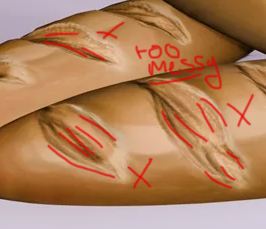 Hi! It looks like you may have made your model in zbrush, and the model itself is pretty messy, which is not helping you out here Things like this draw attention away from your textures and give the impression that you didn't want to spend the time to clean up the model. Did you do any research or find any references to…
 -
Re: Critique request: I'd like to become a character artist
 Just as something to play with, but this would understandably change the art direction, try splashing some off-hues in very light opacity on the leather or metal to give it some slight discoloration. It may add more body to certain surfaces of the materials of the costume.
 -
Re: [UE4] A.Vlaskin's Pirate Lair
 You're right Jeff, I'm trying to rush it. I'm never happy with my work, I could start this scene over right now, redoing all the assets, and still I wouldn't be happy. That's why I started at least 40 projects these last 2 years and I finished like 5 of them... finally I decided that not finishing stuff was worst than…
 -
Re: [WIP][UE5] Stylized Study Suite

 Slight improvement over the previous. But I pretty much have the minimum required proxy meshes, to establish the layout. Now I can start making the higher quality final assets, and start setting up the lighting in Unreal. Notice how the beam above the staircase adds 'interest' and 'feeling of realism' to the overall scene.
 -
Re: Sketchbook: Andrew Bishop
 Love you development for the most recent piece. However you can add some more specular and whites to the waves to make it more dynamic :) :) . You also might want to colour burn the light st the horizon and add a slight silhouette to the Dragon.
 -
Re: Hand-painted heavy armor dude
Looks solid to me! It's got a story of a rich mercenary about it. Just to bring focus to the face, I would recommend adding a slight value gradient to the texture. Bake out a light map and jimmy it until it looks right but not too blown out. -
Re: there was a fly in my room...
 I have a sunroom/studio in the back of my house, and a giant garden spider built a web right in front of the window where the drawing-table lamp is. Right in the light-junkie flight path of any skeeter or moth. Crafty, I say. /jzero
 -
Re: Custom Shader - Metalness Remapping
 Just echoing the blackness situation, same for me with lights (current project), used to crash but just turning off the offending light fixes the issue, could be too many lights or a combination of light and (configuration settings / where bloom is and all those options, unsure if the options play a part) I had about 15 or…
 -
Re: Thick modular meshes in games. Why?
 Thicker walls block light leaking and offer a little more flexibility if you want to nudge the meshes off the grid for some randomness or variation. Also for newer games if they are using mesh shaders or nanite, closed meshes can cull meshes behind them better.
 -
Spicy Jam Subway Station - Modular Modelling
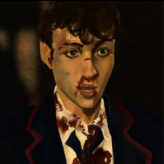
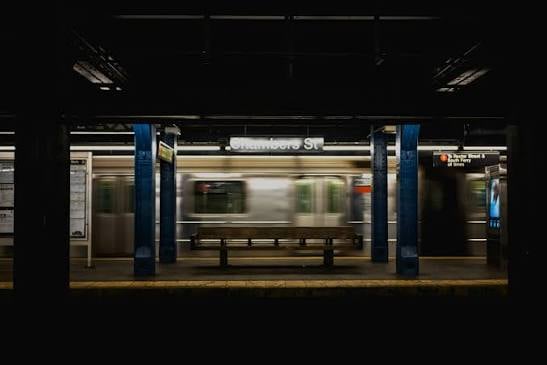 For this assignment we have to create a building using modular assets that snap together. Earlier this year I made a game concept titled Spicy Jam so will be recreating one of the environments (the Subway/underground) for this project. I didn't get to make concept art so got advice to pick an existing train station to base…
>36286 results