Search
-
HELP! Please
 hi there my name is dharmendra.i made this enterence thing. i am getteing weird roughness. i used pbr technique.here are the maps this one is diffuse this one is roughness and unreal engine preview please somebody help me to correct it.:( in case above images doesn't work here are the links…
 -
Re: Problem with Alpha details in Zbrush.
Hi, This is just a guess as to what might be causing this pixilated effect you have on this alpha. 1. When creating this alpha did you use the bucket tool and have the mode accidentally set to dissolve on the tool? This could give you bit of a grainy texture that might cause this. 2. Did you ever resize the image to make… -
Re: What's Your Backup Regime?
I have a 2TB external raid 5 enclosure connected through eSata. I have Acronis True Image create images of the C drive every night and overwrite after there are 3 of them. I also use have Microsoft Synctoy scheduled to create straight data backups of all my program settings and data files. Occasionally I've had to use an… -
Re: Sunn's Progress and Guidance Begging Thread
 If you're having trouble coming up with an accurate pose from your head, find or shoot some reference. The silhouette of the character looks as if no study was put into it. The shadow cast from the character is just a blob and doesn't match the form that is there. The side of the Rock should not be as illuminated as it is.…
 -
Re: Dojo WIP!
 So i've been adding more detail and generally speaking, based of the reference image used, i've got whats needed done. Below are some images: The cube reference is 178cm, so roughly 5ft 10. Unless people can think of any criticism from the images shown, i can start piecing this together in Unreal, which in turn will help…
 -
Re: Sketchbook: Rima
 I'm really bad at arms. Especially the underside. So hard to get a good angle for those in reference images. So I did this planar one studying from a scan. It might've been a questionable choice; the man has unusually long, slightly disproportionate arms. Well, the anatomy will be the same. Anyway, it's not quite right,…
 -
Re: Modo Height Map Bake
I'm pretty sure you need to create a new image map as an output, and set its "effect" to displacement. Shading tree -> add layer -> image map -> new image -> change effect to displacement -> right click on the image map and towards the bottom you got baking options. -
Re: will there be any more contests?
 i think we should leave it open. some images incase some people get confused as to what a bust is because someone undoubtably will http://www.vroma.org/~rscaife/images/091.jpg http://www.vroma.org/images/mcmanus_images/agrippa2.jpg http://www.vroma.org/images/mcmanus_images/flavianhair4f.jpg
 -
Re: Lyla - scifi game character WIP
 did you attach them with the manager? or BBCode i would recommend using a imagehosting service such as Tinypic so you dont have to keep the forum restrictions and the images will be fully visible in the post with [ img ] tags
 -
Insomniac Spiderman Retopo (Help)
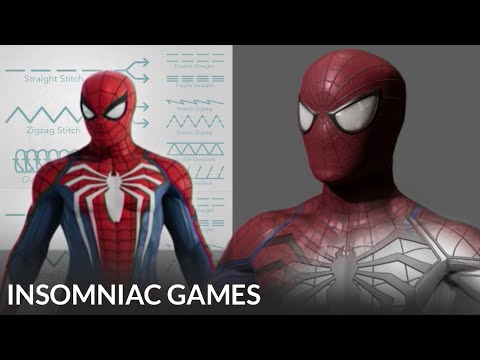 My question is very confusing, so I will do my best to word it. This is the Spider-Man model from Insomniac Games Marvel Spider-Man 2. The only model that is from Spider-Man 1 is the photo taken in Maya (blue wireframe). During the 2018 ZBrush Summit, the modeler for Spider-Man at the time (Leroy Chen) said that he cut the…
>44213 results