Search
-
Re: Importing model from max to zbrush
 This is a pretty common issue, usually has to do with Max reordering the verts on import/export. Deep UV may also have messed with vert order. This plug in below can help.....also check the forums at Zbrushcentral....... I've had this issue as well, and I believe it was using the default .obj export in Max that messed vert…
 -
Re: So how much DO you know about your programs?
 [ QUOTE ] is about 3 steps in Maya [/ QUOTE ] Or one step if you copy the echoed code from the script editor, strip it of any unique identifiers (or code it to rename unique objects) and assign it to a button. Then forever and ever its 1 step. But I think you would need a bit of coding knowledge to setup the isolate…
 -
Blender keymap for Maya / Unity / Substance Designer users
 TL;DR: Download Blender 2.80's "Industry Standard" key configuration at: https://gist.github.com/bitinn/22f6fefe026d8d9e83468864edb8f835 ====== Hi there,* Have you ever find yourself tempting to use Blender but just couldn't get the hang of its navigation? * Are you coming from Maya and Unity looking for an alternative…
 -
Handplane Baker development roadmap
I wanted to post our development roadmap for users to comment on allow for a centralized place for suggestions and feedback. 1) Add support for user editable default settings. This will take the form of a default HPB file that the UI loads on startup. 2) Add support for baking texture data from high poly models 3) Improve… -
Provocator Gladiator Q3 PPM released!
 Well, after far too long, the Roman gladiator model that Poopinmymouth and I started weeks ago, is finally ready for download! Thanks to all of the Polycounters who participated! *** Click on any of the images to download the model! (4.9mb) *** Enjoy! In the interests of keeping the download size to a minimum, I excluded…
 -
Re: 3DCoat Mega Thread

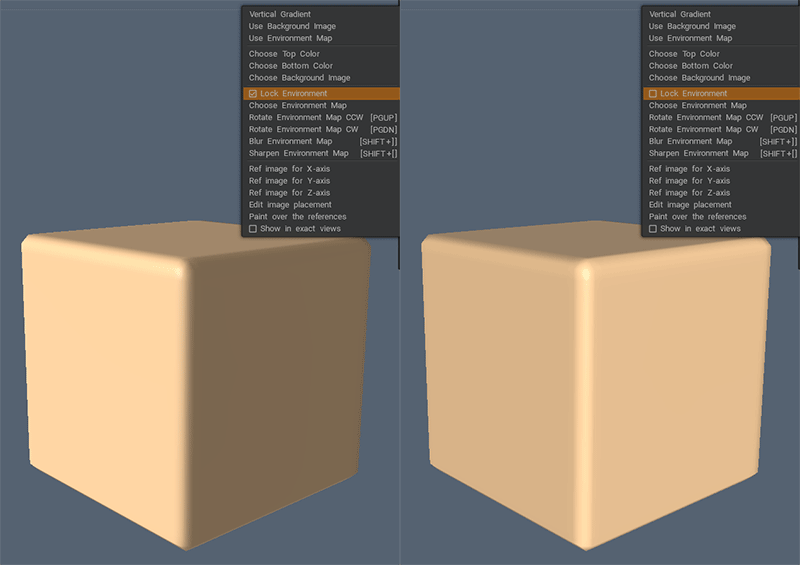 @bond1 Absolutely, it seems to cover a lot of my needs - even though I still wish there was a way to have the stroke type selector always on screen. This seemingly not being possible really baffles me ... While we are at it I might as well ask : is there any way to rotate a background once it has been set to locked to…
 -
Re: How I reduced eye fatigue
 @gnoop thanks, i'll check that out, would be interesting to see what default values for my screen is outputting. after using dimmed screen for awhile, going back to normal display feels like a mag light shining at me. lol, celine for the win. my mom used to listen to that on repeat during long car trips. great memories
 -
Re: Zbrush Decimation Master not Decimating Mesh!
 30 million Total points and 48 subtools shouldn't be too much for a tool, though perhaps too much to try at once. Have you tried only pre-processing and decimating a current tool with default values? Have you tried decimating a different tool such as one of the default projects, to see if this is tool-specific or something…
 -
Re: Discussion: Increasing your speed with highpoly hard-surface modeling
 I don't know where I got this script from but it lets you connect shapes and still maintain quads. Requires max 2010 and up. macroScript QuadConnectcategory:"BTK Scripts"Tooltip:"QuadConnect"ButtonText:"QuadConnect"( if (selection.count == 1 and classOf selection[1].baseobject == Editable_Poly) then ( local curObj =…
 -
Re: 3dsmax custom menus
 Edit Shit, no hang on... the below advice is sort of wrong. That saves out the Quad Colour scheme, the .qop extension. /Edit If I remember correctly you need to tell it to make your .mnu the default startup one. For example I had "GeeD_Quads.mnu" and it works just fine. I assume the .mnu is for quads? I save out all my UI…
>10517 results