Search
-
Re: How The F*#% Do I Model This? - Reply for help with specific shapes - (Post attempt before asking)
 passerby, Sorry, should have been a little more explanatory. Fastest way is to select the code between the parentheses and drag it to a toolbar in Max to make a button. You can right click on the new button and select "Edit Button Appearance..." to label it, give it a tool tip, etc. Then just select some objects and click…
 -
Re: How The F*#% Do I Model This? - Reply for help with specific shapes - (Post attempt before asking)
 Relax button in one of the sub-objects, or add the modifier. There’s also a tool in the Graphite ribbon, to make the edges evenly-spaced, maybe under Loop tools?
 -
Re: How The F*#% Do I Model This? - Reply for help with specific shapes - (Post attempt before asking)
 It kind of depends on what the high poly will be used for. Creating normal maps, or just to do some high poly work? If its just high poly, you can do whatever looks good, allows you to work efficiently (not optimizing every last tri) and as long as it doesn't chug your system you're fine =) I don't see anything wrong with…
 -
Re: How The F*#% Do I Model This? - Reply for help with specific shapes - (Post attempt before asking)

 Outside of specific project requirements, stock 3D certification programs and technical edge cases, there really isn't anything wrong with using triangles and n-gons in subdivision modeling. Flat surfaces are arguably the least effected by messy topology. As long as the corners are supported and the surfaces are co-planar…
 -
Re: How The F*#% Do I Model This? - Reply for help with specific shapes - (Post attempt before asking)
 hey, I'm a bit of an overthinker (and noob) and I'm not sure how to approach complex models. Below is a good example, a Gameboy Advance SP. The whole bottom body (not the flap that's coming up), is filled with circular depressions where the buttons are, indent shaped as the charger, rectangular indent where the on-off…
 -
Re: How The F*#% Do I Model This? - Reply for help with specific shapes - (Post attempt before asking)
 Hi everyone. I've just been modeling random objects around my room lately. I'm working on modeling my Intous4 tablet at the moment. Was hoping someone could help me figure out how to add some certain details. I attached a pic of what I have so far. I need to get these indents for the button and the round indent for the…
 -
Re: How The F*#% Do I Model This? - Reply for help with specific shapes - (Post attempt before asking)

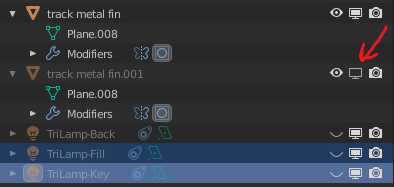 Here are couple of ways you can optimize performance: * Instead of making duplicates of track pieces try to Duplicate Linked. Use Alt + D combination instead of Shift + D. When you use Duplicate Linked you are not making copies of mesh. Instead, you are using the same mesh in many objects. That should save you some RAM. *…
 -
Re: How The F*#% Do I Model This? - Reply for help with specific shapes - (Post attempt before asking)
I hope this is appropriate for this thread. It's certainly not as exciting or advanced as most of the puzzles in here. I'm very new to 3D and have been learning Max for less than a week. I'm trying to model some objects for practice and am getting utterly defeated by my Maglite flashlight here. The button switch sits… -
Re: How The F*#% Do I Model This? - Reply for help with specific shapes - (Post attempt before asking)
 Quickish tutorial on how to make some chainmail/chainlink to wrap around pipes and other objects. First step - Right click snaps toggle button and make these settings in the snaps and user grids tabs, when finished activate snaps... Second step - Go to the front viewport, then on the create panel, select helpers and…
 -
Re: How The F*#% Do I Model This? - Reply for help with specific shapes - (Post attempt before asking)
 But if the buttons not connected then why am i pressing it?
62 results