Search
-
[MAYA] Help with Animation, Speed too fast.

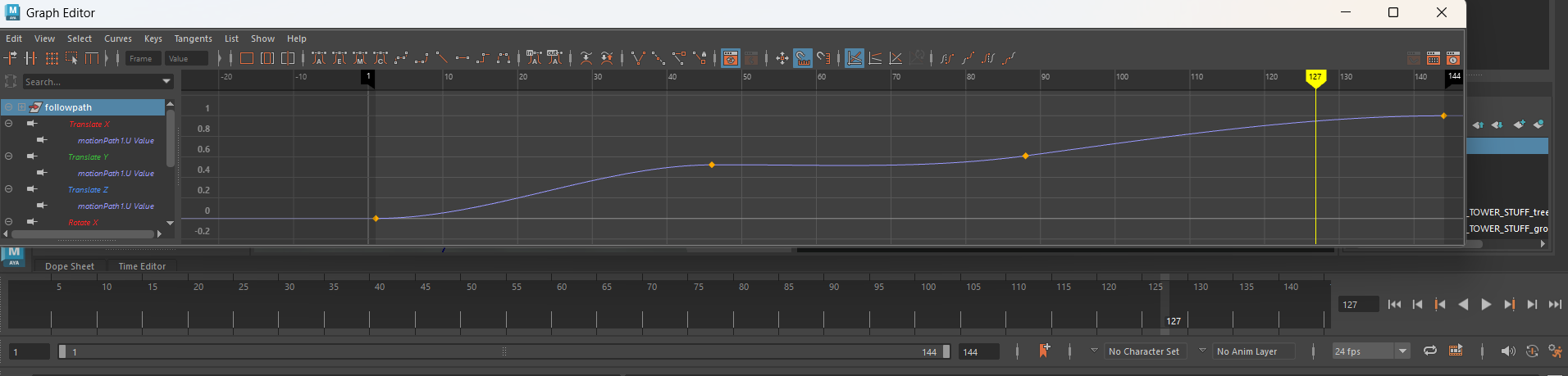 Hey everyone, I'm working on a short animation while watching a tutorial using Maya. Although, unlike the tutorial, my animation is moving extremely fast. My project is running at 24 fps, with a small motion to a total of 144 frames. I've been trying to slow down the speed without changing the fps to a larger number, but I…
 -
Re: [MAYA] Help with Animation, Speed too fast.
 If your position of the object is reached to fast.. shouldn't you move the iframes (or whatever it's called in Maya) for that position to the right so that they are "reached" later in time ? Maybe even using more than 144 frames. The numbers are only the relative position to the curve (0= one side; 0.5= in the middle; 1=…
 -
Re: [MAYA] Help with Animation, Speed too fast.
I figured it out! For whatever reason, in my playback speed it was playing every frame, but under the MAX playback speed it was set to free. Fixed and now it plays much better! Thanks again for the speedy response @okidoki ! -
Re: [MAYA] Help with Animation, Speed too fast.
Ahhhh, I see what you mean on the vertical part on the curve referring only to position and not having to do anything with time... (For whatever reason I was thinking It was some sort of multiplier that would change the timing). I think the iframes, (keyframes on maya) were the same as how I was following along... I have a…
4 results