Search
-
[3D] How to unwrap spherical Visor so texture doesn't distort?
 So I'm having a difficult time making this specific texture wrap around the visor. I've tried quite a few ways of relaxing the the UVs, but nothing I do seems to work. Triplanar also looks too broken because of the type of tileable texture I'm using. Does anyone know how to make the UV work with this hexagonal texture?
 -
Re: [3D] How to unwrap spherical Visor so texture doesn't distort?
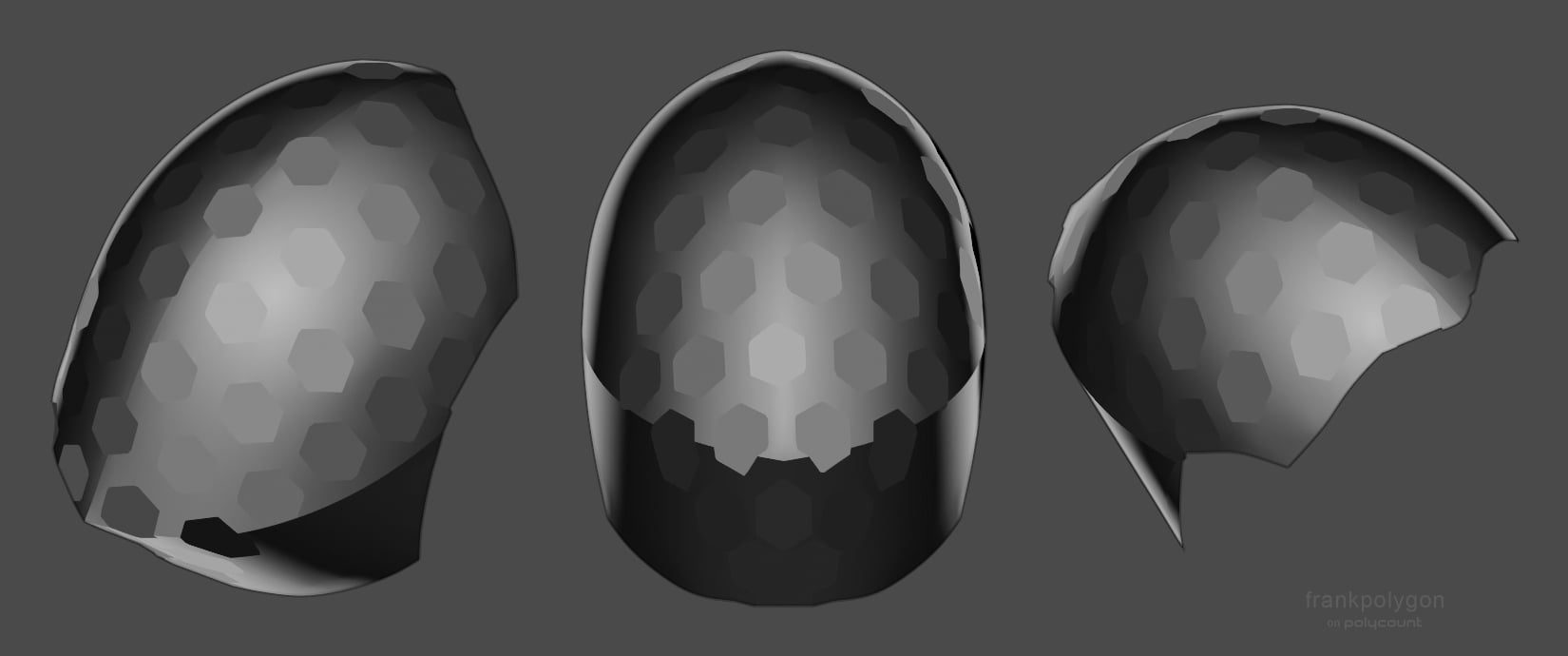 Have to agree with @Noren , @ZacD , and @pior : both the contiguous unwrap and compound curvature of the shape are contributing to the distortion in a way that's almost unavoidable with a [tiling] texture only approach. Lot's of good advice on how to proceed with different approaches from everyone in this thread. As far as…
 -
Re: [3D] How to unwrap spherical Visor so texture doesn't distort?
I'd probably try to drastically reduce the polycount of that element (reproject it later if necessary) so you can manipulate it with greater ease to get a bit more even texture flow, or use soft selections and pinning along with relaxing (or combine both approaches) to get the best possible outcome, but there will be some… -
Re: [3D] How to unwrap spherical Visor so texture doesn't distort?
 Hello, It is very likely that the flawless patterning that you are (loosely) visualizing in your minds eye isn't even possible given the nature of the surface your are dealing with here. In practice, if this surface was to be covered with some sort of IRL tapestry/patterned fabric you'd need at least a seam on the sharp…
 -
Re: [3D] How to unwrap spherical Visor so texture doesn't distort?
 Just my initial thoughts- Try different relaxing methods if your software supports it. Try having the middle seam be a straight line on the UVs and see if you like that look, Like do a sphere projection for the top and a cylinder for a bottom and try to line up the seams and merge them.
 -
Re: [3D] How to unwrap spherical Visor so texture doesn't distort?
 what noren said, i'd just morph this flat, using the animation options in your application, make 1 "hex" object probably use the array option in the application and "bake that down to a normals" map, overlay it on your completed normals map as a new layer overlaying the old with the new hex & rebaking what you need to…
6 results