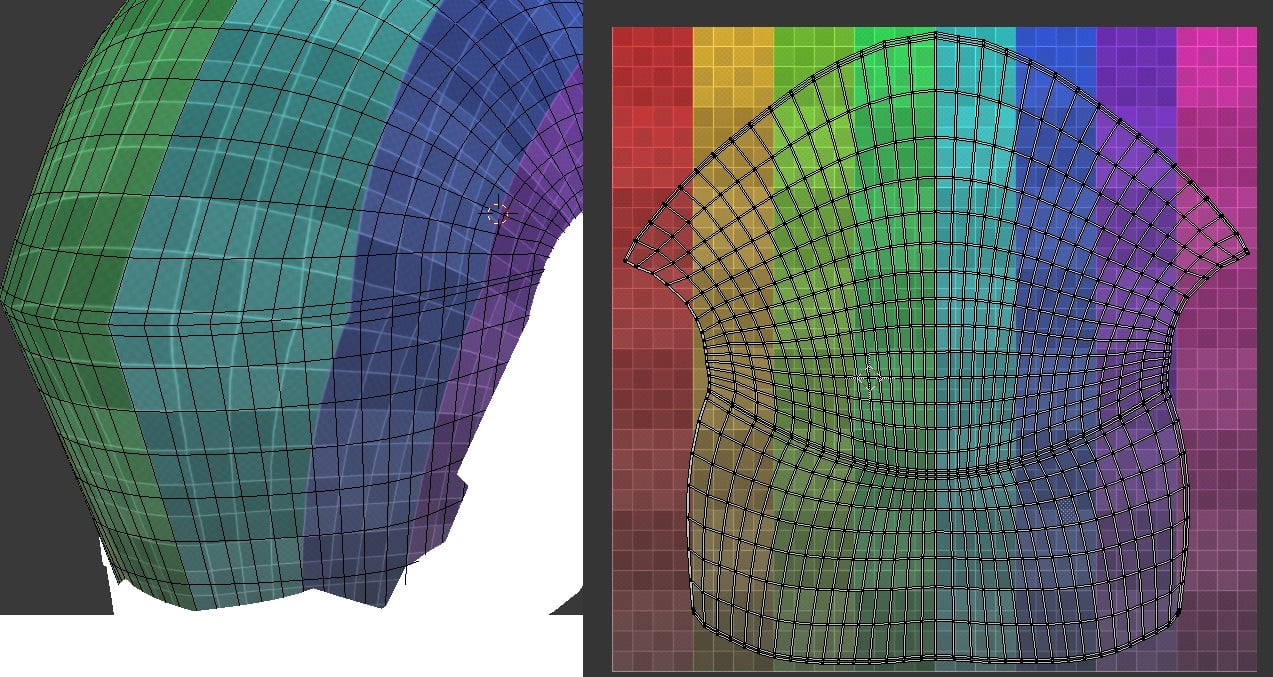
So I'm having a difficult time making this specific texture wrap around the visor. I've tried quite a few ways of relaxing the the UVs, but nothing I do seems to work. Triplanar also looks too broken because of the type of tileable texture I'm using.
Does anyone know how to make the UV work with this hexagonal texture?
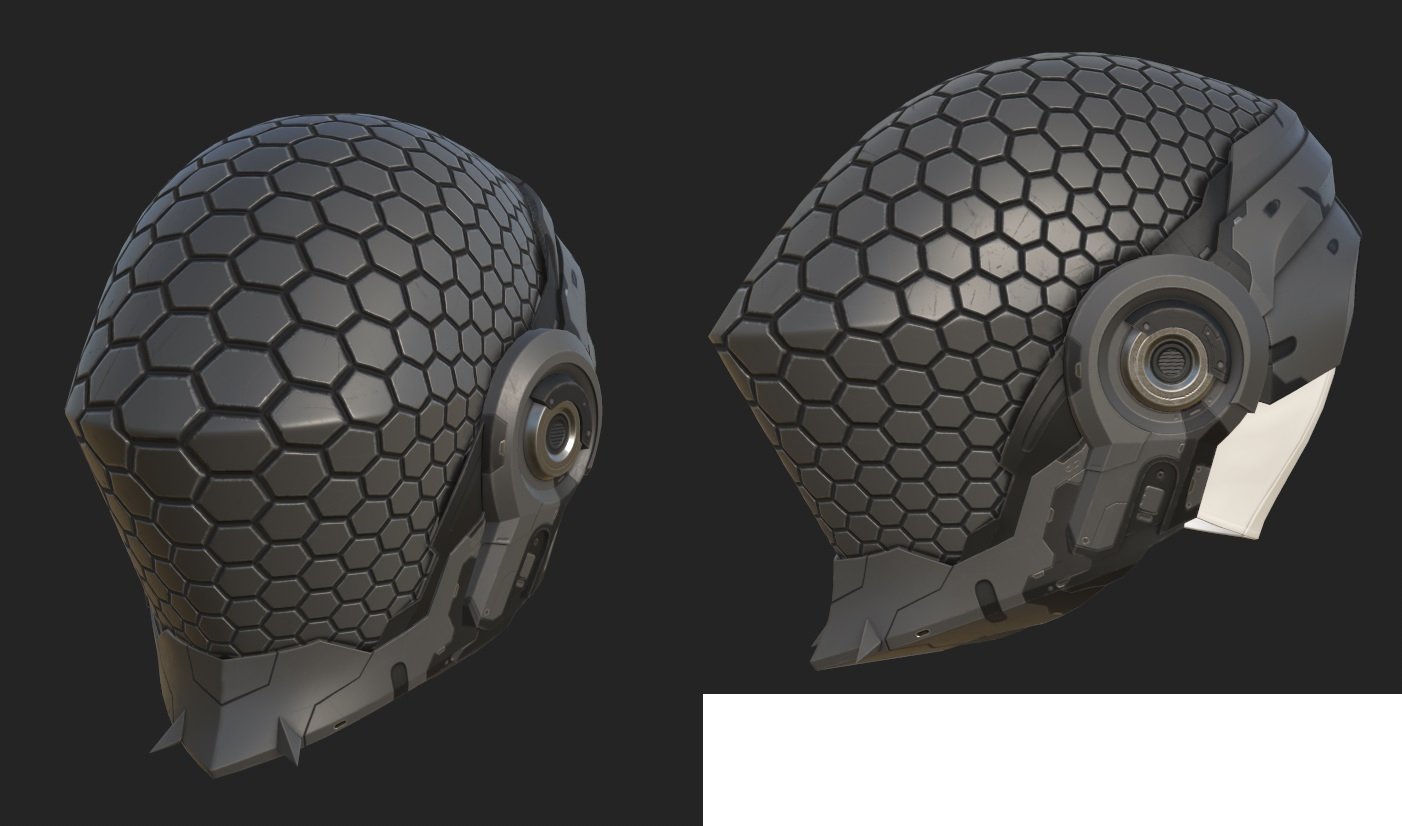
I'd probably try to drastically reduce the polycount of that element (reproject it later if necessary) so you can manipulate it with greater ease to get a bit more even texture flow, or use soft selections and pinning along with relaxing (or combine both approaches) to get the best possible outcome, but there will be some distortion either way. Also, the horizontal hard edge is not a good choice in combination with that kind of pattern if you ask me. You'd have to have the pattern run through this exactly following the direction of the edge (and "halving" every other hexagon) to make it look good, or scale the pattern down a lot so it doesn't create as much of a problem as it doesn't compete with it on the same detail level. Inserting an arch/border along that edge, splitting your pattern, would give you a lot less headaches. Think about how this would be built in the real world.
A much more complicated, but perhaps worthwhile approach would be to model the pattern in 3d or at least create the initial distribution by hand by placing the center points of your hexagons on your mesh so they result in a hex pattern that's as regular as possible, and use that as guides for your mesh or texture somehow. Maybe you could do something with Voronoi with the centers as starting points. Not sure how clean or perfect the result would be, though. There are scripts that turn quad meshes with two-directional flow into hexagons, but then you'd run into the same distortions you are struggling with right now.
You could also morph this into a flat state (e.g. taken from the UVs) to have an easier time working on it and skin the 3D cells to the flat mesh and morph the whole thing back. But like said, that's quite convoluted.
Edit: You might have to insert a couple of pentagons in strategic places if you want the overall pattern to be as undistorted as possible, similar to how a football needs pentagons to accomodate for the curvature.
what noren said, i'd just morph this flat, using the animation options in your application, make 1 "hex" object probably use the array option in the application and "bake that down to a normals" map, overlay it on your completed normals map as a new layer overlaying the old with the new hex & rebaking what you need to rebake.
Try different relaxing methods if your software supports it.
Try having the middle seam be a straight line on the UVs and see if you like that look, Like do a sphere projection for the top and a cylinder for a bottom and try to line up the seams and merge them.
Hello, It is very likely that the flawless patterning that you are (loosely) visualizing in your minds eye isn't even possible given the nature of the surface your are dealing with here.
In practice, if this surface was to be covered with some sort of IRL tapestry/patterned fabric you'd need at least a seam on the sharp horizontal crest/convex line and also a few darts on the top rounded part. Therefore hoping to find some way to unwrap this visor without any distortion at all could very well be a dead end.
Have to agree with @Noren , @ZacD , and @pior : both the contiguous unwrap and compound curvature of the shape are contributing to the distortion in a way that's almost unavoidable with a [tiling] texture only approach.
Lot's of good advice on how to proceed with different approaches from everyone in this thread.
As far as the shape itself goes: something to keep in mind is that, if the individual tiles are supposed to be perfectly flat, then fitting them over a curved surface produces a faceted shape. Not a continuous compound curve. If the shape is supposed to be a continuous compound curve with hexagonal cut outs then each side of those individual hexagons will follow the curvature of the underlying surface.
So even if they are modeled flat and projected or deformed onto the compound curvature of the visor's shape, there will still be some level of visible perspective distortion on every hexagon that's not viewed straight on. Especially towards the sides where the curve drops off rapidly.
Here's a basic example of what it might look like when projecting the same hexagon shape, with equal rotation and spacing, from a central point towards the surface of the compound curves in the visor. The facets break up the surface and there's some subtle differences in each shape, as well as the spacing between the hexagons, even though the rotation angle from the origin point is the same for each of them.
To build on what Noren has already suggested: one possible solution is to split the visor's UV island down the middle and conform it to a hexagonal shape that lines up with the tiling pattern. It's not perfect, there will be one or two diamond shaped filler pieces, but each hexagon is roughly the same size and there's minimal distortion given the shapes are projected onto a compound curve. Below is an example of what that could look like.
Where the filler segments fall and what shape they produce depends on how the unwrap is aligned with the hexagonal grid. Once the UVs are conformed to a hexagonal shape it should be possible to rotate it in 30° increments to alter the position of the tiling pattern.
Here's a quick example of what the textures look like when the UVs are rotated. Some of the subtle distortion around the filler segment and outer edges could be adjusted out by sliding the verts around to re-shape the mesh and UVs. It's also fairly easy to scale things up and down once everything is conformed to the hexagonal grid. The only catch is the UVs scaling needs to line up with the pattern in the tiling texture.
Projecting the actual shapes onto the mesh seems to produce more consistent results, independent of the UV unwrap, but then there's the challenge of getting everything in the model lined up to both the underlying surface and an evenly spaced hexagonal grid. So it kind of comes down to looking at the tradeoffs, between getting close enough with a better unwrap or accurately projecting the shapes onto a high poly, then deciding how much effort the whole thing is worth.
Replies
Also, the horizontal hard edge is not a good choice in combination with that kind of pattern if you ask me. You'd have to have the pattern run through this exactly following the direction of the edge (and "halving" every other hexagon) to make it look good, or scale the pattern down a lot so it doesn't create as much of a problem as it doesn't compete with it on the same detail level.
Inserting an arch/border along that edge, splitting your pattern, would give you a lot less headaches. Think about how this would be built in the real world.
A much more complicated, but perhaps worthwhile approach would be to model the pattern in 3d or at least create the initial distribution by hand by placing the center points of your hexagons on your mesh so they result in a hex pattern that's as regular as possible, and use that as guides for your mesh or texture somehow. Maybe you could do something with Voronoi with the centers as starting points. Not sure how clean or perfect the result would be, though.
There are scripts that turn quad meshes with two-directional flow into hexagons, but then you'd run into the same distortions you are struggling with right now.
You could also morph this into a flat state (e.g. taken from the UVs) to have an easier time working on it and skin the 3D cells to the flat mesh and morph the whole thing back. But like said, that's quite convoluted.
Edit: You might have to insert a couple of pentagons in strategic places if you want the overall pattern to be as undistorted as possible, similar to how a football needs pentagons to accomodate for the curvature.
Try different relaxing methods if your software supports it.
Try having the middle seam be a straight line on the UVs and see if you like that look, Like do a sphere projection for the top and a cylinder for a bottom and try to line up the seams and merge them.
It is very likely that the flawless patterning that you are (loosely) visualizing in your minds eye isn't even possible given the nature of the surface your are dealing with here.
In practice, if this surface was to be covered with some sort of IRL tapestry/patterned fabric you'd need at least a seam on the sharp horizontal crest/convex line and also a few darts on the top rounded part. Therefore hoping to find some way to unwrap this visor without any distortion at all could very well be a dead end.
Lot's of good advice on how to proceed with different approaches from everyone in this thread.
Here's a basic example of what it might look like when projecting the same hexagon shape, with equal rotation and spacing, from a central point towards the surface of the compound curves in the visor. The facets break up the surface and there's some subtle differences in each shape, as well as the spacing between the hexagons, even though the rotation angle from the origin point is the same for each of them.
Where the filler segments fall and what shape they produce depends on how the unwrap is aligned with the hexagonal grid. Once the UVs are conformed to a hexagonal shape it should be possible to rotate it in 30° increments to alter the position of the tiling pattern.
Here's a quick example of what the textures look like when the UVs are rotated. Some of the subtle distortion around the filler segment and outer edges could be adjusted out by sliding the verts around to re-shape the mesh and UVs. It's also fairly easy to scale things up and down once everything is conformed to the hexagonal grid. The only catch is the UVs scaling needs to line up with the pattern in the tiling texture.
Projecting the actual shapes onto the mesh seems to produce more consistent results, independent of the UV unwrap, but then there's the challenge of getting everything in the model lined up to both the underlying surface and an evenly spaced hexagonal grid. So it kind of comes down to looking at the tradeoffs, between getting close enough with a better unwrap or accurately projecting the shapes onto a high poly, then deciding how much effort the whole thing is worth.