Search
-
[3ds Max Script] miauu's Scalpel

 miauu's Scalpel allows you to interactively subdivide (cut up) geometry by drawing lines. When you make a cut, it has to originate from a vertex or an edge. You can't create vertices inside faces. With miauu's Scalpel you can: * Snap the cut point to the nearest(to the mouse cursor) vertex (Auto and Manual mode provided).…
 -
Re: [3ds Max Script] miauu's Scalpel
 miauu's Scalpel version 1.4 is available. Changelog: + added Snap Step in Scene Units + added viewport marker that shows the starting point from which the script measures the percentage/Distance1 along the snapped edge + added "D" key to change the starting point https://www.youtube.com/watch?v=MAVEf57DliI
 -
Re: [3ds Max Script] miauu's Scalpel
 miauu’s Scalpel version 1.7 is available. Changelog: + NEW: Angle Snapping - constrain dragged lines to particular angles. Hotkey A. Press the C key to cycle through the possible reference edges. + NEW: Hotkeys. All htokeys will be shown in the lower right corner of the active viewport. ESC, W, E, R - Exit Scalpel D -…
 -
Re: [3ds Max Script] miauu's Scalpel
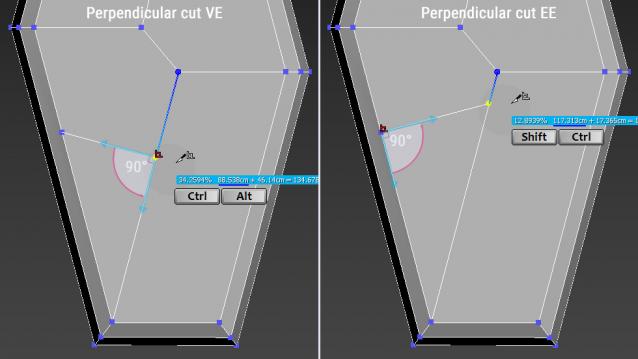 miauu’s Scalpel version 1.5 is available. Changelog: * New Perpendicular cut - the cut line is perpendicular to the edges from which the cut starts. To activate it, hold down the Ctrl and Shift key. In the prompt line this Perpendicular cut is named “Shift + Alt - Perpendicular cut EE”. If perpendicular cut is possible,…
 -
Re: [3ds Max Script] miauu's Scalpel
 miauu's Scalpel version 1.3 is available. Changelog: + added UNDO button https://www.youtube.com/watch?v=X24yIHwmGJ8
 -
Re: [3ds Max Script] miauu's Scalpel
Thank you. Quick comparison of default Cut tool and miauu's Scalpel using the Box with flipped polygons and Backface Cull ON, as Noors suggested. Video: https://drive.google.com/open?id=1Kzuov8RH8zbrbJvx6id0X8wTFG7QCC7_ -
Re: [3ds Max Script] miauu's Scalpel
You mean the next update?Thank you. :) -
Re: [3ds Max Script] miauu's Scalpel
 Cool stuff! very similar to multi cut in maya
 -
Re: [3ds Max Script] miauu's Scalpel
I will make a video to show you what happens. Edit:The video is here:https://drive.google.com/open?id=1UU1y5ypQ30NeCjNRs6bBdEpwQHWf2PB2 As far as I can see the cut lines depends of how the objects i spositioned.
20 results