Search
-
Re: Learning trim sheets. Some questions...

 so im understanding how the normal mapping is working here but can anyone explain to me how in the example from the OP the two sides of the example cube dont have a seam in the albedo/roughness etc? a substance wouldnt tile between these two places. It'd be tiling from top to bottom no?
 -
Re: Learning trim sheets. Some questions...
 Yes, basically. I have done trims with seamless tiling left/right, and it worked fine. Also, you're not limited to just trims. Usually you can also mix in regular tiled textures, as new materials, assigned to neighboring polygons. For example a tiling plaster wall, surrounded by marble moulding. The wall can use a tiled…
 -
Re: Learning trim sheets. Some questions...
 @Eric Chadwick so the best option when setting up something like this would be to create a few strips of normal bevel information and have the same tileable material go across them? (this being if i want something like this to follow around without any seams) In this particular example, three seperate strips of normal…
 -
Re: Learning trim sheets. Some questions...

 You'd need to delve into your packages scripting to make a tool like theirs, or it's gonna be a lot of manual work. Also one thing I missed at first is that it seems like you are trying to use this on a non-90 degree angle. Unless I'm brainfarting atm, this shouldn't work. The technique uses two 45 degree transitions, one…
 -
Re: Learning trim sheets. Some questions...
Yeah that's how I did it for my example. Still, it would become a heaping amount of work to use this across many assets and enforces a rigid look to your models to boot. They show how simple curves require extra geo and distorted UVs to map cleanly onto the 45 degree strips, so considering how that could add up across… -
Learning trim sheets. Some questions...
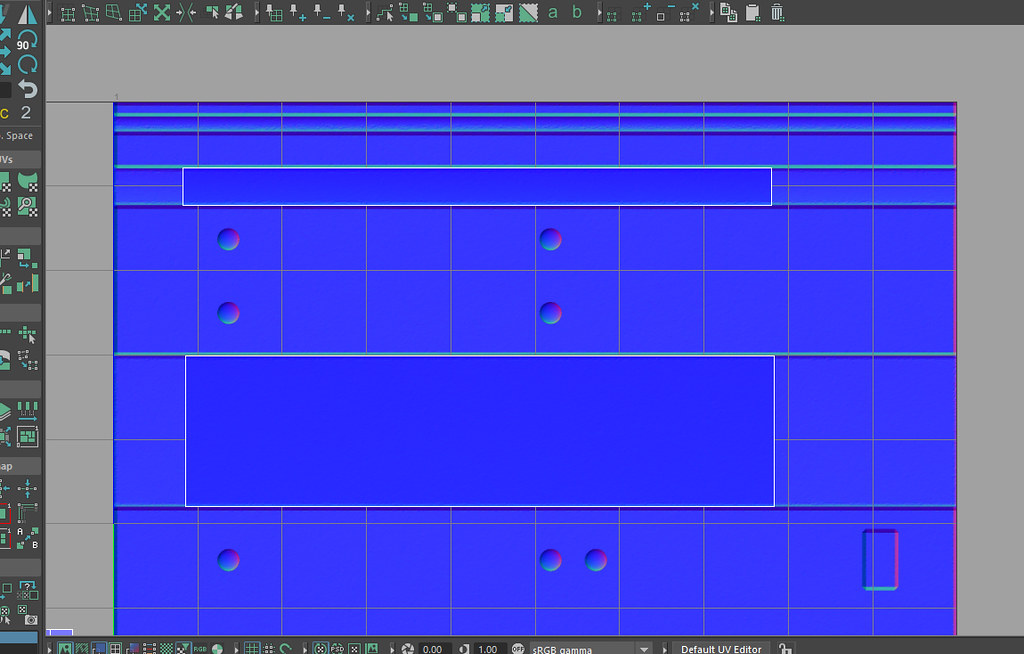 Hey guys. New to trim sheets and I've been experimenting tonight with Morten Olsens guide (https://www.gdcvault.com/play/1022324/The-Ultimate-Trim-Texturing-Techniques). Figure I'd throw all my issues and questions into this thread, hoping to get things cleared up: To get my 45 degree bevels, I tried taking a cube in Maya…
6 results