Search
-
Xnormal: problem with baking normal map - extremely distorted maps

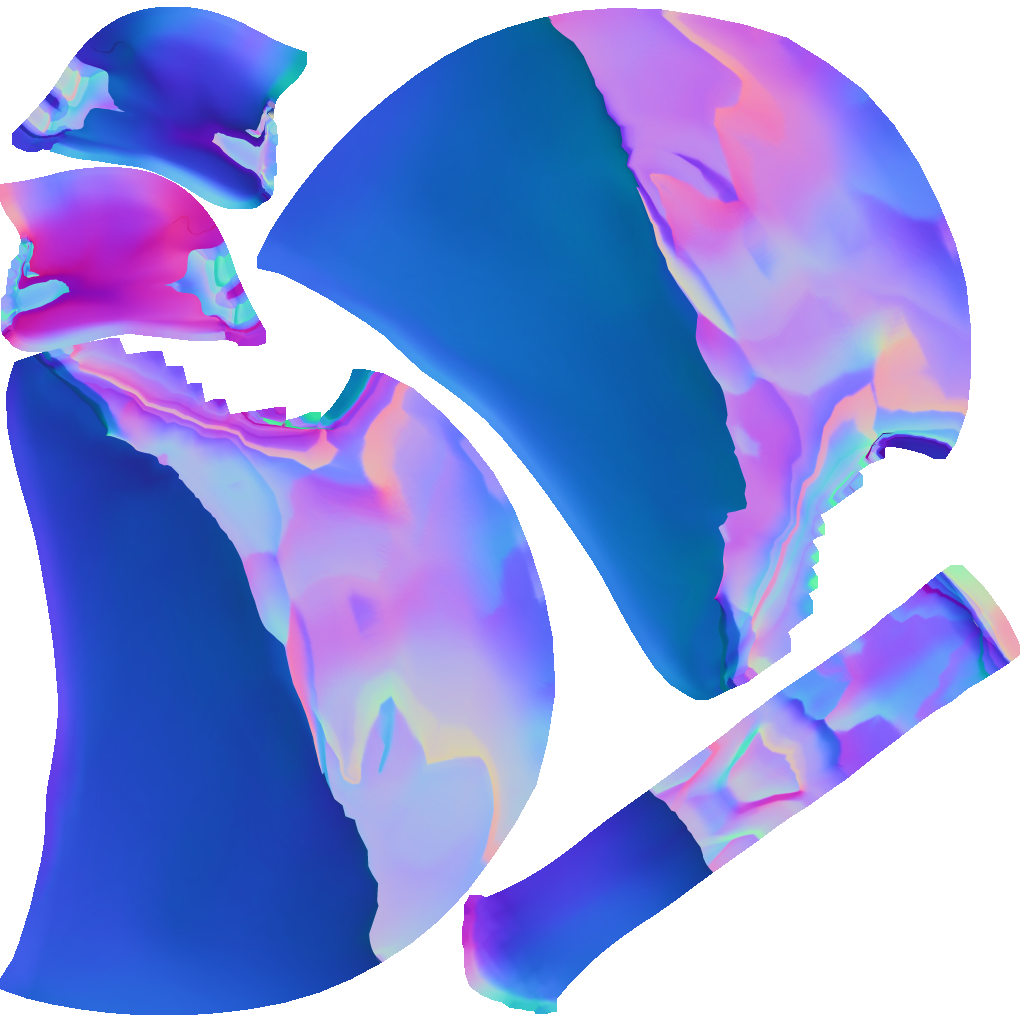 So I've been struggling with making a normal map for this helmet I modeled in zbrush (and retoppoed in topogun then uv'ed in maya) and from what I can tell the UV maps look fine iv'e tried a multitude of different settings setups in Xnormal and this would be the second attempt at a retopo of the model (cause I thought my…
 -
Re: Xnormal: problem with baking normal map - extremely distorted maps
 With that amount of polygons your retopo could be a lot better and follow the shapes of the highpoly a lot closer instead of being just a blob of polygons. Regarding the bake, are you using a cage in Xnormal and have you made sure the objects are in the same location? as it seems to be baking something it could be that the…
 -
Re: Xnormal: problem with baking normal map - extremely distorted maps
 Looks like you're using the normal map as a greyscale bump map. Go into the bump slot of your material and make sure it's set to tangent space normals.
 -
Re: Xnormal: problem with baking normal map - extremely distorted maps
 This looks like the scale and/or position of your highpoly and low poly meshes don't match. Check xNormal's 3D viewer to verify, or bake in an app like Toolbag or Knald so you're not flying blind. It also looks like your low poly mesh normals aren't set up well. I would recommend finding some basic tutorials on normal…
 -
Re: Xnormal: problem with baking normal map - extremely distorted maps
 Hey folks just wanted to give a update. I turned on smoothing and also made sure they were located in the same world space, unfortunately the map still came out very badly ( ill be back with pictures in a bit I'm just out right now) Edit: 1 heres the normal version with the corrected orientation and smoothing on, sadly the…
 -
Re: Xnormal: problem with baking normal map - extremely distorted maps
 Try just slotting this into the normal map slot in marmoset or something. Maya is easy to set up but marmoset should be even easier. You should really retopo your low poly to match the silhouette and shapes of your high poly. It looks like you just zremeshed out of zbrush for your low poly. The geo flow doesn't match the…
 -
Re: Xnormal: problem with baking normal map - extremely distorted maps
 agreed on the retopo which i'm in the process of doing for now but this problem has persisted even when just using a square and a beveled square so I feel like im just missing an obscure step somewhere. Ill defiantly check out marmoset as suggested though. Edit 1: So I discovered something interesting apparently view port…
 -
Re: Xnormal: problem with baking normal map - extremely distorted maps
I tried what you suggested it looked a little better also tried it with a non beveled square and a beveled one and still didn't turn out quite right. So what ever i'm not doing right it seems to be something obscure that I don't know about cause the two squares noramls didn't turn out right either(also tried baking in… -
Re: Xnormal: problem with baking normal map - extremely distorted maps
Beyond the fact that retopo model and unwrap are very inefficient and troublemaking you forgot to make the shading smooth or make a set of smoothing groups matching UV seams . It's first to start from -
Re: Xnormal: problem with baking normal map - extremely distorted maps
 Triangulate your low poly before baking, those look like errors you get from the mesh being triangulated differently in the baker vs Maya.
12 results