Search
-
Re: DcBoolManager- Free maya script for boolean modeling
 Hi Vexinglion, You just have to put the DcBoolManager.mel in your maya script folder. If you're on windows, it should be located here: C:\Users\YourUserName\Documents\maya\YourMayaVersionNumber\scripts then, restart maya and type this command in the command line (or in the script editor): DcBoolManager; You can also…
 -
Re: DcBoolManager- Free maya script for boolean modeling
Did you follow the install procedure?The script doesn't work if you just copy/paste it in the script editor. It needs to be placed in your maya/version/script folder. When it's done, restart maya and use this command to launch the script:DcBoolManager; If it still doesn't work, I need more infos to help you.Does it fails… -
DcBoolManager- Free maya script for boolean modeling
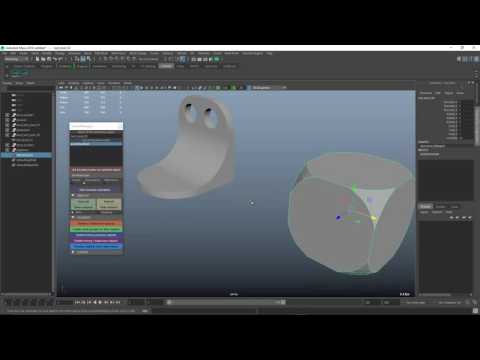 Hi, DcBoolManager is a free maya script to enhance boolean modeling workflow. It works on maya 2016 and above. It's available on gumroad here: https://gum.co/LMlq It's still wip so please give it a try and tell me what I can change. here's 2 videos showing how it works: https://www.youtube.com/watch?v=m2LGtvwCLy4…
 -
Re: DcBoolManager- Free maya script for boolean modeling
 Really thanks for such a great plug-in. Actually, i have some problem. i click the icon or roll the scripts, there are no response. Any error message or any pop-up windows. Other mel scripts are doing well, and I tired both 2016 & 2017 ver. Have you any idea about this? :)
 -
Re: DcBoolManager- Free maya script for boolean modeling
 Sorry i replied to the wrong boolean script here. But testing this one also.
 -
Re: DcBoolManager- Free maya script for boolean modeling
Mel script ;) -
Re: DcBoolManager- Free maya script for boolean modeling
 does this script work in 2019?
 -
Re: DcBoolManager- Free maya script for boolean modeling
 Oh man this is really cool other scripts are paid and having same features thank you so much. :smile:
 -
Re: DcBoolManager- Free maya script for boolean modeling
Thanks Mossbros! I will try to update the script tomorow. -
Re: DcBoolManager- Free maya script for boolean modeling
 Much better :) Now all we need is a script to automate from zbrush and back to maya.
35 results