Search
-
Re: blurred cube map reflections
 As far as I know, only statically and globally. You can't switch the MIP level with a function. Not even with custom code, since you can't custom code an asset node, which is essentially just the sampling fuction.
 -
[3ds Max] Turn off Antialiasing only for some objects?
 So global Antialiasing on/off tick box under Render Setup>Renderer to affect everything in the scene, but I was wondering, is there any way to have it on for some models and off for others? Maybe MAXScript under Object Properties>User Defined? --how would I write that though?
 -
BBC news article on Games sales
 There was a thread a while back about how the global financial crisis would affect the gaming industry.. http://news.bbc.co.uk/1/hi/technology/7814272.stm good sales will turn around how people view the industry as an investment opportunity. So all the layoffs on here might lead to a reuptake for new projects.
 -
Self-Illumination and Ambient textures
 Can anyone explain the difference between Self-Illumination and Ambient for me? In 3dsMax's default material settings there are slots for Self-Illumination and Ambient textures (and a global Ambient value). Is there a conceptual difference between the two or is it just what 3dsMax chose to call them?
 -
AtomFishing II Ressurection [Unity3d]
 Hi all! want to introduce a new game, genre MMORPG. Game - fishing simulator in the world, survived a global catastrophe. Events unfolding in 400 years after. On this game I have been working as environment artist and level design. View in unity3d:
 -
Re: What is the proper way to add "content" on a previous subtool? - ZBrush

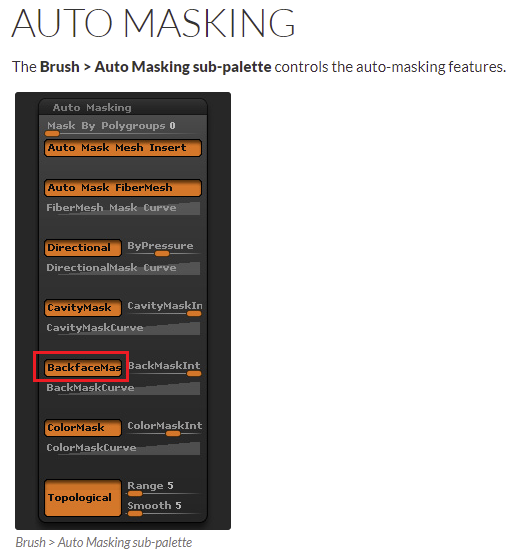 Another issue you seem to be running into is that because the mesh is so thin you're simultaneously sculpting the back faces. You can remedy that by turning on "BackfaceMasking." You may also want to do a global inflate through the deformation tab or use the inflate brush on those super thin areas.
 -
Re: Mass Effect Reaper
 I like the background, but i feel like the effect has taken away some of depth the subtle details making the model look flatter than it is. Also I feel it could use a touch more global AO, maybe a play around with that and see how it changes the image?
 -
Re: Radiator Room [CE3]
 In crysis 2, the interiors of the buildings were split off of the exterior as 2 sepperate meshes. the interior is then placed in a VisArea, which will block the sun's ambient light and lead to better interior lighting. then you can place various small lights and anti-lights to fake some global illumination.
 -
Re: Environment WIP. Critiques Welcomed!
 Some people might advised against it since it's still being worked on by Epic but have a look into dynamic lighting and dynamic global illumination, the latest UE4 has improvements on dynamic lighting and it's features do vastly improve the scene without having to click the Build button again and again.
 -
Re: Maya pixel snap texture bleed conundrum
 Try opening up the material's attributes and look under the hardware texturing tab. Change Texture Filter to "nearest (unfiltered)". By default, Maya uses bilinear filtering (I think) unless you switch it off. There's a way to apply the filter setting globally as well, but I've forgotten how.
>3258 results