Search
-
Re: "Use Pivot Point Center" in Maya equivalent
 /*cly_discretePivot.mel v.0.1Roger Klado was herebecause no one else will do it fer mejune 10, 2009 ( boy oh boy )[EMAIL="RogerKlado@gmail.com"]RogerKlado@gmail.com[/EMAIL] ( Klado/Claydough/cly_ )discrete component pivot on multiple objects using the scale or rotate tool Usage: make component selections and apply this…
 -
Re: Young Knight
 Remember that when bending forward, or rotating the torso, humans don't just bend only at the legs or waist. It's a big rolling motion as several lumbar vertebrae rotate at once. The way you have the abdominal area of the armor now, it would severely limit his movement and ability to fight since he can't bend down, or even…
 -
Re: modo: mirror object and pivot
 hmm I can get an object to mirror across with pivot position intact if I freeze it's transforms, but the pivot rotation is not mirrored. it's the same as the original, which is rubbish :/ in that second link, I'm not sure what he means in the second post: 'Playing with this more. In the animate tab I set the center of each…
 -
Re: Soldier Cycle - crits plz
 Hey! You're off to a good start there. Biggest issue I'm seeing right now is that his pelvis and spine are a bit too stiff, which makes him look somewhat robotic. When his right foot makes a step forward, his pelvis should also rotate forward quite a bit on that side, like so: Meanwhile, the spine will counteract that…
 -
Re: Pelt Mapping from an inner seam?
 That's one of the things that bugs me about pelt, it always like to rotate pieces. To make it easy to paint on you'll have to rotate it back and align the edges. I would cylinder unwrap that. With the cylindrical button turned on you can move, scale and rotate the gizmo in the viewport which will update in the editor…
 -
Re: Camera Controls
Update: When I apply this code to an empty Game Object that I then parent the camera to the rotation works, mostly, however it seems to approach a maximum and slow down on a curve. The effect is holding the left arrow for example, the camera rotates and then slows and eventually stops at 10.7892 degrees and holds. You can… -
Plexus - Unity Procedural Node Editor

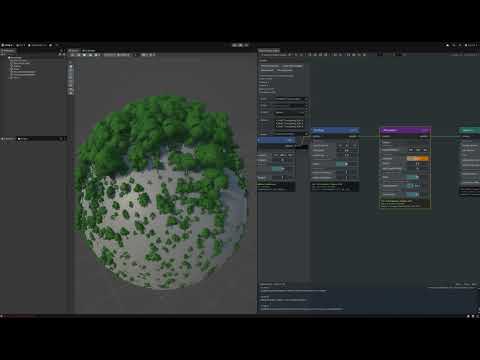 Plexus - Procedural System for Unity ( 6.1+ ) * Node-Based Procedural System - Visual graph editor for creating procedural content using nodes * Terrain Generation (Altura) - GPU-accelerated heightmap generation with Ridge/Simplex noise and terrain manipulation * Point Scattering & Sampling - Generate and distribute points…
 -
Re: Calling all tablet/Interactive Display Users
 Good stuff here guys. I really appreciate your opinions. @Using it across two monitors: YES. That was the first thing i noticed and changed. Probably 5 seconds into fiddling with it. What is nice about the intuos 5 is you can restrict the pen to X monitor(x proportions) and then you can still finger touch your way around…
 -
Re: 3DSmax pivot not working in editable poly, almost Impossible to model anything
I toggle back and forth between local, view and world so often I put it in a double tap script. Tap W, E, or R once and it selects that tool. Tap it again and it switches the gizmo between the modes. Super useful it saves me a bunch of time. Run the script and it shows up under the Customize menu under " MyTools", where… -
Polycount Banners, showcasing your artwork. Make suggestions here!
 It's that time again where I ask you guys to point out and 'banner worthy' threads happening around Polycount. Or better yet, if you think yours is ready for our rotation please let us know. If you guys are in, post the thread here and why you think it should be in the banner rotation and I'll get it updated. "Uh...…
>8347 results