Search
-
Re: Building a System-Most important specs?
 Hey. Im a Beginner jut like you, so dont take my word 100%, but from what ive seen, read, and learned over the past few month is this: 1. CPU: This is probably the most important in max. Im with a Core2Duo and I can barely work once my project gets complex. So id suggest You spend a decent amount on this one. Id say a i5…
 -
Re: Modular roads with unique normal
 The basic mechanics of that Witcher technique are really cool. I've used the same/similar approaches for various ID related things in a few games - the huge benefit is that it's not subject to filtering and compression artefacting in the same way that texture based masking is. There are some considerations though if you're…
 -
Re: Please help. Exporting my Tree to UE4. Question on Multiple Texture Use
 In 3ds max make a Multi/subObject material and apply 2 ID: id one leaf id 2 bark ...when you export your fbx it will remember and ue4 will make you a material with both textures.Hope this helps
 -
Re: Multiple Texture Plates
 If I'm understanding you right, what you're asking about is Material IDs. You give different areas different Material ID number, and you can then assign a different material (and hence a different texture) to those IDs.
 -
Re: [MAYA] Creating straight uvs in maya for pixel art texture , cant get straighten uvs to work
 Generally ive found straighten uv's to be only helpfull at bringing into alignment a selection thats almost aligned but just slightly off (ex: unfolding a pipe usually has some distortion that can easily be fixed this way) Id recommend using the allign tools instead since they allow you to select a boundary uv to align…
 -
Answered: Reimporter UI won't open
 I've been having a number of issues centred around my Ddo project when I come to reimport input maps. When I came to update my material ID texture I wrote over the existing .targa file (leaving the quixel generated png alone), I then opened my quixel project and attempted to open the reimporter to update the texture but…
 -
PC-CSGO | MP9 The ONE
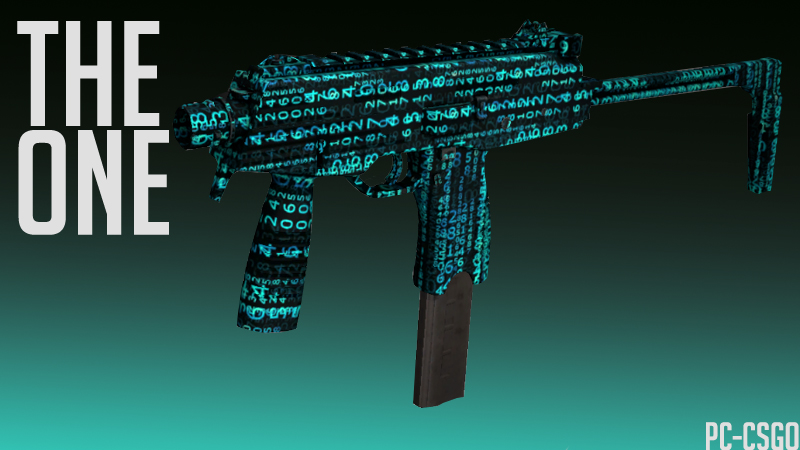 My third (okay) entry for the CS:GO weapon finish competition: The workshop: http://steamcommunity.com/sharedfiles/filedetails/?id=680098403 My other creation: http://steamcommunity.com/sharedfiles/filedetails/?id=679071044 Another one (Another one): http://steamcommunity.com/sharedfiles/filedetails/?id=679376761 Thank you!
 -
Re: PC-CSGO | Space Ace
 I submitted my entry from my bf, Konras account :D http://steamcommunity.com/sharedfiles/filedetails/?id=693571916 http://steamcommunity.com/sharedfiles/filedetails/?id=693573516 http://steamcommunity.com/sharedfiles/filedetails/?id=693575130
 -
Re: TexTools for Blender

 @keket Thank you #Jakro There was always more than 5 colors to choose from. It's just that most color templates that I include only use 4-5 colors. It's like with copic markers when drawing: uusually you don't need that many. But you have the option now to choose between 2 and 20 colors I am not sure if I understand, where…
 -
Re: Experienced | 2D/3D Gaming & Animation service provider @ Indie Price| Looking for Work

 Looking for new projects Email ID:info.hephaestusent@gmail.com Skype ID: hephaestusent Contact Details: Email ID:info.hephaestusent@gmail.com Skype ID: hephaestusent Facebook: https://www.facebook.com/HephaestusEntertainmentarts/ More Art: https://www.artstation.com/artist/hephaestus_entertainment Email…
>55307 results