Modular roads with unique normal

polycounter lvl 3
Greetings. In general, this is my first attempt to socialize among 2D artists and 3D artists. I hope for your understanding, since I am a beginner 3D environment artist. I ask for help and support. I need to make a modular road. Unusual, dilapidated in places, more like a rural or country road.
In general, I did it and followed the following path
1. Created a master model + UV (For fitting by level and understanding the dimensions of the module)
2. Created a separate Low poly module
3. Transferred it to Zbrush, created several high poly options
4. Made Decimation
5. Made Retopology in Maya
6. Corrected the UVs if necessary (Some roads change more in shape and differ more from the base low poly model)
7. Bake and texturing in substance (I selected a seamless texture on polyheaven, but baked a normal one with zbrush highpoly model)
8. I combined and remade two normal textures in Photoshop to get a unique normal
9. Transferred textures and model to Unity
Why did I do this?
Firstly, I wanted to keep the detail of the road to normal, with its holes and cracks.
The result was that despite the fact that I have a seamless albedo and normal texture, I also have a unique normal for each individual module, which generates separate materials for each module. This is no longer good! On top of that, when tiling I completely kill the UVs as all the cracks start to move.
It turns out that the roads are no longer modular since they do not use the same material and they cannot do tiling.
I need to somehow resolve this issue, please give advice. However, I believe that I will have to solve the problem in some other way, perhaps create a custom shader for roads, where it will be possible to mix channels for vertex paint. So far this is my idea, but I hope you will tell me if I am thinking correctly and perhaps there is another way.
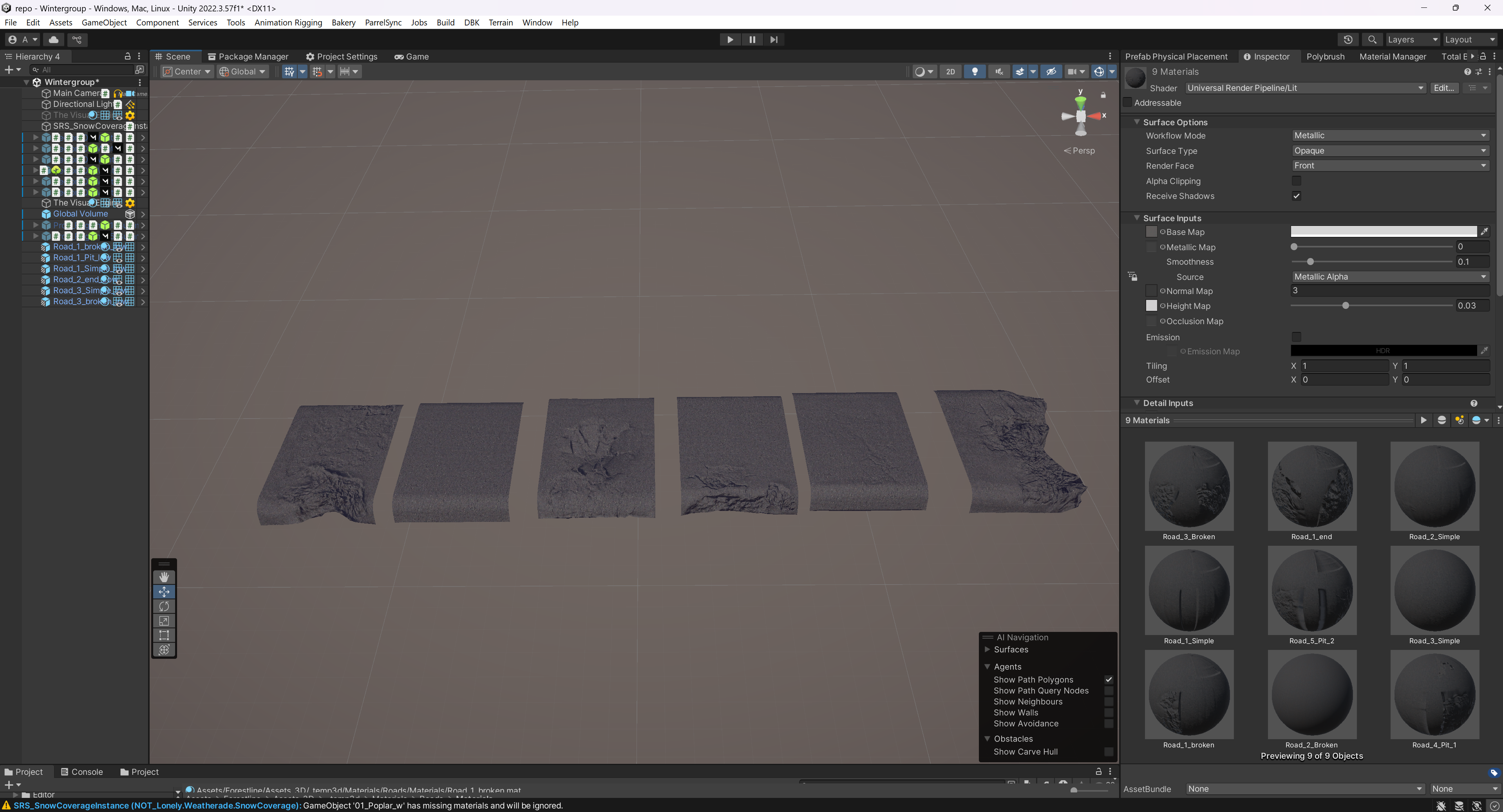
Some prefabs of modular roads (Some modular road prefabs (6 of 9 shown, side shows total materials by module)
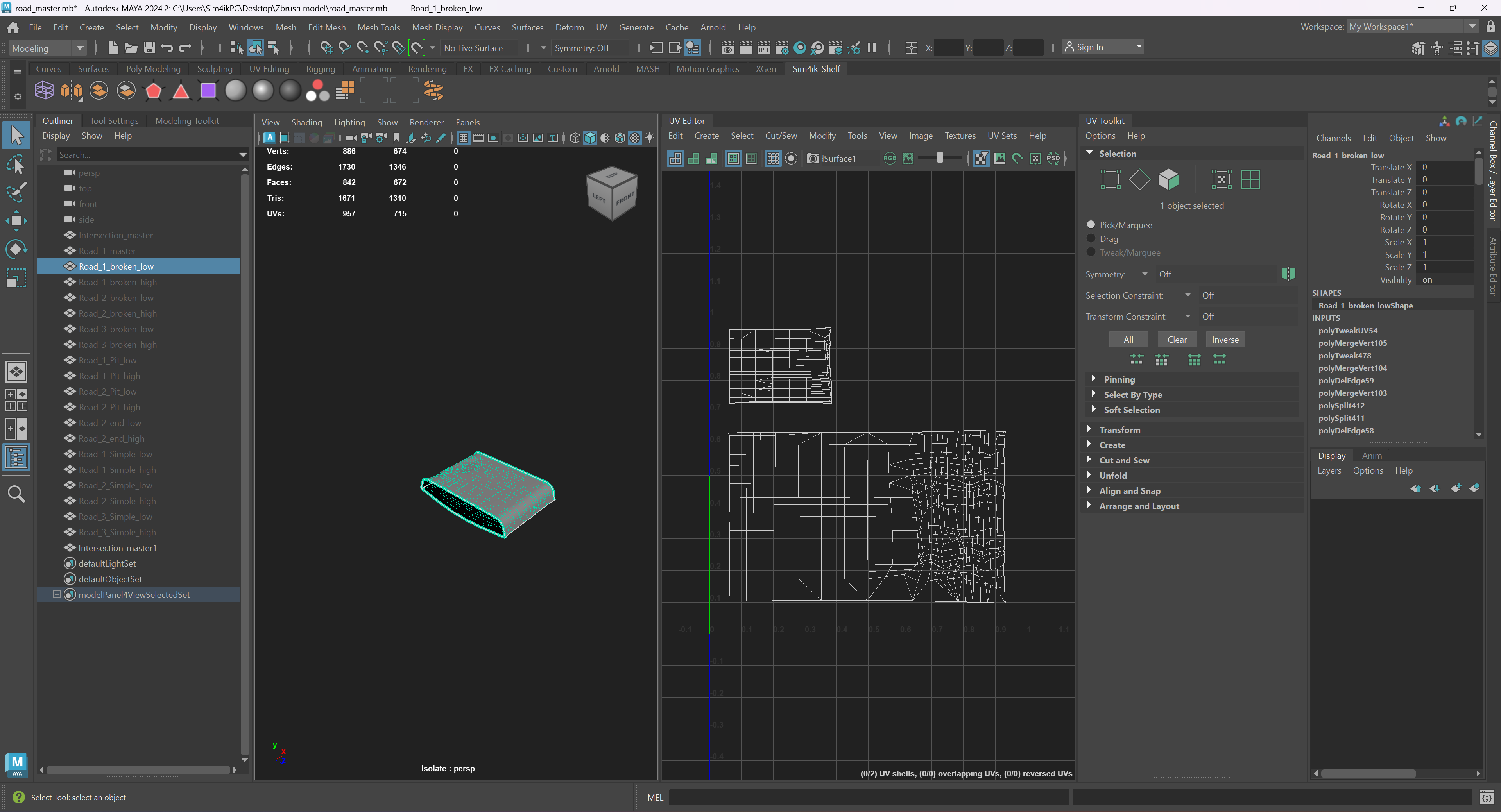
This is what a typical UV looks like for each road module

Some prefabs of modular roads (Some modular road prefabs (6 of 9 shown, side shows total materials by module)
This is what a typical UV looks like for each road module

Replies
You might use this workflow for something like sidewalks, but for anything that needs to feel more natural and 'off-grid' you will have a lot of problems, not least is the normal map issue you've run into. A typical workflow would involve simple meshes or even just planes that are duplicated and deformed along a curve in your editor, ie: Unity. You'd use tiling textures aligned to the world and vertex color for blending. A fancy tech art solution might affect the landscape, as well as stamping down decals of cracks and road markings.
In short, a lot of how you would do something like this is outside the mesh baking/substance workflow.
Modular simply means that you can assemble a bigger object from smaller, often repeating or exchangeable meshes. Your road bits are still modular, and you wouldn't tile the texure, but repeat/switch your meshes.
If you want a basic setup for a freely tiling texture (so not in predefined steps), then the UVs of your mesh should cover the full 0-1 range of your UV square in the directions that you want to tile in. But like you noticed, you can't do that with unique normals if they compensate for unique mesh geometry instead of being a simple bump that does not care about the geometry.
Currently, you seem to have UVs for the underside of your model, which will likely never be seen. You could get rid of them or map them to an already existing area of your texture while having the full width and/or height of your texture for tiling. However, simply assembling pieces of fixed length is fine too, if that matches your workflow. You'll want a freely tiling texture if you do something more interactive where you draw out a road of unspecified length.
And if you're happy with offsetting your texture at set intervals, with predefined transition areas, then you can have some generic pieces and some unique ones and mix them up as needed. They don't need to stretch the full length of the UVs then, either.
And even with unique normals, you could still have a single second tiling diffuse or even generic (not shape defining) normal texture, that you can blend to with vertex painting. For example, if it's just some moss, that might work well enough, and if there are areas where a loss of shading is noticable, you could simply skip over it.
Or you use a detail normal map that's added on top.
As for the material question, it's been ages since I used Unity, but according to a quick search, it still doesn't support UDIMs. Maybe you can use texture arrays instead so you'll only need one material. You could also do an atlas and shift your UVs in set intervals within the 0-1 region, but that's probably cumbersome.
if you want any texture to be independent from another you need different UVs - eg. by using a second UV set, creating them in your shader or a combination of existing UVs and some maths
personally - I'd tile an asphalt texture set in world space and blend it with the unique normals using some masks or whatever.
and - because I haven't said it recently...
UDIMS are nothing more than a naming convention that potentially saves you some manual work.
if your engine supports texture arrays or has good batching you do not need UDIMS except to save you some manual work
if your engine doesn't support texture arrays or have good batching UDIMS give you nothing except a saving in manual work
..after "some hours".. it was about "The Witcher 3"
http://wiki.polycount.com/wiki/MultiTexture#Modulation_Blending
I've used the same/similar approaches for various ID related things in a few games - the huge benefit is that it's not subject to filtering and compression artefacting in the same way that texture based masking is.
There are some considerations though if you're looking at use in production..
- Memory footprint scales linearly with mesh complexity so there comes a point where it stops being a good idea - for architectural assets or these roads it wouldn't be off the table for me at all though (also, if you're already using vertex color and have a channel spare it's basically free).
- And... depending on how you architecture the resources it can get super expensive per-pixel. Blending 8 or 16 full materials in a single shader is very, very costly and there are an awful lot of texture reads involved if you do it naively. I'ts not an insurmountable problem with a modern engine though and honestly is a problem for your TAs/rendering people to sort out.
- Your main problems with going down this route are around effective authoring pipelines - its not a big deal for a one-off asset but your DCC isn't going to support visualising your work by default and you need that if you're going to produce a number of things using the same method.
I think making that stuff is great fun but I'm a TA for a reason