Search
-
Re: center to world in maya
 Hi! Here it is my solution to move ANY selected object back to the center of the world: - create a MEL tab and copy/paste this snippet: // Get the selected object(s) string $selectedObjects[] = `ls -sl`; // Check if any objects are selected if (size($selectedObjects) > 0) { // Loop through each selected object and move it…
 -
Re: misc. maxscript UV scripts/tools
 a little teaser before I update to the next release as you can see in the following screenshot is the texel size in each object equal even though the objets were created with different scales and different shapes: I got it so far running I just need to bend the scale math a little bit right (it's a bit try and error right…
 -
Re: Vehicle Project
 Hi! Really enjoy the cables and ropes. Did you use splines? Was it difficult to wrap them around the objects?
 -
BAKING COMPLETE LIGHTING ISSUE
 Hello I 'm a newbie at marmoset toolbag and I have a problem regarding baking complete lighting as It bakes the front of object and the back remains black. what i'm doing wrong ,can you help me please to bake all lighting. This is what the objet looks like from the back with texture on it.
 -
Re: Photoshop - PixelB Game Maps and PixelB Normal Tools - extensions for painting game textures
Would love it all be working as live filter over height as smart object . I am tired of fighting with weird sbsars support in Photoshop -
Re: Sketchbook: Frank Polygon
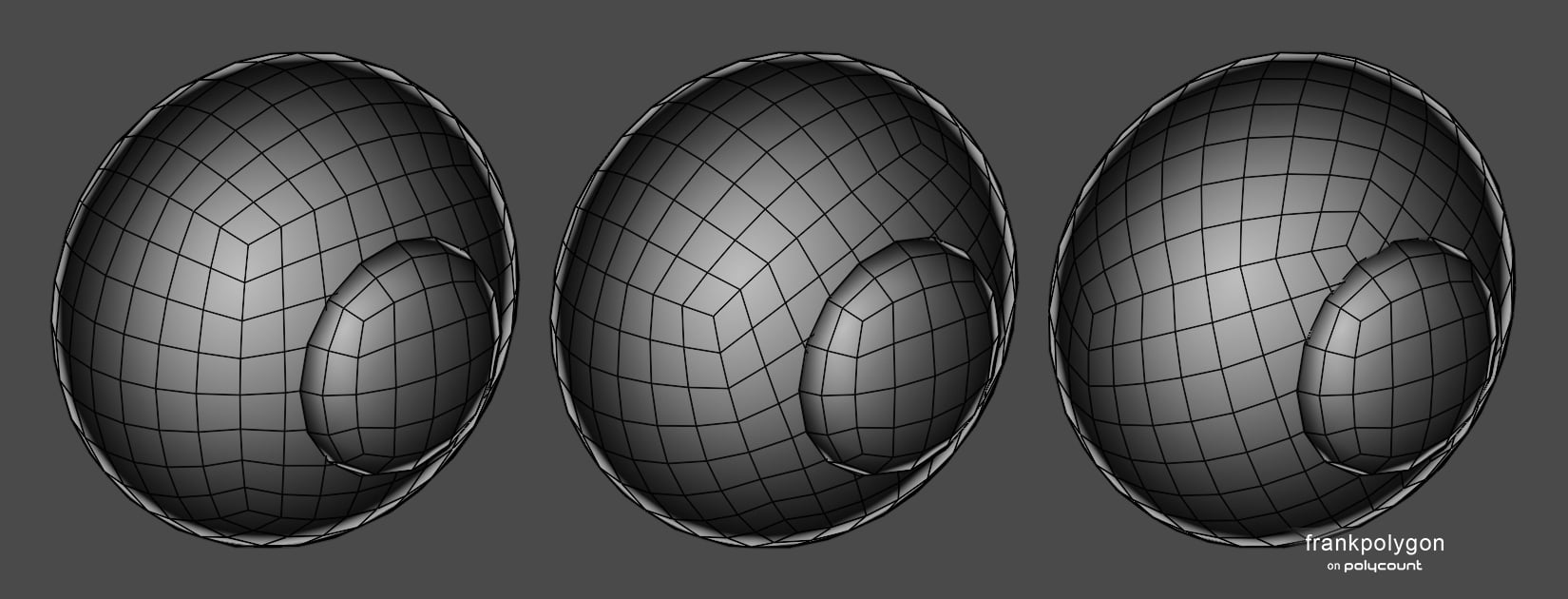 Subdivision sketch: Hemispherical helmet. This is a brief look at a few basic strategies for routing topology around cut outs and panel lines on spherical [and ellipsoid] surfaces. Note: there's several different ways to structure spherical geometry. Since this write-up is specific to basic subdivision modeling only basic…
 -
Re: [SOLVED] [3ds Max] Animated shutter: Bones bend whilst animating along a path.
@poopipe thanks for responding. I already tested a 3 slats, with skinning and bones with the same spline all worked fine in max and Unity. The actual main asset is with multiple groups, 2 LOD’s and many objects in hierarchies. These two shutters are separate from one another are the only skinned objects with bones, a… -
Re: basic knowledge help
1-high and low poly should have the same siluet. objects view distance also matters. you want to avoid baking artifacts from objects thats closer to the camera. 2-biggest thing i learned was that there are multiple uv maps for a reason. you can uv map the same object for many different reasons. like adding extra details or… -
Re: Baking Artifacts That Disappear When Moving the Mesh
@gnoop I separated the selector into a different object with prefix, and it seems to have fixed the issue! It was that simple all along. Thanks for your time! -
Re: [3D] How to unwrap spherical Visor so texture doesn't distort?
 what noren said, i'd just morph this flat, using the animation options in your application, make 1 "hex" object probably use the array option in the application and "bake that down to a normals" map, overlay it on your completed normals map as a new layer overlaying the old with the new hex & rebaking what you need to…
>26394 results